

Tapnow AI
Tamar AI · Image · Video
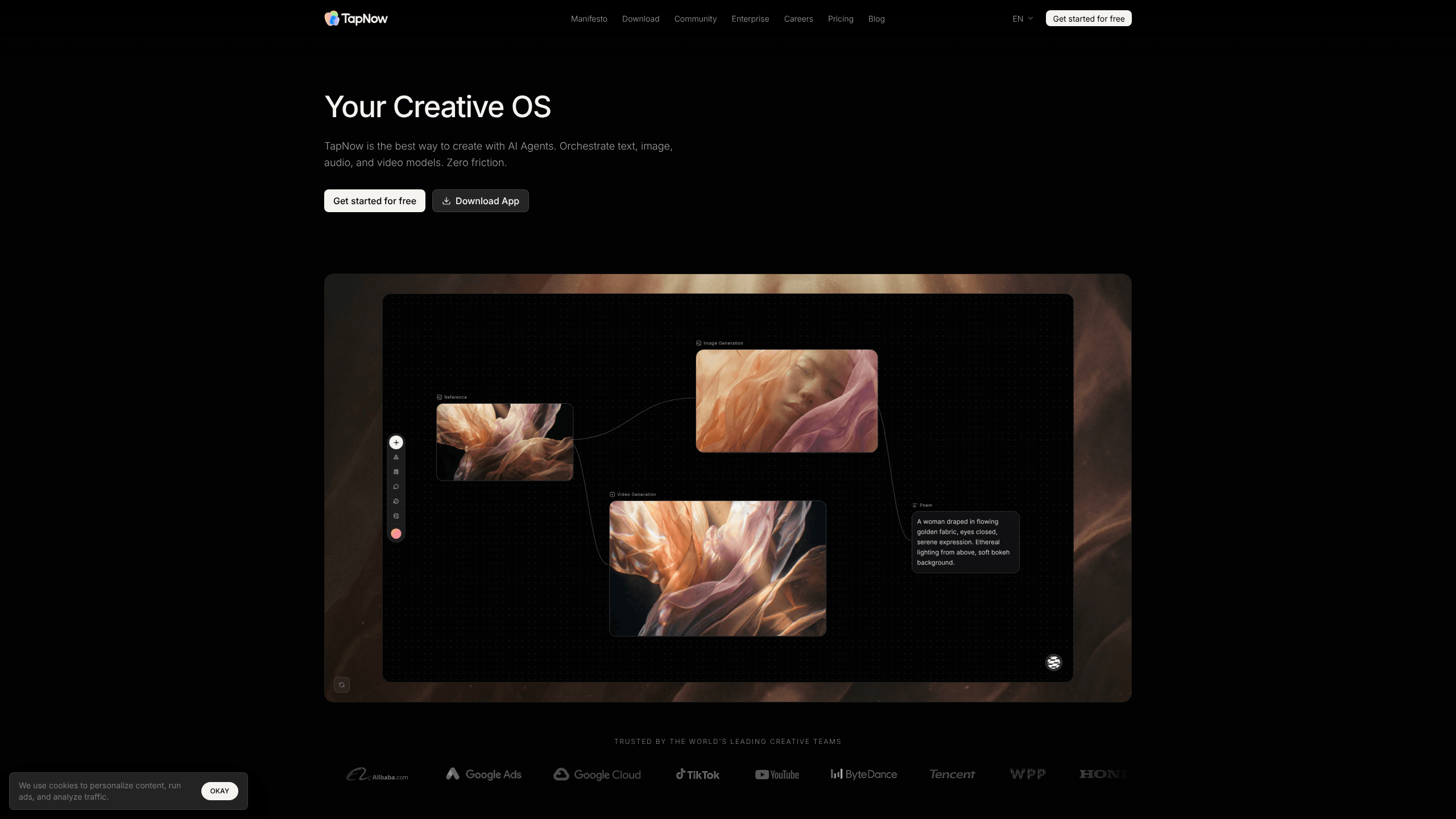
Tapnow AI is an AI visual creation platform for turning scripts into finished commercial visuals. It runs on Tapflow, a node-based infinite canvas where you drag text, image, video and audio blocks into a working pipeline, then export the result. A single product photo can become a full ad spot without ever leaving the project. The same account also opens TapTV, a creator community where you can clone someone else's project and learn how it was built. If you make ad content, e-commerce imagery or short cinematic pieces, this is a tool built for that specific job.
About Tapnow AI
What Is Tapnow AI
Tapnow AI is a visual production tool built around a node-based canvas instead of a chat box. You place nodes for writing, image generation, video generation and audio, then connect them so the output of one step feeds the next. The pitch is simple: one person can move from a rough idea to a finished product in days rather than weeks. According to the company, the platform pulls in 15+ generation models, including Veo, Sora, Kling, Midjourney and Flux, so you can swap the engine behind a shot without rebuilding the workflow.
The strongest fit is commercial content. E-commerce sellers use it to spin a handful of product photos into a full set of listing images. Brand teams use it for short ad films and social clips. Cinematic tools such as camera lens presets and spot-level editing give you more control than re-rolling a prompt and hoping.
The limits matter too. It's a web platform aimed at creators who are willing to learn a canvas workflow, and generation runs on a paid credit system called Tapies. There's a free entry point, but heavy use costs money, and the model library is licensed from other providers, so quality shifts as those upstream models change. Not ideal for quick one-offs.
Getting Started
- Create an account at tapnow.ai and sign in with email or a third-party login.
- Open a new project to reach the Tapflow canvas, or start from a template in the TapTV community.
- Drag in nodes for text, image, video or audio and connect them into a pipeline.
- Optionally upload a reference video and run the one-click breakdown to get an editable shot list and prompts.
- Generate your shots, refine them, combine the audio, then export the finished piece.
Product Information
A quick look at Tapnow AI's pricing, supported platforms, and performance.
Best for
The users, tasks, and scenarios where this tool fits best.
Users
- E-commerce sellers
- Brand and marketing teams
- Solo freelancers
- Short-film and music-video creators
Tasks
- Product image sets
- Reverse-engineering a competitor ad
- Multi-model comparisons
Scenarios
- A small team shipping weekly social ads
- Learning a workflow from scratch
- Localizing a campaign for a new market
Key features
Tapflow node canvas
Tapflow is an infinite canvas where every stage of production lives as a node. You drop in text, image, video and audio blocks and connect them, so a written script can feed straight into image generation and then into a video shot. Nothing is hidden in a menu. You can see exactly where a project went wrong and fix that step only.
One-click shot breakdown
Upload a reference commercial and the platform reverse-engineers it. Instead of a single unclear prompt, you get a shot-by-shot table with the prompts behind each frame, all editable. Fast. This is the quickest way to learn from work you admire, since you're studying an actual production rather than guessing at what someone typed.
Multi-model hub
The hub gives you access to 15+ image and video models in one place. When one engine struggles with a specific shot, you swap in another without leaving the project. That single change matters on longer pieces, where one model might nail faces while another handles motion better, and comparing them side by side on the same scene saves you from committing to one engine before you know how it behaves. Worth the extra tap.
TapTV community and project cloning
TapTV is a public library of finished projects, and each one exposes the full workflow behind it. You can clone a project into your own space, swap the product or subject, and end up with something new. For newcomers this beats a tutorial video, because the canvas itself is the lesson. Genuinely useful.
Cinematic camera controls
Rather than accepting whatever angle the model picks, you choose the camera and lens setup, including focal length and aperture. A wide lens paired with a strong image model gives you a composed shot with a deliberate look. It's the difference between a lucky frame and a planned one. Simple as that.
E-commerce image batches
The platform is tuned for the e-commerce grind: a couple of product photos plus scene references become a batch of finished listing images. It handles backdrop, model and style changes in one pass. That saves the manual retouching which usually eats a working day.
Spot-level editing
Later refinements target small areas instead of regenerating the whole image. You point at the exact region you want changed and adjust it. That cuts down on wasted attempts. It's the fix for a near-perfect shot with one bad detail.
Pros and cons
Pros
- One canvas covers text, image, video and audio, so you don't juggle separate tools for each stage.
- TapTV exports real workflows you can clone, which shortens the learning curve a lot.
- Swapping models per shot is genuinely useful when one engine fails on a detail.
- Cinematic camera controls give more direction than prompt-only tools.
- The free tier is enough to test whether the workflow suits you before paying.
Cons
- The node canvas has a real learning curve, and casual users may find plain chat tools quicker for one-off images, especially when the only thing they need is a single throwaway picture rather than a repeatable pipeline they can reuse across a whole campaign.
- Generation runs on Tapies credits, so busy projects get expensive fast, and costs scale with how many retries you need.
- Since the models are licensed from third parties, output quality and available engines can shift when those providers update.
Frequently asked questions
It's built for commercial visuals: e-commerce product images, brand ad films, social media clips and short cinematic pieces. The workflow spans script, storyboard, image generation, video and audio in one project. It works as an AI ad maker and an AI video generator under one roof. Both jobs, one canvas.
Related content
Explore related tools, skills, and articles for Tapnow AI.
Tapnow AI Alternatives

X Ray Interpreter
X-ray Interpreter · ImageX Ray Interpreter is a web-based AI radiology tool that turns X-rays, CT scans, MRI, ultrasound, and PET images into plain-language reports. You upload a scan, get a preliminary X-ray interpretation in moments, then ask follow-up questions if something needs explaining. It works as a second opinion and a learning aid, not as a medical diagnosis.

Aieasypic
AIEasyPic · ImageAIEasyPic is an AI image generator that turns plain text prompts into finished artwork in seconds. You can also train custom models on your own photos, swap faces in existing images, and create short video clips from text, all from a browser. It suits casual creators who want quick visuals and hobbyists who want to build a personal model without touching any code.

Chargen
Chargen · ImageChargen is an AI character generator and worldbuilding toolkit built for Dungeons & Dragons and other tabletop RPGs. It turns a one-line idea into a painted character portrait, spins up NPCs, monsters, maps and encounters from the same session, and keeps every creature's details close at hand. The tabletop RPG art side runs on a credit system called Gold, while the text generators stay free for everyone.