

Tarn
Tarn Apps Inc · Productivity
Tarn is a Salesforce AI agent that cleans up records, runs batch updates, and builds reports from plain prompts, learning your org at login with no setup.
About Tarn
What Is Tarn
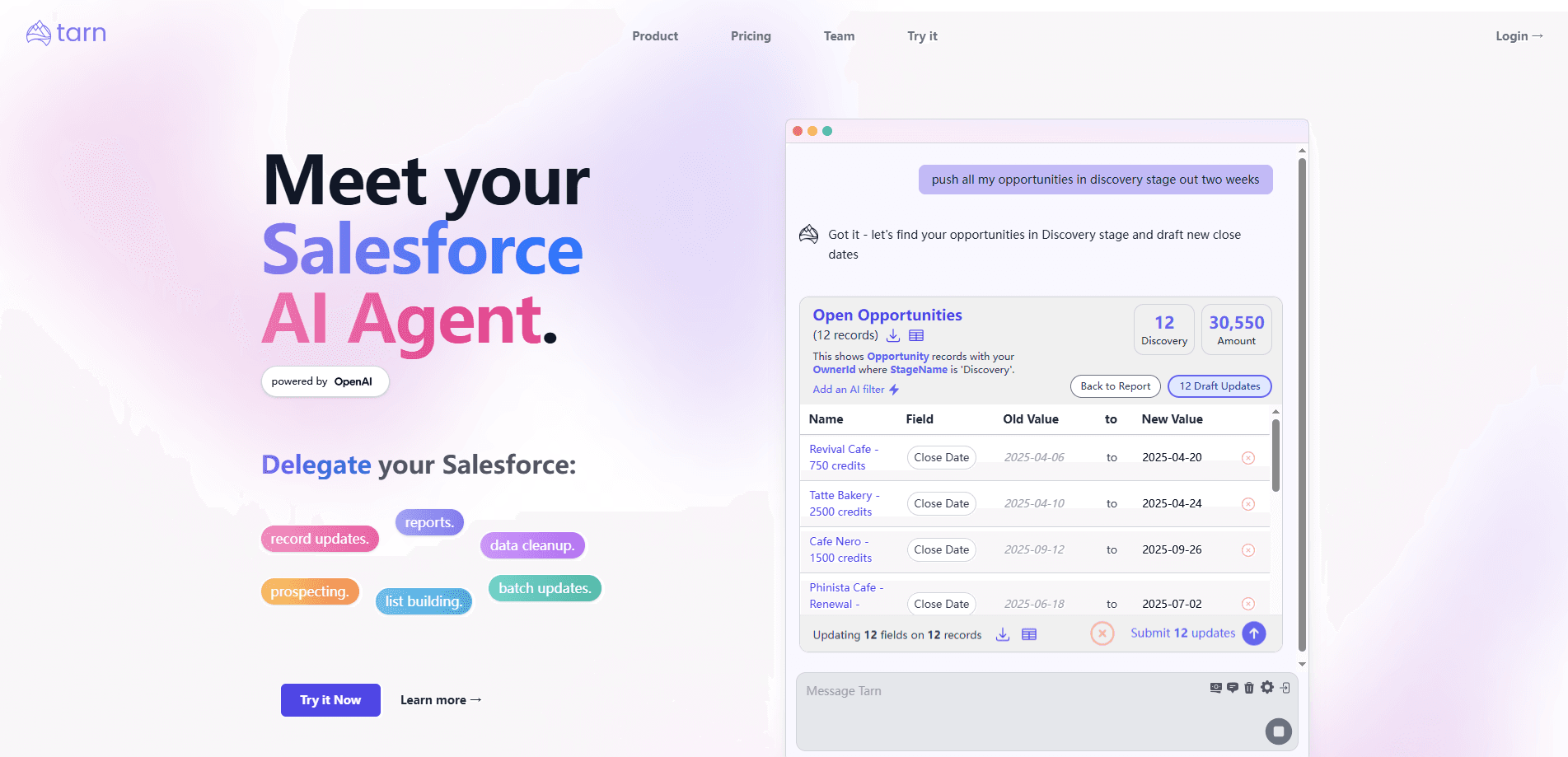
Tarn is an AI agent that sits inside Salesforce and does the everyday work admins and sales teams put off. Instead of clicking through objects and list views, you describe the job in a prompt: clean up these records, update this field across thousands of rows, or pull a report that would normally take a few filters and exports. Tarn runs it against your live org, powered by OpenAI models.
It belongs to a newer wave of CRM agents, the same space Salesforce pushes with Agentforce. The pitch here is narrower and more practical. Tarn doesn't try to be a copilot for every task in the platform. It targets the chores that eat admin time: messy data, bulk edits, and reporting, all without a build-out.
Setup is the part that stands out. There is no configuration step to map your objects by hand. When you log in with Salesforce, Tarn reads your standard and custom objects, writes a description for each one, and indexes the custom fields, so it understands your org from the first session. You can correct and extend that context as you go for company-specific fields.
Know the limits. Tarn is only as good as the access you grant it, and it works through the Salesforce API, so it inherits the same validation rules and permissions you already have. Record caps differ by plan, and heavy batch jobs on the free tier will hit those ceilings quickly. This is a young product from a small team, so treat the roadmap as fast-moving rather than fixed.
Getting Started
- Sign in with your Salesforce account to authorize Tarn. It reads your objects and fields at login, so there is nothing to configure first.
- Pick a job in plain language, such as cleaning up duplicate accounts or updating a status field across a list.
- Review what Tarn proposes, then run it. Validation errors from Salesforce come back the same way you would see them in the UI.
- Set up autofill on key fields if you want AI to populate or enrich them, or ask for a report when you need numbers fast.
Product Information
A quick look at Tarn's pricing, supported platforms, and performance.
Best for
The users, tasks, and scenarios where this tool fits best.
Users
- Salesforce admins
- Sales operations teams
- New Salesforce users
Tasks
- Data cleanup
- Batch updates
- Complex reporting
- Field autofill
Scenarios
- Post-import cleanups
- Quarterly CRM hygiene
- Fast answers for a meeting
Key features
Prompt-driven Salesforce work
Tarn takes a plain-language instruction and turns it into Salesforce actions. You say what you want done, and it works through the objects to carry it out, so you skip the clicking normally needed for records, updates, and reports. It's the through-line the rest of the product is built on.
Zero-setup org learning
When you log in with Salesforce, Tarn reads your standard and custom objects and indexes the custom fields. It writes a description for each object. That means it understands your specific org without you mapping fields manually. You can revise the instruction context later for fields that are company-specific.
Bulk data cleanup and batch updates
The agent can clean up thousands of records or update a field across a large set in one run. It's aimed at the work that usually means exporting to a spreadsheet and importing back. Practical caps depend on your plan, so the free tier suits small jobs while the top plan is built for large batches.
AI reporting
You can ask for a report in plain terms and get results in seconds, rather than assembling filters and exports by hand. On higher plans, AI can also filter reports, which narrows the results to what you actually need without a manual query.
AI field autofill and web search
Tarn can populate or enrich fields with AI, and on paid plans it adds web search so a field can be filled from live information rather than only what is already in Salesforce. This turns sparse records into more complete ones without manual research.
Custom object and validation awareness
The agent learns custom objects and custom fields at login, and it returns Salesforce validation errors back to you the same way the UI would. That keeps the agent inside your existing rules instead of silently overwriting them.
Pros and cons
Pros
- There is no setup: it learns your objects and fields at login, which separates it from tools that need a manual mapping phase.
- It handles the unglamorous work admins avoid, including bulk cleanup and batch updates on thousands of records.
- Reports arrive in seconds from a prompt, which is useful when you need numbers before a meeting.
- It runs through the Salesforce API and surfaces validation errors, so existing rules and permissions still apply.
- Paid plans add AI web search for fields, which fills gaps that live only outside your CRM.
Cons
- Record limits vary by plan, and the free tier caps you at five records at a time, so real cleanup jobs need a paid plan.
- It needs broad Salesforce access to be useful, which is a real governance decision for security-conscious teams.
- It's a young product from a small team, so feature depth and roadmap are moving targets compared with established vendors.
- Because it works through the Salesforce API, permissions and validation rules you have set still constrain what it can do.
Frequently asked questions
Tarn is an AI agent for Salesforce. From a prompt, it cleans up data, updates records in bulk, builds reports, and fills fields. It runs against your live org rather than a separate tool.
Related content
Explore related tools, skills, and articles for Tarn.
Tarn Alternatives

Swms
Swms AI · Writing · Productivity · BusinessSwms is an AI safety compliance tool that turns a plain description of a job into ready-to-use safety documents. Describe your project, trade, and known hazards, and it writes a safe work method statement, job hazard analysis, safe work procedure, RAMS, or safety data sheet in seconds. It also ships with Oscar, a chat assistant that answers workplace safety questions in any language. Teams in construction, mining, transport, and warehousing use it to cut the paperwork that usually eats into a workday.

Wordly AI Translation
Wordly · Voice & Language · ProductivityWordly AI Translation is a real-time AI translation and captioning platform built for meetings, conferences, and events. It delivers live translation, captions, transcripts, and summaries in more than 60 languages, and attendees join by scanning a QR code or opening a link instead of using dedicated headsets. The platform works with Zoom, Microsoft Teams, Google Meet, and Webex, and it's designed for organizations that want multilingual access without hiring human interpreters for every session. Simple as that.

Rows
Rows (Superhuman) · Productivity · BusinessRows is an AI spreadsheet and data analysis tool that imports live data from more than 50 sources, then lets you work with it using plain language instead of SQL queries or nested formulas. You can pull numbers out of PDFs, connect ad platforms, databases, and bank accounts, and ask the AI to build reports, merge datasets, or set up models that recalculate themselves. It runs in the browser, works like a spreadsheet, and now sits under the Superhuman umbrella.