
Termexo
Gemron · Coding
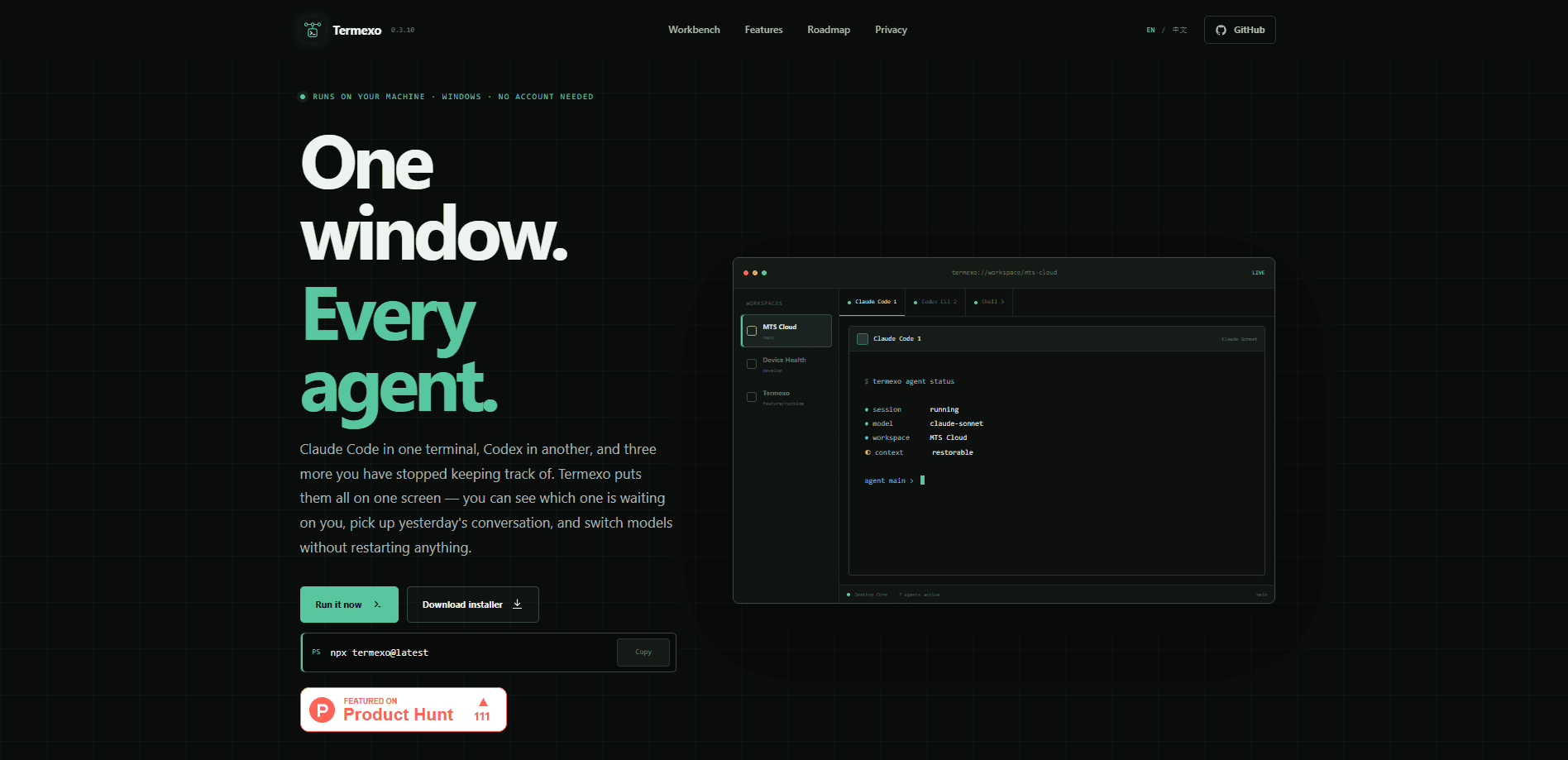
Termexo is a local-first AI coding agent workspace for Windows that runs several coding agents side by side in real PTY terminals. It's a Windows terminal workbench you keep open all day, not a portal you log into. It keeps Claude Code, Codex CLI, OpenCode, Antigravity, and Grok Build in one screen, restores your layout and sessions, and pings you when an agent needs input. Think of it as a coding agent aggregator you reopen, not a service you depend on.
About Termexo
What Is Termexo
Termexo is a desktop app for Windows 10 and 11 that acts as a home base for command-line coding agents, so instead of juggling six terminal windows you get one workspace where each project keeps its own terminals, models, and grid layout. It's built around real terminals, not a chat wrapper. So the agents keep running as genuine processes on your PC.
The problem it solves is sprawl. When you run several agents at once, approvals get missed, windows pile up, and you lose track of what changed. Termexo adds a task board, agent status, and Git change views so you can see who's waiting on you and what files moved. That's the core idea. It's open source under the MIT license, and the app itself is free.
The main limit is the platform. Termexo is Windows-only for now, and it doesn't include the agents themselves. It's built for local-first AI development, so you still install each agent's CLI and sign in with your own account or API key. Remote access also expects a reachable HTTPS relay or a trusted LAN or VPN, so it isn't a zero-config cloud service.
Getting Started
- Install the app from the latest GitHub release (the Windows x64 installer) or run
npx termexo@latestwith Node.js 18.18 or later. Both routes need WebView2. - Create a workspace, give it a project name, and point it at a folder that already exists on the machine.
- Check the detection status for Claude Code, Codex, OpenCode, Antigravity, and Grok Build in Settings, then complete each agent's sign-in or model setup.
- Open a terminal from the tab bar, pick an agent, confirm the working folder, account, and model, and send your first task.
- For remote use, set up an HTTPS relay or connect over a trusted LAN or VPN, then reach the same session from your phone.
Product Information
A quick look at Termexo's pricing, supported platforms, and performance.
Best for
The users, tasks, and scenarios where this tool fits best.
Users
- Windows developers running more than one coding agent at a time
- Solo developers who work across side projects and open source
- Engineers on managed Windows machines
Tasks
- Running several coding agents in parallel
- Recovering a long session
- Checking what an agent changed
- Approving agent actions while away from the desk
Scenarios
- Leaving a long build or agent run going and stepping away
- Splitting one feature across agents
- Returning to a project the next day
Key features
Real terminals for each agent
Termexo runs Claude Code, Codex CLI, OpenCode, Antigravity, and Grok Build in actual PTY terminals, not simulated chat panes. Each session stays alive in its own tab. Keep ten agents running. Show the two or three you're watching right now. That setup means no lost context when you switch away.
Grid layouts that fit how you work
You arrange visible terminals in a grid anywhere from one to six rows and columns. Switching to another project and back restores the exact arrangement. A 2x2 review screen for one repo won't overwrite the layout for another. Your screen stays yours.
Session recovery and handoffs
Every session is saved, and you can reopen a native session later or prepare a handoff that captures the goal, progress, and next step. If you pick up the work tomorrow, or hand it to a different agent without re-reading a wall of notes, you spend far less time re-explaining where the project actually stands. That's the quiet win.
Agent status and task board
Termexo surfaces which agent needs input or an approval, so you stop silently missing prompts buried in a background window. The task board lets you assign work across agents and see results come back in one place. No more guesswork. That keeps multi-agent runs honest instead of turning into a hunt for which window is stuck waiting.
Remote access from your phone
Keep your PC running, then reconnect over a reachable HTTPS relay or a trusted LAN or VPN. From your phone you can check output, answer an approval, or send the next instruction without moving the session off the host. Nothing restarts. Nothing gets lost. The desktop app and the phone view are two doors into the same workspace.
Model, account, and network profiles
You can manage model, account, and network profiles for different providers and compatible gateways in one place, with quota visibility where the provider supports it. That makes switching between a Claude-compatible model and a Codex setup a config change rather than a reinstall. Simple enough.
Local-first by design
The agents and your project stay on the host PC, and the app is MIT-licensed open source. Termexo doesn't host your code or proxy your model calls, which means nothing about your repository leaves the machine unless an agent you configured reaches out on its own. Why does that matter? If you'd rather not send prompts to an unknown server, it's the whole point.
Pros and cons
Pros
- Runs coding agents in real terminals, so behavior matches the CLI you already trust and any agent-specific quirk stays exactly where you learned to expect it.
- One workspace per project, with layouts and sessions that survive restarts.
- Agent status and a task board cut down on missed approvals during parallel runs.
- Free and open source under the MIT license, with no account required for the app itself.
- Remote access lets you supervise long runs from your phone.
Cons
- Windows-only, so macOS and Linux users are out for now.
- You still install, sign in, and pay for each agent's own CLI and model separately.
- Remote access needs a reachable HTTPS relay or a trusted LAN or VPN, which takes some setup.
- Quota visibility depends on what each provider reports, so some agents can't show usage.
Frequently asked questions
Yes. Termexo is open source under the MIT license and the app costs nothing. You only pay for the underlying coding agents and model access you choose to use.
Related content
Explore related tools, skills, and articles for Termexo.
Termexo Alternatives
Forefront
Forefront · CodingForefront is a web platform for building with open-source AI. It lets you fine-tune leading open-source language models on your own data, evaluate how they perform, and run them through an API or export them to host yourself. Developers who want the convenience of a closed-source platform but insist on owning their models and data are the target audience here.

Startkit
StartKit.AI · CodingStartkit is a boilerplate for building AI SaaS and AI wrapper products. Think of it as an AI startup boilerplate with the boring parts already wired up: authentication, Stripe and Lemon Squeezy payments, usage limits, transactional email, and an AI API starter that talks to OpenAI, Anthropic, Groq, or Llama. You clone the repo, set your price, and start on the part of your product that people actually pay for. It's Next.js under React and Tailwind, so most of the boilerplate code already feels familiar.
Testim
Tricentis · CodingTestim is an AI-powered test automation platform for building and running end-to-end tests across web, mobile, and Salesforce applications. It leans on machine learning to keep tests stable when an interface changes, so teams spend less time fixing broken selectors. Not bad for an automated testing tool you can start using today. You create tests by recording actions in a browser, then optionally add JavaScript when you need more control. It's a solid pick for busy QA teams.