

Thumbmagic
Submagic · Video
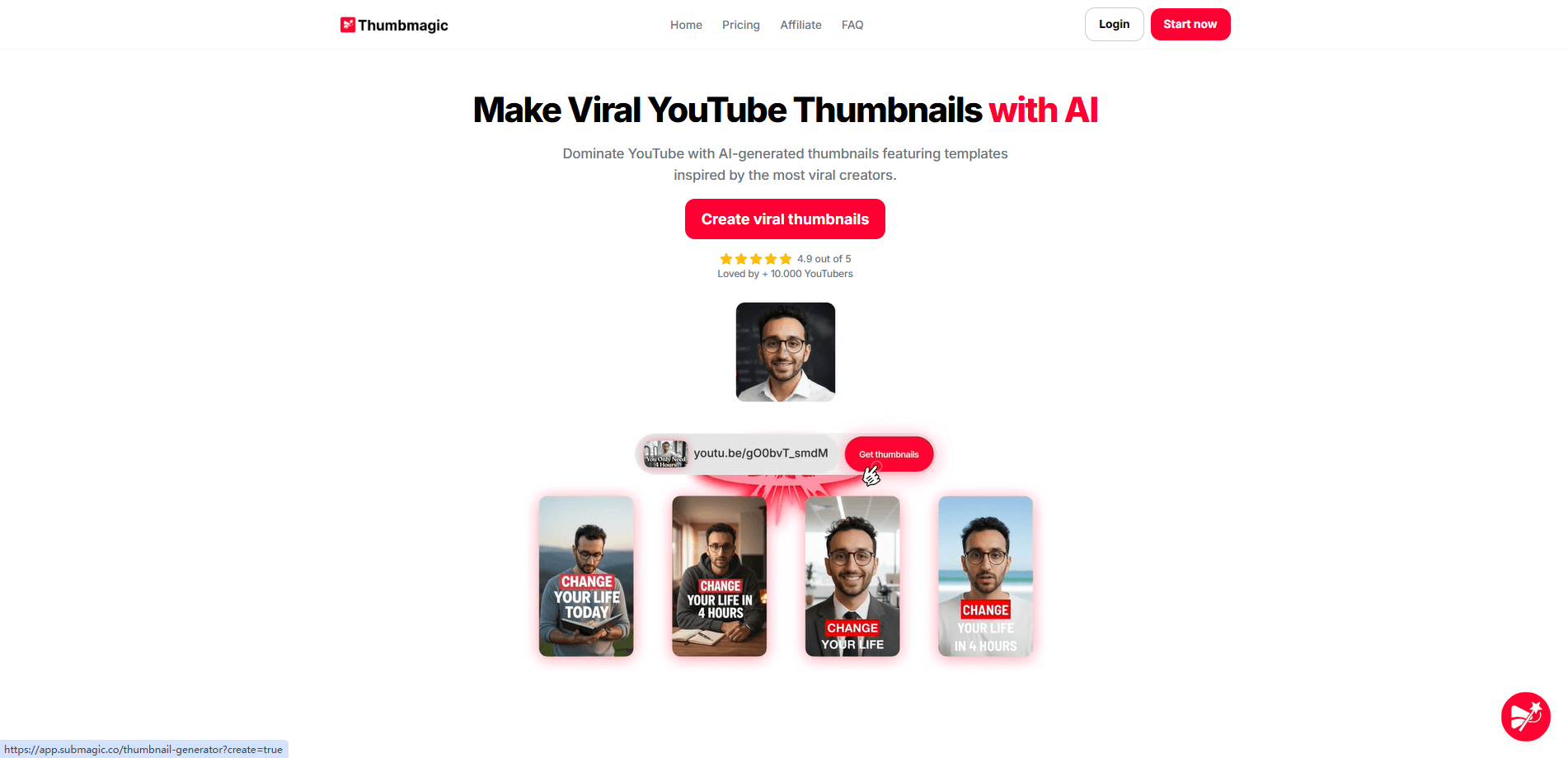
Thumbmagic is an AI thumbnail maker built for YouTubers who need clickable covers fast. You paste a video link, upload a file, or drop in a script, and it returns several finished options in seconds using layouts pulled from high-performing channels. It targets one job: raise your click-through rate without opening Photoshop. Think of it as a thumbnail maker for YouTube creators who post a lot and design little.
About Thumbmagic
What Is Thumbmagic
Thumbmagic is a web-based video to thumbnail tool from the team behind Submagic, a video editing app for short-form creators. It generates YouTube and Shorts covers from a video or script, then lets you tweak text, colors, backgrounds, and facial expressions before exporting. The pitch is speed: multiple variations per video, ready in seconds, so you can test what actually gets clicks.
The main problem it solves is the grind of design. Most creators either spend an hour in a design app or hire someone for every single upload, and Thumbmagic skips both so the thumbnail stops being the reason a video ships late. You still make the final call on which thumbnail to publish, so judgment stays with you.
Its biggest limit is that image generation is only as good as the inputs. A blurry source frame or a weak headline still produces a weak thumbnail, and AI text on images can need manual cleanup before you'd ever publish it. Thumbmagic is a shortcut, not a replacement for knowing your audience, and creators who ignore that distinction end up with polished covers nobody clicks.
Getting Started
- Go to the Thumbmagic site and create a free account through the sign-up page.
- Paste a YouTube URL, upload a video file, or type in your script so the AI can pull key moments.
- Pick a template that matches your niche, then adjust the headline, colors, background, and expressions.
- Generate multiple variations and compare them side by side for A/B testing.
- Export your favorite in 4K and upload it to YouTube or Shorts.
Product Information
A quick look at Thumbmagic's pricing, supported platforms, and performance.
Best for
The users, tasks, and scenarios where this tool fits best.
Users
- YouTube creators
- Short-form creators
- Small teams
Tasks
- Generating multiple thumbnail variations for A/B testing
- Cover art for a video you haven't finished editing
- Fixing a low-CTR thumbnail
Scenarios
- Publishing 100+ thumbnails a week across several channels
- Running a gaming channel through a content sprint
- Testing headlines and faces on a single video
Key features
Instant thumbnail generation
Upload a video, paste a URL, or drop in a script. Thumbmagic returns several thumbnail options within seconds. The AI scans the footage for strong frames and visual hooks instead of leaving you to scrub the timeline by hand. It's the core reason people try this AI thumbnail generator.
Creator-proven templates
The template library is built from layouts that already perform on big channels, so your starting point is a design that works rather than a blank canvas you have to fill from nothing. You can adjust text, colors, and background to fit your branding. It saves the guesswork of designing a YouTube thumbnail generator output from scratch.
Smart face and style detection
Thumbmagic picks out usable facial expressions from your video and adapts the result to your channel's visual identity, which matters more than most creators admit for a camera-facing channel. If you film yourself talking, this cuts out the manual hunt for a frame where you don't look half-asleep. The result is more on-brand than a generic stock layout.
Built for A/B testing
Every generation produces multiple variations, so you can run a quick test and let click data decide. Creators who test consistently tend to find a winner faster than those who publish one and hope. Skip it and you're guessing. It turns guessing about what works into a measurable loop, which is the part most people get wrong.
4K platform-ready exports
Thumbnails come out at high resolution, sized for YouTube and Shorts as well as other platforms. No separate export step for different aspect ratios. That matters when you post the same video to several channels at once. Cropping is a chore. Resizing for each platform is worse. Thumbmagic skips both.
Text generator
You can add and restyle the text overlay, which often makes or breaks a thumbnail. Short, punchy headlines usually beat long ones on mobile. Test a few phrasings without opening another app.
Expression changer
The expression changer swaps or adjusts your facial expression in the thumbnail, useful when the frame you need doesn't exist in the footage. It's a small feature that solves a very specific annoyance. Creators who show their face get the most out of it.
Pros and cons
Pros
- Turns a video or script into several finished thumbnails in seconds.
- Template library is drawn from layouts that already work on real channels.
- Multiple variations per run make A/B testing painless.
- 4K exports are ready for YouTube, Shorts, and other platforms without resizing.
Cons
- Output still depends on your source footage and headline, so weak inputs produce weak thumbnails.
- AI-generated text on images can need manual cleanup before it looks right.
- No public API, so it doesn't plug into automated publishing pipelines.
Frequently asked questions
It's a YouTube thumbnail generator that works from your video or script. You get several options in seconds and can adjust them before exporting. It targets creators who want clickable covers fast. But does it replace a designer? Not quite. Treat it as a fast starting point you still get to refine.
Related content
Explore related tools, skills, and articles for Thumbmagic.
Thumbmagic Alternatives

Vadu AI
Vadu AI · Image · VideoVadu AI is a web-based AI video generator that turns written prompts or still images into short clips, and it can also generate images on its own. You type what you want, pick a model and style, and the platform renders the result in minutes. A free plan covers light testing, while paid tiers run from $9 to $77.40 per month based on how many credits you burn.

Mykaraoke Video
MyKaraoke Video · VideoMykaraoke Video is an online karaoke video maker and lyric video maker that turns any song into a finished, lyrics-synced video right in your browser. It handles the slow part for you. The AI pulls vocals out of the mix and locks the lyrics to the beat, then lets you customize background, fonts, and colors before exporting in 1080p MP4. If you make lyric videos for social media, party nights, or music promotion, it skips the software installs and manual timing work entirely. Want a karaoke video generator that doesn't eat your whole evening? That's the pitch here.

Finalframe
Finalframe · VideoFinalframe is a set of free, browser-based tools for grabbing exact frames out of a video clip. Its best-known feature, the Final Frame Extractor, lets you extract the last frame of any video so you can use it as the starting image for AI video tools like Luma Dream Machine, Runway, or Kling. Want to keep a clip going? That last frame is your starting point. The tool runs locally in your browser, needs no sign-up, and costs nothing. A separate paid AI video-generation app from the same team is currently offline while it's rebuilt.