

TIKTOKEMOJI.COM
Spino · Image
TIKTOKEMOJI.COM is a browser-based AI emoji generator that turns a written prompt into a custom TikTok emoji you can save and use as a sticker, overlay, or reaction image.
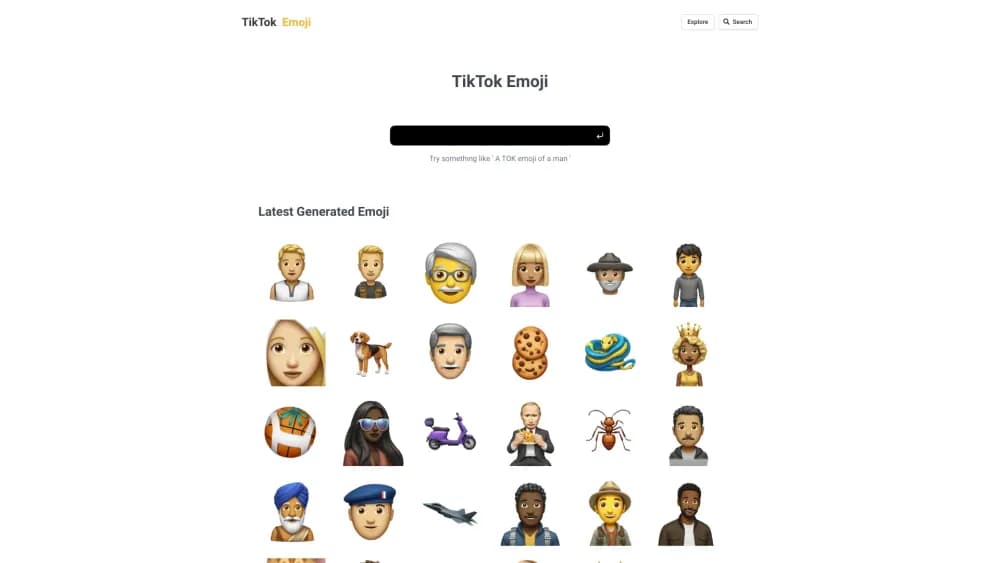
About TIKTOKEMOJI.COM
What Is TIKTOKEMOJI.COM
TIKTOKEMOJI.COM is a web app with one job: turning a sentence into an emoji image. You describe the face, the mood, or the character you want, choose a style, and an AI model draws it. There is no canvas to learn and no template grid to scroll through.
The gap it fills is real. Native emoji come from your keyboard, and TikTok's own codes cover a fixed set of reactions. A custom TikTok emoji made here is an image file instead, so it belongs in a video edit, a thumbnail, a sticker overlay, or a picture sent in a DM. It won't appear when someone types a code into a comment.
The tool lives behind an account. You register, land on a dashboard, and spend credits on each generation, with extra credits sold through Paddle checkout. The public side of the site is thin: no sample gallery, no feature documentation, and at the time of writing the homepage loads a blank page for signed-out visitors. You see what the AI emoji maker can do only after you sign in.
Getting Started
- Open tiktokemoji.com and create an account with an email address and a password. Login is the first screen that renders for a new visitor, so registration comes before anything else.
- On the dashboard, find the prompt field and describe the emoji in plain words: the expression, the colors, any prop such as headphones or a coffee cup, and the art style you have in mind.
- Choose the style and characteristics offered by the form, then run the generation. Each run draws from your credit balance, so check the remaining count before you queue a long batch.
- Save the result you like, then bring the file into TikTok through your editor, a sticker app, or a thumbnail tool. Keep the prompt text with the image so you can reproduce the look later.
Product Information
A quick look at TIKTOKEMOJI.COM's pricing, supported platforms, and performance.
Best for
The users, tasks, and scenarios where this tool fits best.
Users
- TikTok creators who need a reaction that doesn't exist
- Meme page admins posting several times a day
- Small brand social managers
Tasks
- Making a one-off reaction sticker for a specific joke
- Building a small emoji set for a channel
- Filling a thumbnail or overlay slot
Scenarios
- A reply video to a comment
- A product launch week
- A weekly meme batch
Key features
Prompt-Based Emoji Generation
The core loop is text to emoji. You write what you want in ordinary language, and the model returns a drawn face or character instead of a Unicode glyph. Detail in the prompt does most of the work: expression, angle, lighting, and props all change the result. Short prompts tend to produce generic smileys, so the useful skill here is describing a scene rather than naming an emotion.
Style and Character Controls
The generator asks for a style alongside the prompt, which is what separates a flat sticker look from a 3D render or a hand-drawn sketch. Keeping that setting fixed across several runs is the easiest way to build a consistent set. Change it and the same prompt produces a different family of images, so the control doubles as a brand switch.
TikTok-Oriented Output
Everything on the site points at one destination: a TikTok post. The images work as stickers in edits, as overlays on a clip, or as pictures sent in a chat, which covers the places where a custom TikTok emoji actually appears. What they can't do is act like a native emoji code. If your plan depends on typing a shortcut in a comment and watching a face appear, this tool doesn't solve that problem.
Credit Balance and Top-Ups
Generations run on credits rather than a flat subscription. The dashboard tracks the balance, and extra credits are sold through Paddle, the payment processor behind the checkout. That model suits occasional use: you buy a batch before a project and don't carry a monthly bill afterward. It also means the cost of experimenting is visible, since every rerun spends something.
Free Entry Point
The site is free to join, which gives you a way to test the output before paying for credits. Treat the free allowance as a sample, not a production budget. A handful of generations is enough to judge whether the style matches your channel; it isn't enough to build a full emoji set for a campaign.
Browser-Only Access
There's no app to install and no desktop client. The AI emoji maker runs in a mobile or desktop browser, so the same account works on a phone and a laptop. The tradeoff is that nothing is stored locally by default: keep your own copy of every image you want to reuse, because the site is the only place the generation lives.
Pros and cons
Pros
- Plain-language prompts: you describe a face instead of operating a design tool, so the first useful output can come from a single sentence.
- Narrow focus: the product is built around TikTok reactions rather than general image generation, which keeps the workflow short.
- Style control: one setting carries across runs, which is the difference between a random pile of images and a recognizable set.
- Free start: an account costs nothing, so you can judge the output quality before buying credits.
- No install: a phone browser is enough, which matters for creators who edit on mobile.
Cons
- Gated behind login: there's no public gallery or sample output, so you can't evaluate the AI emoji generator without registering.
- No API or batch tools: every image comes from a manual prompt, which rules out catalog work or automated pipelines.
- Not a native emoji: the files work as stickers and overlays, but they can't be typed into a TikTok comment as a code.
- Opaque pricing: credit prices and per-generation costs aren't published outside the checkout, so budgeting takes a test run.
Frequently asked questions
It's a TikTok emoji maker that generates custom emoji images from text descriptions, aimed at creators who want reactions that aren't in the standard keyboard set. You write a prompt, pick a style, and save the result.
Related content
Explore related tools, skills, and articles for TIKTOKEMOJI.COM.
TIKTOKEMOJI.COM Alternatives

X Ray Interpreter
X-ray Interpreter · ImageX Ray Interpreter is a web-based AI radiology tool that turns X-rays, CT scans, MRI, ultrasound, and PET images into plain-language reports. You upload a scan, get a preliminary X-ray interpretation in moments, then ask follow-up questions if something needs explaining. It works as a second opinion and a learning aid, not as a medical diagnosis.

Aieasypic
AIEasyPic · ImageAIEasyPic is an AI image generator that turns plain text prompts into finished artwork in seconds. You can also train custom models on your own photos, swap faces in existing images, and create short video clips from text, all from a browser. It suits casual creators who want quick visuals and hobbyists who want to build a personal model without touching any code.

Chargen
Chargen · ImageChargen is an AI character generator and worldbuilding toolkit built for Dungeons & Dragons and other tabletop RPGs. It turns a one-line idea into a painted character portrait, spins up NPCs, monsters, maps and encounters from the same session, and keeps every creature's details close at hand. The tabletop RPG art side runs on a credit system called Gold, while the text generators stay free for everyone.