

Toolspend
ToolSpend · Coding · Business
ToolSpend is an AI spend tracking dashboard that acts as a token usage tracker and cost console for the providers you already use, then shows everything in one place. It connects to services like OpenAI, Google AI, Azure, Bedrock and Anthropic, and it turns scattered billing pages into a single view with forecasts, budget alerts and savings tips. If your team runs LLM calls in production and nobody can say what a month of it costs, this is the tool that answers that question.
About Toolspend
What Is ToolSpend
ToolSpend is a monitoring product for teams that pay for AI services. Instead of logging into each provider's billing console and guessing how the numbers add up, you connect your accounts once and read one dashboard. It covers spend, token usage, trends and the share each provider takes of your total bill.
The problem it solves is a common one. AI costs rarely show up in one invoice. A small team might use OpenAI for chat, Google AI for embeddings and RunPod for GPU time, and by month's end nobody has a clear picture until the cards are charged. ToolSpend pulls those streams together with read-only access, so you see the total without handing over the keys to your accounts. Think of it as LLM cost management in one window. No spreadsheet. No guesswork.
The main limitation is scope. ToolSpend reports on spend, it doesn't cap it. It won't block a runaway job at the source, and its savings suggestions are recommendations you act on elsewhere. It's also built around providers that expose usage data through an API, so a tool billed in a way it can't read won't show up cleanly. That's a real gap for some setups.
Getting Started
- Sign up at toolspend.com and create a workspace. You get 14 days free with no credit card.
- Add the AI providers you use. Each connection is read-only, and you can disconnect at any time.
- Invite teammates or attach your projects, so spend is sorted the right way from the start.
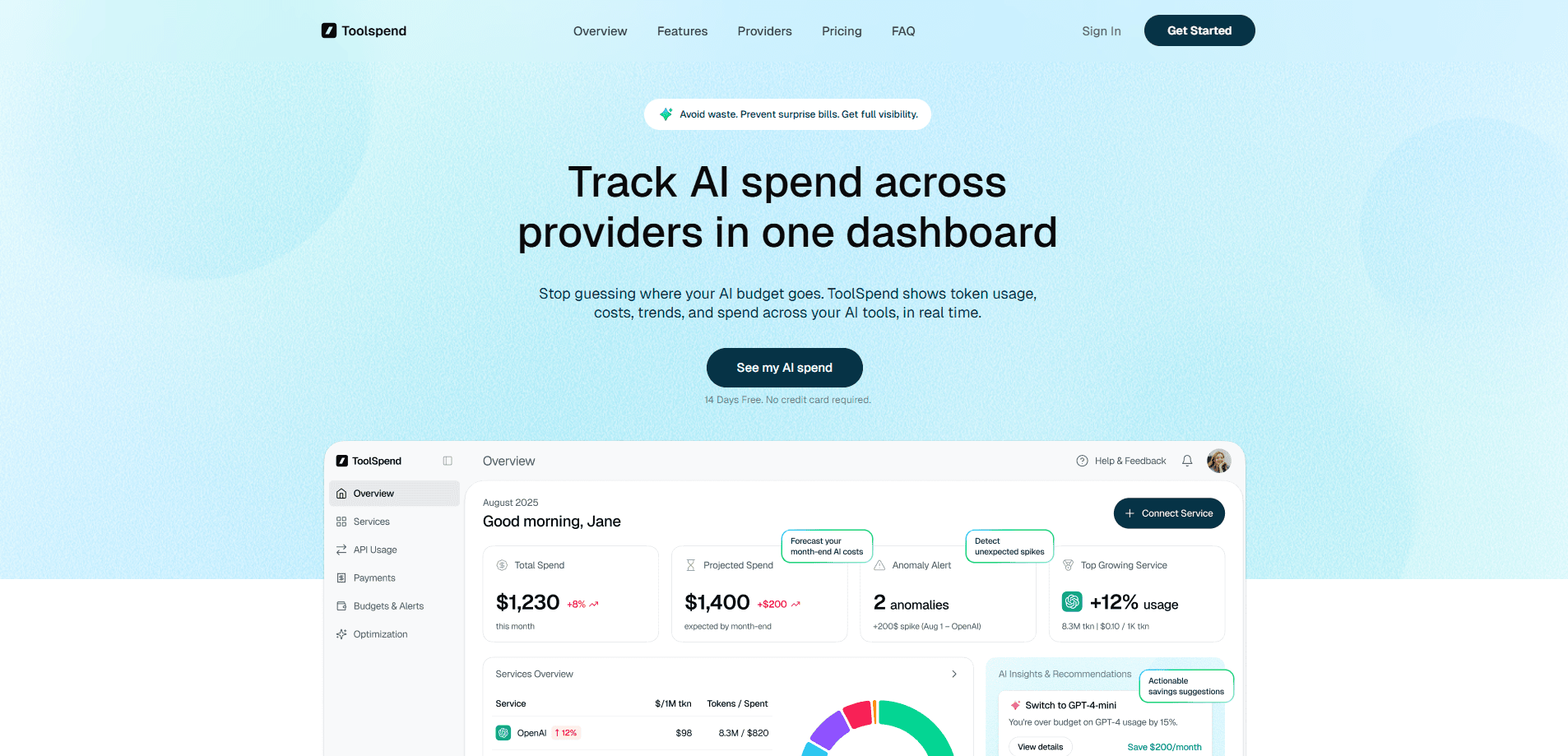
- Open the overview dashboard to see total spend, projected month-end cost and your top growing service.
- Set a monthly budget and turn on spike alerts so you hear about a jump before the bill lands. Setup takes minutes.
Product Information
A quick look at Toolspend's pricing, supported platforms, and performance.
Best for
The users, tasks, and scenarios where this tool fits best.
Users
- Startup founders paying for several AI services
- Developers shipping LLM features
- Finance and ops teams
Tasks
- Forecasting month-end AI spend
- Spotting runaway jobs
- Comparing providers
Scenarios
- After a product release
- Monthly budget review
- Early-stage cost control
Key features
One dashboard for every provider
ToolSpend connects OpenAI, Google AI, Microsoft Azure, Amazon Bedrock, Anthropic, Replicate, RunPod and others, then merges their usage into a single overview. You get total spend this month, projected month-end spend and the top growing service at a glance. The point is simple: no more tab-hopping between billing consoles to answer one question. One screen. One answer.
Provider comparison by cost per 1M tokens
A comparison table lines providers up by cost per 1M tokens, alongside tokens used, total spend and usage change. It shows how your budget splits between OpenAI, Google AI, Azure and the rest. This is where a vague plan to "use cheaper models" turns into a specific swap. Fair enough.
Spend forecasting
The forecast view projects your month-end bill from current usage. Instead of discovering an overspend after the invoice arrives, you can adjust workloads while there's still time. For teams on a fixed budget, this is often the feature that pays for the subscription on its own. That's the whole pitch, really.
Anomaly alerts and budgets
You set monthly budgets and get notified when usage spikes. High API retries, broken prompts and runaway jobs all show up as the kind of jump that alerts catch. Catching a retry storm on day two beats finding it in the month-end report. Timing matters here.
AI insights that reduce waste
ToolSpend generates recommendations from usage patterns and billing signals. Typical ones include switching an endpoint to a cheaper model that does the job, pausing GPUs with low activity, and fixing API retries that waste tokens. These are suggestions, not automatic fixes, so the follow-through happens in your own stack. Nothing happens on its own.
Cost attribution by team and project
On the Enterprise plan, spend is attributed to teams so you can see who's driving the bill. Founders, developers and finance each get a view that matches their question, from a single dashboard with different lenses. That's the difference between a number everyone argues about and one everyone understands. Not glamorous. Just useful.
Reporting that's ready to share
The dashboard exports a reporting view meant for whoever asks about the numbers, and the Enterprise tier adds custom executive reports. If someone asks what AI cost last quarter, you answer with a document rather than a login and a screenshot. Real AI cost reporting, ready when you need it.
Pros and cons
Pros
- Pulls multiple providers into one dashboard, which is the main thing scattered billing pages can't do.
- Read-only connections and no stored API keys, so connecting a provider doesn't widen your security surface much.
- Forecasts and spike alerts catch overspend during the month instead of after it.
- 14-day free trial needs no credit card, so the setup cost is mostly your time.
- SOC 2 Type II compliance meets the bar most finance teams ask about.
Cons
- No free tier, so you're paying $199/year minimum once the trial ends.
- It reports and recommends, but it doesn't enforce limits, so a runaway job still needs a fix in your own code or provider settings. Alerts aren't brakes.
- Coverage depends on providers exposing usage data through an API, so odd billing setups may not map cleanly.
Frequently asked questions
It tracks AI spend and token usage across the providers you connect and shows it in one dashboard. You get totals, forecasts, provider comparisons and alerts when usage jumps.
Related content
Explore related tools, skills, and articles for Toolspend.
Toolspend Alternatives
Forefront
Forefront · CodingForefront is a web platform for building with open-source AI. It lets you fine-tune leading open-source language models on your own data, evaluate how they perform, and run them through an API or export them to host yourself. Developers who want the convenience of a closed-source platform but insist on owning their models and data are the target audience here.

Startkit
StartKit.AI · CodingStartkit is a boilerplate for building AI SaaS and AI wrapper products. Think of it as an AI startup boilerplate with the boring parts already wired up: authentication, Stripe and Lemon Squeezy payments, usage limits, transactional email, and an AI API starter that talks to OpenAI, Anthropic, Groq, or Llama. You clone the repo, set your price, and start on the part of your product that people actually pay for. It's Next.js under React and Tailwind, so most of the boilerplate code already feels familiar.
Testim
Tricentis · CodingTestim is an AI-powered test automation platform for building and running end-to-end tests across web, mobile, and Salesforce applications. It leans on machine learning to keep tests stable when an interface changes, so teams spend less time fixing broken selectors. Not bad for an automated testing tool you can start using today. You create tests by recording actions in a browser, then optionally add JavaScript when you need more control. It's a solid pick for busy QA teams.