

TrackHands
TrackHands · Image
TrackHands is a free desktop app that watches your webcam and warns you when your hands drift toward your face, helping you break the touching habit without cloud uploads or accounts.
About TrackHands
What Is TrackHands
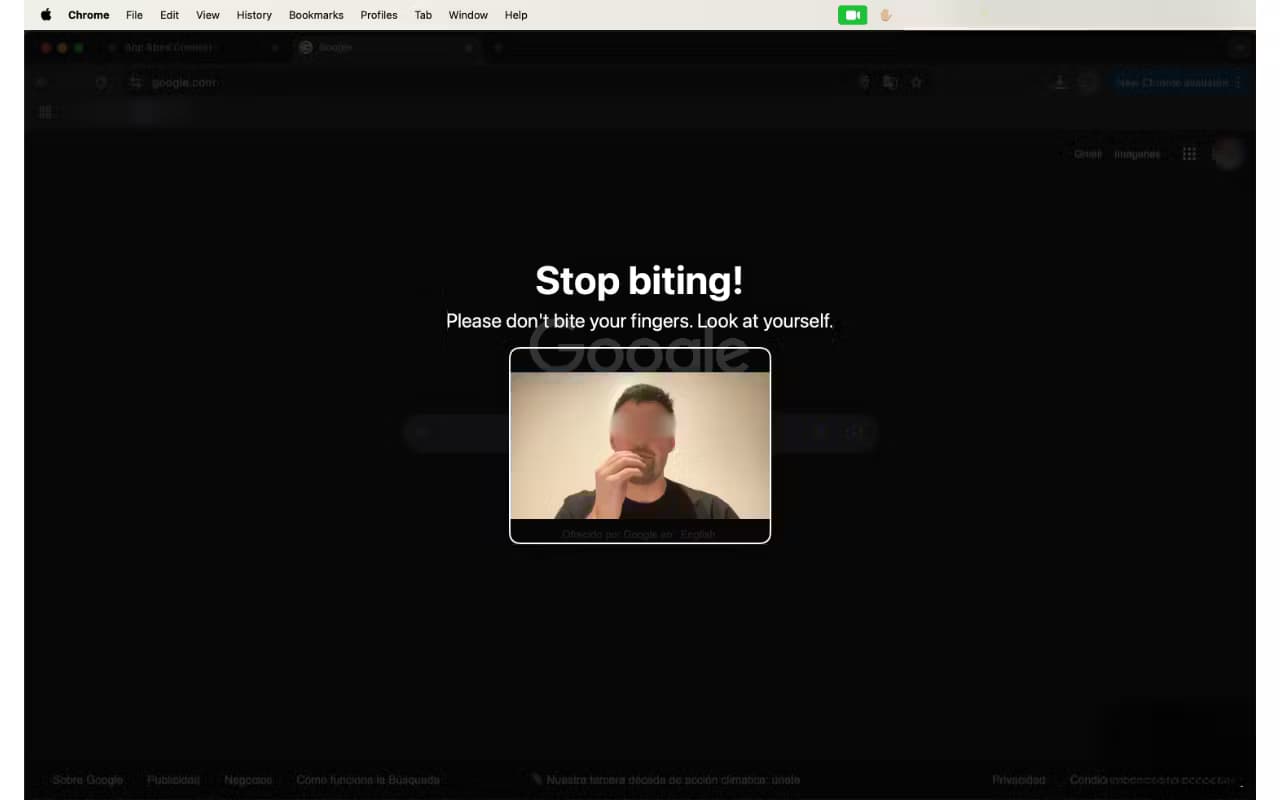
TrackHands is a small desktop app that turns your webcam into a habit coach. It watches where your hands and face sit in the frame, and when your hand gets close to your mouth or nose, it shows a gentle on-screen warning. The point is simple. Face touching spreads germs and often goes unnoticed, so the app makes the habit visible in the moment.
Everything runs on your own machine. TrackHands uses MediaPipe, a face and hand tracking library from Google, to read the camera feed locally. Your video never leaves the computer, and there's no sign-up, no tracking, and no data collection.
The main limit is scope. The app only watches hand-to-face contact. It won't track other habits, and it needs the webcam on while it runs, which may bother people who work in shared spaces or on laptops with limited battery.
Getting Started
- Download TrackHands from the official site and install it on macOS, Windows, or Linux.
- Launch the app and grant camera permission when your system asks.
- Let it sit in the system tray while you work. It keeps running in the background.
- Adjust detection sensitivity and camera resolution if the default warnings feel too eager or too slow.
- Review the screenshots it saves when a warning fires, and use them to spot when you touch your face most.
Product Information
A quick look at TrackHands's pricing, supported platforms, and performance.
Best for
The users, tasks, and scenarios where this tool fits best.
Users
- Health-conscious desk workers
- Remote workers and students
- Habit trackers
Tasks
- Breaking the face touching habit
- Building awareness of triggers
- Staying hands-off during cold and flu season
Scenarios
- Long solo work sessions at a desktop
- Study or focus blocks
- Lightweight setup on an older laptop
Key features
Real-Time Face and Hand Tracking
TrackHands uses MediaPipe to watch your face and hands through the webcam and to measure the distance between them with millisecond precision. When your hand crosses a threshold near your mouth, the app reacts right away. There's no lag between the gesture and the warning.
Gentle, Configurable Warnings
A delay setting lets you set how long your hand can stay near your face before a warning appears. Quick, harmless touches pass without a peep, so the reminders don't turn into noise you ignore. You set the tolerance that matches your habit.
System Tray Design
The app lives in your menu bar or system tray and runs in the background. It doesn't open windows or interrupt your work. You only see it when a warning fires, which keeps the tool out of the way until you need it.
Adjustable Sensitivity and Resolution
You can tune detection speed and camera resolution to match your machine. Higher resolution catches smaller movements. Lower resolution uses less power on laptops. The trade-off is yours to pick.
Screenshot Capture on Detection
When a warning triggers, the app saves a screenshot of the moment. Those images build a log of when and how often you touch your face, which turns a vague habit into something you can actually see and measure.
Local Processing and Privacy
All detection runs on your device. The camera feed never goes to a server, and there are no accounts, no tracking, and no data collection. For a tool that watches you through a camera, that design choice matters.
Cross-Platform Support
TrackHands runs on macOS, Windows, and Linux with the same core experience. You don't need a specific brand of laptop or a particular operating system to use it.
Pros and cons
Pros
- Free to download and use, with no subscription or account.
- Runs entirely offline, so your camera feed stays on your machine.
- Configurable delay keeps quick touches from triggering false alarms.
- Screenshot log gives you data on when the habit shows up.
- Works on macOS, Windows, and Linux with the same features.
Cons
- The app covers face touching only, so it won't help with other habits.
- It needs the webcam on the whole time, which drains battery on laptops and may feel odd in shared rooms.
- Detection depends on lighting and camera angle, so a bad setup can cause missed or extra warnings.
Frequently asked questions
It watches your webcam, tracks your face and hands, and shows a warning when your hand gets close to your face. The goal is to make face touching obvious so you can cut back on it.
Related content
Explore related tools, skills, and articles for TrackHands.
TrackHands Alternatives

X Ray Interpreter
X-ray Interpreter · ImageX Ray Interpreter is a web-based AI radiology tool that turns X-rays, CT scans, MRI, ultrasound, and PET images into plain-language reports. You upload a scan, get a preliminary X-ray interpretation in moments, then ask follow-up questions if something needs explaining. It works as a second opinion and a learning aid, not as a medical diagnosis.

Aieasypic
AIEasyPic · ImageAIEasyPic is an AI image generator that turns plain text prompts into finished artwork in seconds. You can also train custom models on your own photos, swap faces in existing images, and create short video clips from text, all from a browser. It suits casual creators who want quick visuals and hobbyists who want to build a personal model without touching any code.

Chargen
Chargen · ImageChargen is an AI character generator and worldbuilding toolkit built for Dungeons & Dragons and other tabletop RPGs. It turns a one-line idea into a painted character portrait, spins up NPCs, monsters, maps and encounters from the same session, and keeps every creature's details close at hand. The tabletop RPG art side runs on a credit system called Gold, while the text generators stay free for everyone.