

TrendWidget: AI Search & News
TrendWidget · Coding · Marketing
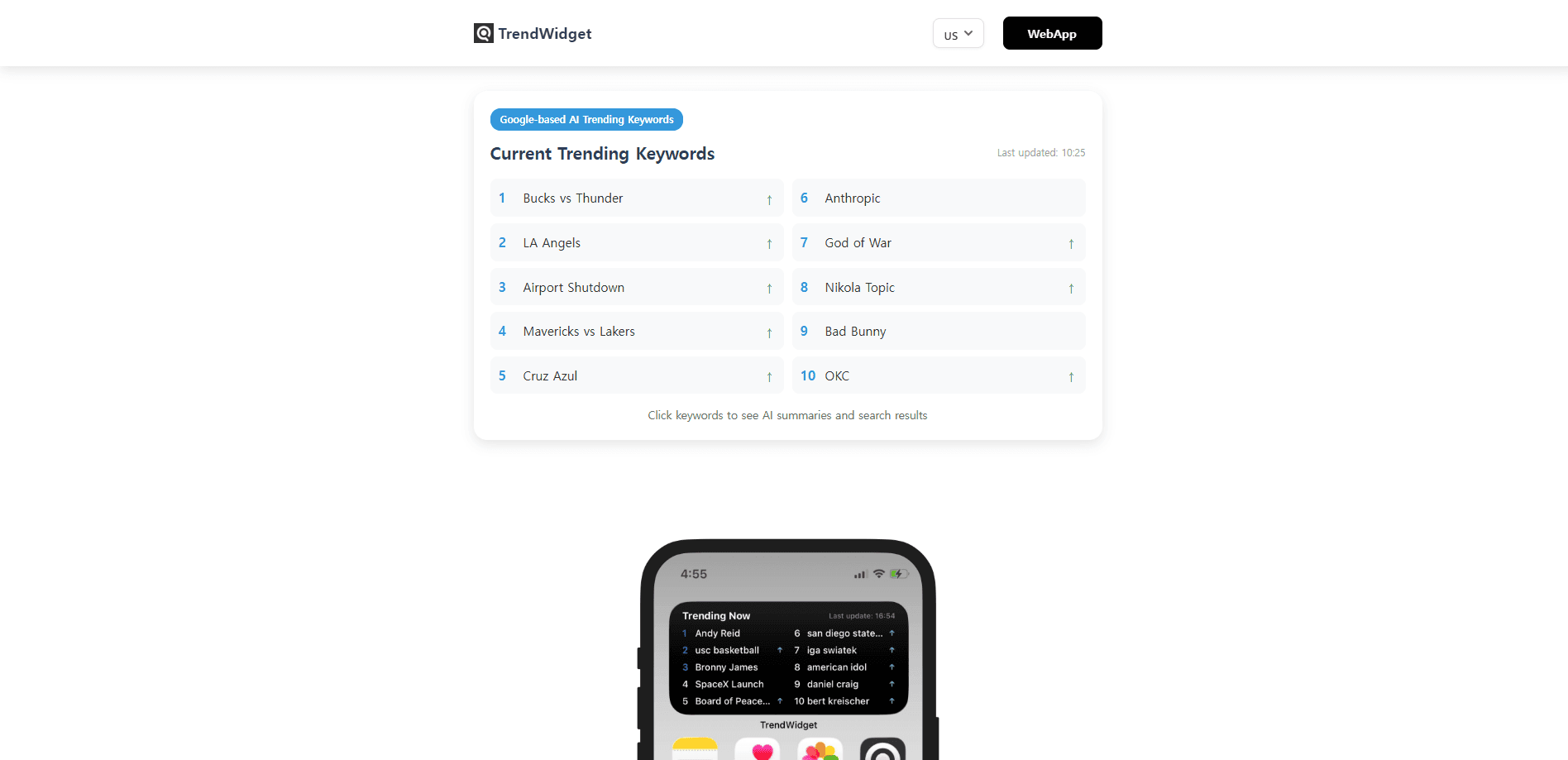
TrendWidget: AI Search & News is a home screen widget that shows what people are searching for right now, then explains each trending topic with an AI-generated summary. It pulls signals from Google and other major portals, turns them into a short list of rising keywords, and lets you tap any one of them to see the news, images, and videos behind it. There's also a browser version for desktop, so you can check the same trend feed without installing anything.
About TrendWidget: AI Search & News
What Is TrendWidget: AI Search & News
TrendWidget is a real-time trending topics dashboard built around one habit. You glance at your home screen to see what the internet is talking about. The app sits in the widget slot on Android, refreshes through the day, and pulls its keyword list from Google search data plus other big portals.
The part that sets it apart from a plain trends list is the AI layer. Tap a keyword. TrendWidget searches news, websites, and videos, then writes a short summary explaining why that topic is spiking. You get context without opening five tabs.
Two limits are worth knowing up front. The app is Android-only, and the multi-country trend view (US, Japan, Korea, Europe) was still marked as coming soon when we checked the official site. So what happens if you need region-by-region monitoring today? That piece isn't there yet. The trend feed itself is also US-centric, and the AI summaries are machine-written. Treat them as a starting point, not a verified report.
Getting Started
- Install the TrendWidget app from Google Play, or open the browser version at trendwidget.app if you're on desktop.
- On Android, long-press an empty spot on your home screen, tap Add Widget, and pick TrendWidget.
- Resize the widget to fit your layout, then let it load the current trending keyword list.
- Tap any keyword to pull up its AI summary along with related news, images, and videos.
- Optionally answer three short questions on the site to get a free unlimited AI summary code.
Product Information
A quick look at TrendWidget: AI Search & News's pricing, supported platforms, and performance.
Best for
The users, tasks, and scenarios where this tool fits best.
Users
- Social media managers
- Blog and YouTube creators
- Casual news readers
Tasks
- Spotting breaking topics
- Getting quick context
- Tracking Google Trends and Yahoo trending topics
Scenarios
- Checking your phone in the morning
- Working on a trending post
- Researching a market's mood
Key features
Home Screen Trending Widget
The core of TrendWidget is a widget, not a full app you have to open. It sits on your home screen, refreshes on its own, and shows a compact list of trending keywords. You can resize it. That matters on a crowded home screen where every tile competes for room.
AI Summaries for Every Keyword
Tapping a keyword triggers an AI search across news, websites, and video, and the result is a short written summary of why that topic is trending. It's the feature that makes the widget useful rather than decorative. The summaries are machine-generated. That means they're fast, but not always complete on a breaking story.
Google and Yahoo Trend Sources
TrendWidget builds its keyword list from Google search data along with other major portals, including Yahoo. That mix gives you a broader signal than a single trends page. The company frames the product as a replacement for the real-time search features that used to live inside search engines.
Desktop Web Version
The same trend feed runs in a browser at trendwidget.app, so you don't need an Android phone to use it. The layout is built for a laptop screen. You reach it without an install. For anyone who works at a desk all day, that's the more practical entry point.
Light, Battery-Friendly Design
The app is tuned to run quietly in the background. The company describes it as low-power by design, with minimal battery impact. Widgets that refresh often can drain a phone. That's a real concern for a product living on your home screen. You can verify actual usage in your device settings.
Free Unlimited AI Summary Code
The site offers a free code for unlimited AI summaries in exchange for answering three short survey questions. It's issued instantly, with no email verification. You answer the questions, you get the code. The trade is simple: your answers shape the product roadmap in return for the upgrade.
Pros and cons
Pros
- Free to use, with no account or sign-up required on the app or the web version
- Puts trending keywords on the home screen, so you catch topics without opening another app
- AI summaries add context to a keyword instead of just listing it
- Works on desktop in a browser, which widens it beyond Android owners
- Built to be light on battery, which matters for an always-on widget
Cons
- Android-only for the widget, so iPhone users can't use the feature they'd most want
- Multi-country trends were still labeled coming soon, which limits anyone tracking regions outside the US
- AI summaries can miss context on fast-moving or very new stories, since they're generated from available sources
Frequently asked questions
Yes. TrendWidget is free on both the app and the web, and it doesn't ask you to create an account. The optional unlimited AI summary code is also free, issued after you answer three short survey questions.
Related content
Explore related tools, skills, and articles for TrendWidget: AI Search & News.
TrendWidget: AI Search & News Alternatives
Forefront
Forefront · CodingForefront is a web platform for building with open-source AI. It lets you fine-tune leading open-source language models on your own data, evaluate how they perform, and run them through an API or export them to host yourself. Developers who want the convenience of a closed-source platform but insist on owning their models and data are the target audience here.

Startkit
StartKit.AI · CodingStartkit is a boilerplate for building AI SaaS and AI wrapper products. Think of it as an AI startup boilerplate with the boring parts already wired up: authentication, Stripe and Lemon Squeezy payments, usage limits, transactional email, and an AI API starter that talks to OpenAI, Anthropic, Groq, or Llama. You clone the repo, set your price, and start on the part of your product that people actually pay for. It's Next.js under React and Tailwind, so most of the boilerplate code already feels familiar.
Testim
Tricentis · CodingTestim is an AI-powered test automation platform for building and running end-to-end tests across web, mobile, and Salesforce applications. It leans on machine learning to keep tests stable when an interface changes, so teams spend less time fixing broken selectors. Not bad for an automated testing tool you can start using today. You create tests by recording actions in a browser, then optionally add JavaScript when you need more control. It's a solid pick for busy QA teams.