

trumpet
Trumpet · Marketing · Business
Trumpet is a digital sales room platform where sales and customer success teams build shared, personalized spaces for buyers, track engagement, and run mutual action plans.
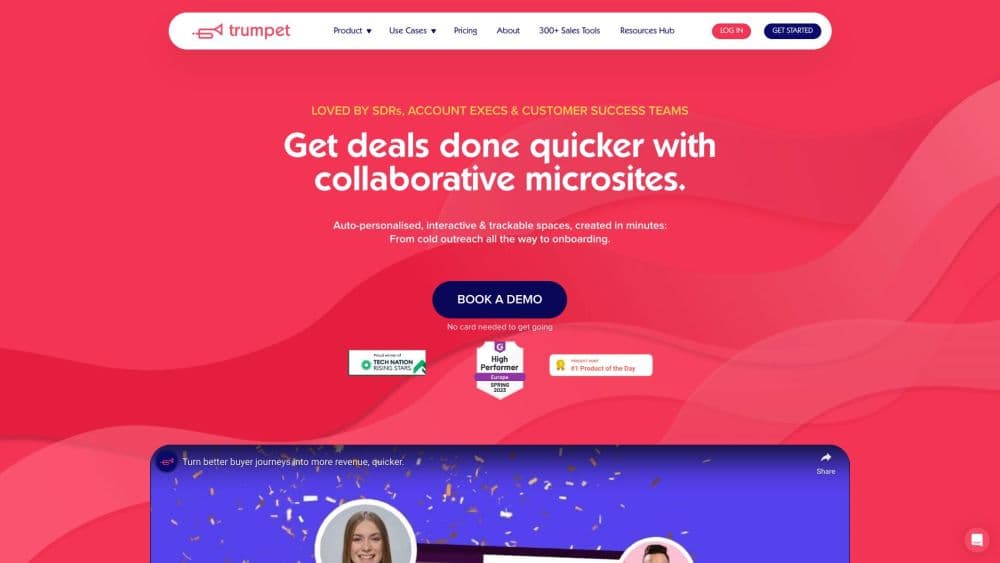
About trumpet
What Is Trumpet
Trumpet is a B2B sales workspace that gives revenue teams one shared, branded link per deal or customer. Instead of scattering decks, pricing sheets, and follow-up notes across email threads, reps assemble a single space. Buyers open it in the browser, see what's relevant to them, and work through next steps alongside the seller. Nobody has to download a file or create an account to read it.
The product started as a follow-up tool for account executives. It has since grown into a broader revenue platform, with mutual action plans, proposals, e-signature, forms, content analytics, and an AI layer called Trumpet AI. Customer success teams now use the same workspace for onboarding and renewals. That expansion is why the company markets it as one system for the whole revenue cycle rather than a sales-only tool.
The honest limit: this is B2B software with a per-seat cost starting well above free chat tools. Small teams selling low-value deals rarely get enough from the analytics to justify it. Content library quality caps everything else, since a room only works as well as the material inside it.
Getting Started
- Sign up for the free plan and connect your calendar or CRM, which unlocks the basics: up to 10 Pods on the account and unlimited users who can view and collaborate.
- Build a template. Upload your standard collateral, set a folder structure for decks, pricing, and case studies, then save the layout so every new room starts from the same base.
- Create a Pod for a specific deal or customer, personalize the name and header, and add the content that matches the buyer's stage.
- Share the link by email or calendar invite and invite the buying committee, so stakeholders join the same space instead of forwarding attachments to each other.
- Watch engagement in the analytics view, then act on it: reply to the buyer who read the pricing page three times, or move the mutual action plan forward when a step stalls.
Product Information
A quick look at trumpet's pricing, supported platforms, and performance.
Best for
The users, tasks, and scenarios where this tool fits best.
Users
- Account executives selling mid-market and enterprise deals
- Customer success and onboarding managers
- Sales enablement and revenue operations teams
Tasks
- Sending a follow-up after a demo
- Running a mutual action plan
- Handling a renewal or expansion conversation
Scenarios
- A buying committee with five stakeholders across finance, IT, and operations
- A software vendor onboarding a new enterprise customer
- A partnerships or channel team managing a joint go-to-market plan
Key features
Branded Digital Sales Rooms
Trumpet is the digital sales room software at the centre of this stack, and each room lives at its own link, carries your logo, colors, and header image, and can sit on a custom domain on the Elite plan. Buyers open it in a browser with no download or account setup. The practical effect is that all deal material lands in one place, so a later question doesn't mean scrolling through six email threads to find the pricing PDF.
Mutual Action Plans
Mutual action plans give the seller and the buyer a shared checklist with owners, due dates, and status for each step. Everyone sees the same view, so the vendor can't quietly mark things done and the buyer can flag a hold-up early. Sales leaders use it as a deal health signal, separate from what the rep reports in the CRM.
A Buyer Enablement Platform, Not Just a Link Sharer
Most file-sharing tools stop at delivery. Trumpet works as a buyer enablement platform: the room holds the material a buyer needs to make an internal case, such as security reviews, ROI models, and references, and the mutual action plan makes the vendor's own commitments visible alongside them. Champions can forward the link to a CFO and the page will still explain itself, which matters when the person who signed off on the demo isn't the one who signs the contract.
Engagement Analytics and Buying Signals
The analytics side records what buyers open, how long they stay on a page, and which stakeholder is involved in which conversation. That content engagement tracking covers every person and every asset, and a composite score pulls the signals together, so sales room analytics answer who is warm rather than how many people clicked. Reading a pricing page twice at 9pm tells a rep more than a vague "let me think about it" email, and the data is what turns follow-up from guesswork into a timed nudge.
Trumpet AI Copilot and Vibe Coding
An AI sales copilot earns its place when it removes the tedious parts of deal work, and this one works inside the workspace in plain language: it builds a room layout, drafts content, summarizes a call, creates an action plan, or assembles an interactive ROI calculator. Vibe coding lets a rep describe a widget or page in a sentence and get a working version without a developer. AI org charts map the buying committee from call data, and recommended stakeholders point to people who should probably be in the room but aren't yet.
MCP Server and AI Tool Connections
The MCP server connects Trumpet to tools like Claude, ChatGPT, Gemini, and Gong, so an AI assistant can read Pod content and engagement data without the rep copying screenshots into a prompt. A marketing team, for example, can ask an assistant which accounts are reading a campaign landing page inside their sales rooms and get an answer from live data, not last month's export.
Content Management and Personalization
A content management system holds the approved decks, videos, case studies, and pricing sheets, with AI search, tagging, and a writer for new drafts. Templates standardize how rooms look. Personalization swaps the header, messaging, and featured content per account. Global content updates push a corrected document into every room that already contains it. That solves the classic problem of an old pricing deck living on in fifty open deals.
Proposals, E-Signature, and Forms
Proposals and quotes can be built inside the room. E-signature support covers DocuSign and PandaDoc, so the contract gets signed without switching apps. Forms and surveys collect qualification details and post-deal feedback in the same place as everything else. The account record then grows in one system rather than five.
CRM and Integration Coverage
Trumpet lists more than 50 integrations across CRM, enablement, and intelligence tools, including Salesforce, HubSpot, Gong, and Slack. Room activity, engagement, and mutual action plan status sync back to the CRM. That keeps the deal record current without a rep manually logging every touch. Together with the analytics layer, the sync turns the room into a revenue intelligence source: forecasts can lean on buyer behaviour instead of rep optimism. The integration list is the main practical difference between using Trumpet as a standalone room tool and running it as part of an existing sales stack.
Pros and cons
Pros
- One shared link per deal replaces deck attachments and long email threads, and buyers don't have to install anything.
- Engagement data is per person and per page, so reps can tell which stakeholder read what and when, which is far more useful than an open count.
- Mutual action plans and customer onboarding live in the same workspace, so the sales-to-CS handoff keeps its context.
- AI features like Copilot, vibe coding, and AI org charts reduce manual setup work for reps who aren't technically inclined.
- The MCP server lets assistants in Claude, ChatGPT, or Gemini pull live deal data, which most competing room tools don't offer.
Cons
- Per-seat pricing at $45 to $160 a month adds up fast for larger teams. The AI features sit on the most expensive plan.
- The Free plan caps the account at 10 Pods, which is fine for a trial and tight for a real pipeline.
- Value depends on content quality. Rooms built from stale decks look more organized but still answer nothing.
- The product surface is large, so a small team can end up paying for analytics, proposals, and AI features it never uses.
Frequently asked questions
Trumpet is used to run sales deals and customer onboarding in one shared workspace. Reps send buyers a single branded link with the materials for that deal, track who opens what, and keep next steps visible through mutual action plans.
Related content
Explore related tools, skills, and articles for trumpet.
trumpet Alternatives

Tractionwave
TractionWave · Image · MarketingTractionWave is an AI attention heatmap tool for static ads. Upload a PNG or JPG and it returns predicted attention, ranked hotspots, and fixes before you spend budget.

OpenSEO - AI Visibility
EveryApp · Coding · Marketing · BusinessOpenSEO is an open source SEO platform for keyword research, backlinks, rank tracking, site audits, and AI visibility, with usage-based pricing and MCP access for AI agents.

Plugins Radar
Plugins Radar · Marketing · BusinessPlugins Radar tracks where your ChatGPT plugin ranks in directory and in-chat search, which competitors outrank it and what changed, with hourly checks on 9,885 listings.