

Decoratly
Kamil Uhryn · Image
Decoratly is a browser-based AI interior design app that turns a photo of your own room into a photorealistic redesign in about 30 seconds, with 75+ styles and one-time paid access.
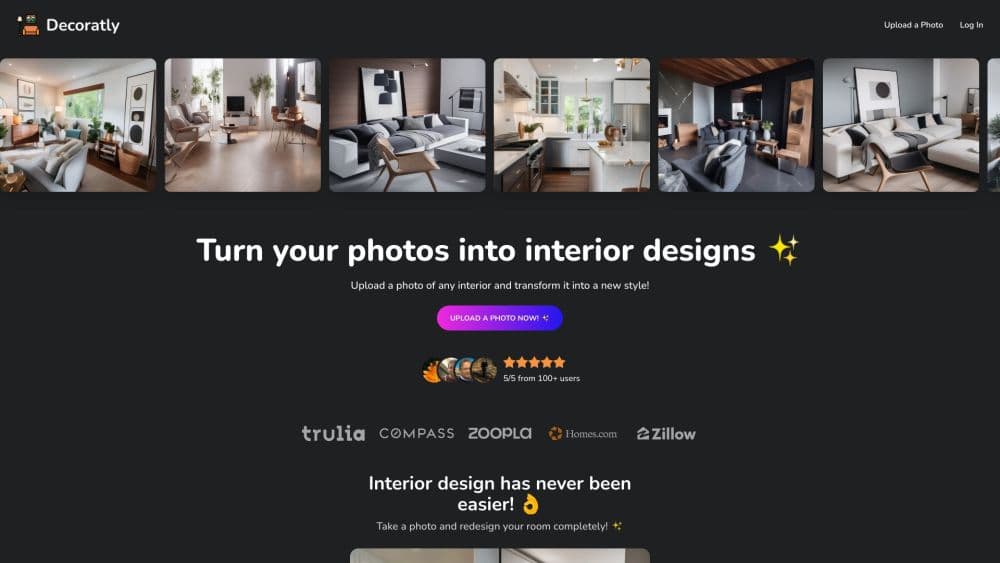
About Decoratly
What Is Decoratly
Decoratly is a web app that redesigns the room you photographed. You upload a phone picture of a living room, a kitchen or a bedroom, choose a style, and the AI returns the same room with new furniture, finishes and lighting. Walls, windows and proportions stay put, which is the part most AI image tools get wrong.
It was launched in November 2023 by Kamil Uhryn, a developer in Poland who still runs the project on his own. According to the site, more than 25,000 rooms have been transformed so far. The product isn't a furniture store and isn't a design agency. It sells visualization, plus a shopping search that points to real pieces.
Three limits are worth knowing before you start. The redesign comes from a single photo, so anything outside the frame is guessed. It isn't a floor plan or a construction drawing, so you still measure and check with a contractor before knocking down a wall. And the AI can slip on details, like an extra chair leg or a window that shifted, so new results deserve a second look.
Getting Started
- Open decoratly.com or app.decoratly.com in any modern browser. No install, no account and no card is needed for the first design.
- Upload a photo of the room. Daylight and an eye-level shot from the doorway give the model the best read on geometry and light.
- Pick one of the 75+ styles, or type what you want in plain words. The Style Builder also lets you mix an era, a palette and materials into a look you can reuse.
- Let the AI render the room. Results usually land in about 30 seconds, and a background check regenerates broken output before you see it.
- Refine or buy in. Use the Edit tools to repaint walls, swap lighting or move furniture, tap pieces to hunt down real versions, or unlock the 30-day pass for the full toolkit.
Product Information
A quick look at Decoratly's pricing, supported platforms, and performance.
Best for
The users, tasks, and scenarios where this tool fits best.
Users
- Homeowners planning a refresh
- Interior designers working with clients
- Real estate agents and home stagers
- Renters who can't repaint
Tasks
- Testing a wall color before buying paint
- Trying a furniture layout
- Staging an empty listing
- Cloning a look from Pinterest or a magazine
- Finding furniture that matches a render
Scenarios
- A renovation where the plan keeps changing
- Prepping a property for sale on a tight budget
- A weekend makeover of one room
Key features
Photo to Redesign, Not a Stock Room
The core feature does room photo to design work in one step: you upload a picture and get back a redesign of that exact room. Decoratly detects the room type, reads walls, floor, windows and light, and rebuilds the scene around them. That's the difference between an AI room design you can show your partner and a generic render of somebody else's space.
75+ Styles and a Style Builder
The style library runs from Scandinavian and Japandi to Moody Library and Electric Retro, and every style applies to the same photo so you can compare looks side by side. When a preset doesn't fit, the Style Builder turns a written prompt or a mix of era, palette and materials into a reusable style. A short quiz helps when you have no idea what your taste is called.
An AI Interior Designer That Sees Your Room
The built-in chat looks at your photo and talks about the room in front of it: what works, what fights the light, and what to change first. You can ask about palettes or layouts, then have the conversation turned into a style you apply with one click. It behaves more like a second opinion than a generic chatbot.
Edit Tools for Single Changes
Applying a style changes everything at once. The Edit tools do the opposite: repaint only the walls, add a wardrobe photographed in a store, remove a piece, swap the lighting to evening or rearrange the layout. For a room you already like, this is the more useful half of the app, and it only comes with the paid pass.
Clone a Design From Any Inspiration Image
Drop in a Pinterest pin, an Instagram post or a magazine page and Decoratly extracts the palette, materials and mood, then renders your room in that style. Your geometry and lighting survive the transfer, so you get your space in someone else's look rather than a copy of their room. It pairs well with the edit tools for fine-tuning.
Multi-Angle Redesigns and Virtual Staging
You can add several photos of the same room and redesign them together in one style, which keeps colors and materials consistent from shot to shot. Realtors use this for staging empty listings, and the paid pass removes the watermark and unlocks exports up to 2048px for portals and presentations.
Shop the Render
Tap any piece in a render and Decoratly searches Google Shopping for products that look like it, usually at more than one price point. The matches are visual rather than keyword based, and each result opens on the retailer's own page. The furniture is real. The room is AI.
Pros and cons
Pros
- A redesign keeps your actual room's walls, windows and light, so the picture is usable when you brief a contractor or a partner.
- The first design is free without an account, an email address or a card, which lets you judge quality on your own space.
- The $9.99 pass is a single 30-day payment that never renews, so there's no subscription to cancel later.
- The edit tools and the room-aware chat go further than the one-click restyle most rival AI interior design apps stop at.
- Virtual staging and 2048px exports without a watermark give agents and stagers a cheap way to prep listings.
Cons
- Everything outside the frame is inferred. A room shot from one corner can come back with a layout the photo never showed.
- The edit tools, all 75+ styles and unwatermarked images sit behind the paid pass, so the free design is a demo more than a workspace.
- Results still need a human eye. AI renders sometimes add an extra chair leg or shift a window, and you have to catch it.
- The free design is limited to the US, Canada, the UK and a short list of European countries. Buyers elsewhere start with the paid pass.
- There's no native app, no API and no team features, which matters if you wanted to wire it into your own pipeline.
Frequently asked questions
Decoratly redesigns a room from one photo. You upload a picture of your own space, choose a style or describe one, and the app returns a photorealistic version of that same room in about 30 seconds, keeping the walls, windows and proportions in place.
Related content
Explore related tools, skills, and articles for Decoratly.
Decoratly Alternatives

Tractionwave
TractionWave · Image · MarketingTractionWave is an AI attention heatmap tool for static ads. Upload a PNG or JPG and it returns predicted attention, ranked hotspots, and fixes before you spend budget.

Imejis.io
Imejis.io · Image · MarketingImejis.io is an AI design studio for agents and marketing teams. Describe an image in plain words, and it writes the copy, builds the layout, reflows it to every size, then exports a finished file.

Layoutr
Van Dijk Ontwikkeling · Image · China AILayoutr is a browser floor plan tool that scales your own plan, places furniture at true size, shows the room in 3D and renders it with AI.