

TypeBoost
palmio · Prompts
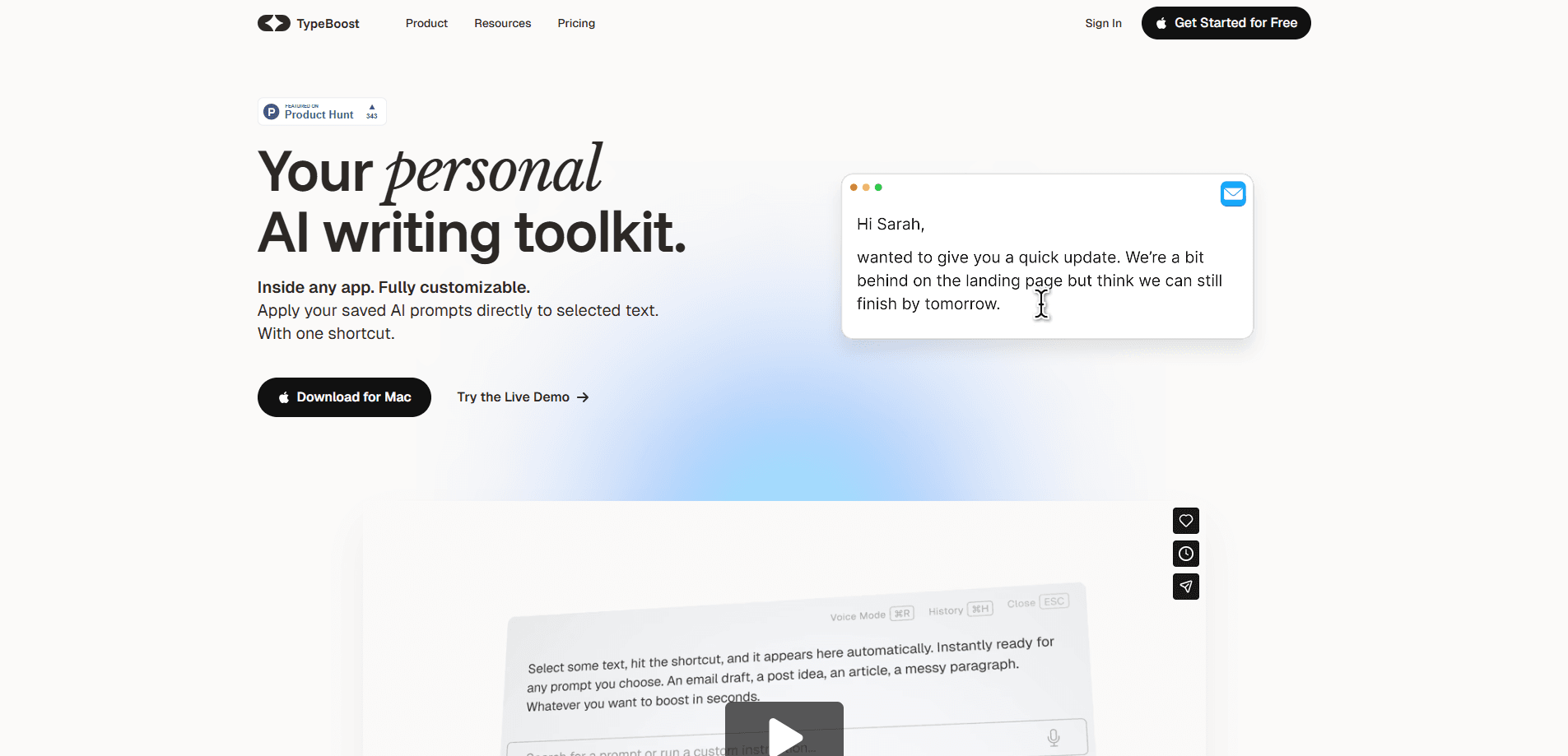
TypeBoost is an AI writing assistant for macOS and iOS that turns your own prompts into one-tap actions you can run on any text, in any app. It works as an AI text rewriter and it handles summaries, translations, and grammar too. Save prompts once, then trigger them without leaving the document you're in. Built for people who write all day.
About TypeBoost
What Is TypeBoost
TypeBoost is a personal AI writing toolkit, not another chatbot window you have to open and paste into. You build a library of prompt actions once, then apply them instantly to whatever you're writing. Rewrite a paragraph, shorten an email, change the tone, or translate a message, all from a keyboard shortcut.
The appeal is context. Most AI tools pull you out of your work and into a separate tab. TypeBoost works inside the app you're already in, so you stay in flow. It handles the small, repetitive editing tasks that eat up time across a full workday.
The catch is the platform. TypeBoost runs only on macOS and iOS. Windows and Android users are out of luck. It also leans on you to write good prompts. If you'd rather have everything done for you, a general-purpose chatbot with preloaded skills may suit you better.
Getting Started
- Download the macOS app from typeboost.ai or grab the iOS app from the App Store.
- Create an account and pick a plan.
- Build your first prompt action, such as "make this email sound more professional."
- Assign it a keyboard shortcut, or use the TypeBoost Keyboard on iPhone to run it in other apps.
- Apply the action to your text, review the diff view, and keep or reject individual changes before sending.
Product Information
A quick look at TypeBoost's pricing, supported platforms, and performance.
Best for
The users, tasks, and scenarios where this tool fits best.
Users
- Writers and editors
- Freelancers and consultants
- Non-native English speakers
Tasks
- Polishing emails
- Shortening long text
- Translating messages
Scenarios
- Handling a full inbox of routine replies, where the same cleanup steps repeat every morning.
- Writing on the go, using the iOS keyboard and dictation instead of typing on a phone.
- Keeping tone consistent across a long document when you're switching between formal and casual passages.
Key features
Custom Prompt Actions
TypeBoost's core idea is simple. Your prompts become buttons. Save a prompt once, name it, and reuse it forever. Instead of retyping the same instruction into a chat window, you fire it at the selected text and move on. The result is consistency. Every email comes out with the same voice, because the same saved action shaped it.
Works Inside Any App
The macOS version runs on a keyboard shortcut, so you can apply a prompt action in Mail, Notes, Slack, or a browser field without switching windows. This matters more than it sounds. Losing your place every time you clean up a sentence adds up over a day. Staying in the current app removes that friction.
TypeBoost Keyboard for iPhone
On iOS, a custom keyboard brings the same prompt actions to other apps on your phone. It's an AI keyboard that rewrites a LinkedIn post, sharpens a message, or fixes a typo right where you type. That puts desktop-grade editing on a phone. Small-screen writing still has its limits.
Diff View and Edit Control
After an action runs, TypeBoost shows a diff of what changed. You can accept the whole rewrite or reject the individual edits you don't like, keeping your original wording where it matters. This is a real difference from a chat tool that hands you a block of text and leaves the comparison to you.
Every Model and Prompt in One Library
The Prompt Library collects ready-made actions, and the app lets you choose which underlying AI model handles a task. Long translation might want one model, while a quick tone tweak might want another. Custom prompts and model choice live in one place, which is what makes the toolkit feel like a workspace rather than a single trick.
AI Dictation
Speak naturally and let TypeBoost shape your words into clean writing. Who is it for? People who think out loud, or who draft while walking, commuting, or between meetings. You get a first pass of polished text. No raw transcript you'd have to fix by hand.
History That Works For You
The app keeps your recent texts and lets you copy, paste, or share outputs with one tap, organized by type. If you write the same kind of message often, this saves you from digging through old drafts or rebuilding a prompt from scratch.
Pros and cons
Pros
- Turns your own prompts into reusable one-tap actions, so repetitive editing gets faster over time and you stop retyping the same instruction into a chat box every single morning.
- Runs inside the apps you already use instead of forcing you out of your draft and into a separate chat window where you lose both your place and your train of thought.
- The diff view lets you keep or reject individual changes, which gives you final say over the wording before anything goes out under your name.
- The iOS keyboard extends the same toolkit to phone apps, not just the desktop.
- Free tier available, so you can test the workflow before paying.
Cons
- macOS and iOS only, so Windows and Android users can't use it at all.
- You need decent prompts to get good results; weak instructions produce weak rewrites, and there's a learning curve.
- The paid plans add up for heavy use, and pricing isn't easy to pin down without checking the site directly.
- It's a writing helper rather than a full document editor, so it won't replace your main writing app.
Frequently asked questions
It's an AI writing assistant that applies your saved prompts to text in any app. You build a set of actions for rewriting, summarizing, translating, or fixing grammar, then trigger them with a shortcut instead of typing the same instruction each time.
Related content
Explore related tools, skills, and articles for TypeBoost.
TypeBoost Alternatives

Refs
Pratyush Rungta · Video · Marketing · PromptsRefs is a video reference library that measures launch films shot by shot, then hands Claude a 15-plate blueprint and prompt recipe to plan your own.
Siteprint
Siteprint · Coding · PromptsSiteprint measures any website's colors, fonts, spacing, and layout in a real browser, then turns the result into a prompt, DESIGN.md and theme files that AI coding agents can build from.

Promptic
Promptic GmbH · Coding · Business · PromptsPromptic is a GenAI optimization platform from Promptic GmbH. It benchmarks models, tunes prompts and agents on your data, and traces live calls to pick the cheapest setup meeting quality targets.