

UGC Creator: FastUGC
Rick-y Media AB · Video
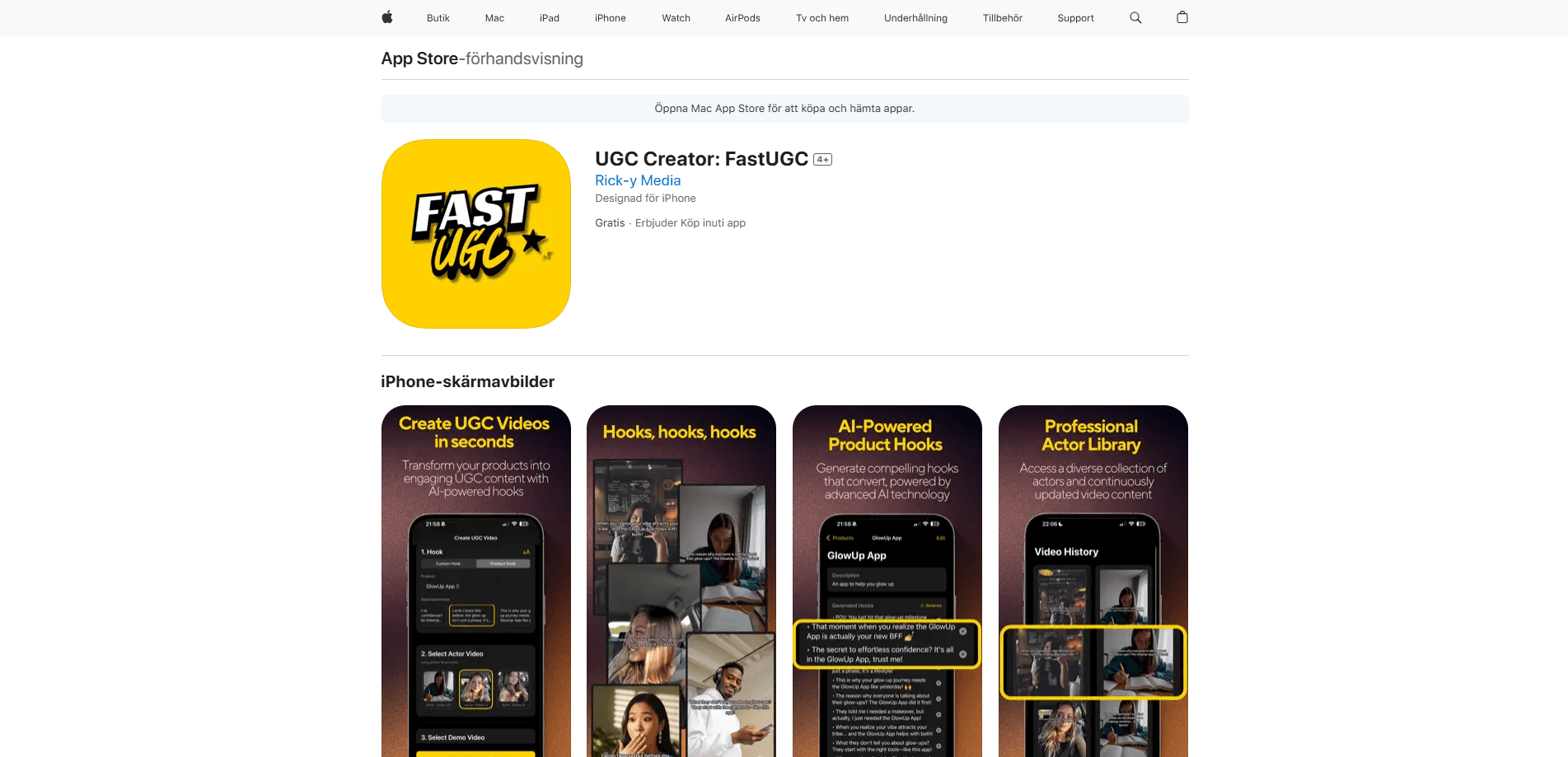
UGC Creator: FastUGC is an iOS app that turns your product details into short UGC videos. You pick an AI-written hook, choose an actor clip and export for social.
About UGC Creator: FastUGC
What Is UGC Creator: FastUGC
UGC Creator: FastUGC is an iPhone and iPad app from Rick-y Media AB, the studio behind the MuxoAI app collection. It works as an AI UGC video maker: it builds short, vertical videos in the style of a real creator talking about a product, the kind of UGC ad video brands run on TikTok or Reels. The app packages that into three steps: write a hook, pick an actor, and generate the video.
The problem it targets is cost and time. Traditional UGC means paying a creator, shipping the product, waiting on edits and hoping the result matches your brief. FastUGC replaces that loop with a library of pre-shot actor clips and an AI step that writes the opening line for you. You bring the product photo and the description, and the app handles the rest.
There are real limits worth knowing before you download. It's an iOS-only app that needs iOS 18 or later, and the listing lists English as the only language. The actor library is fixed, so the faces and settings you see are the ones you get, and you'll still want to check how the output fits your brand before you run it as an ad.
Getting Started
- Install UGC Creator: FastUGC from the App Store on an iPhone or iPad running iOS 18 or later
- Add your product and fill in the details the app asks for, such as name, category and selling points
- Generate a hook with the AI, or write your own, then pick an actor clip from the library
- Combine the hook with the actor video, preview the result and export it for TikTok, Reels or Shorts
Product Information
A quick look at UGC Creator: FastUGC's pricing, supported platforms, and performance.
Best for
The users, tasks, and scenarios where this tool fits best.
Users
- E-commerce store owners
- Social media managers
- Small marketing teams
- Solo content creators
Tasks
- Writing ad hooks
- Making product videos
- Producing ad variations
- Filling a posting schedule
Scenarios
- A new product launch
- Testing ad angles
- A store with too many SKUs
- A small team without a studio
Key features
AI Hook Generation
The first step works as an AI hook generator and writes your opening line. You feed the app your product details, and it produces several hook variations built to stop a scroll, along with options to adjust the wording so it sounds like your brand rather than a generic ad. If the suggestions miss the mark, you can write your own and skip the AI step entirely.
Professional Actor Library
Instead of filming a person, you pull from a library of pre-recorded actor clips. The library is described as continuously updated with new talent, and you can preview a clip with a long press before you commit. This is the part that saves the most time, since there's no casting, no shipping a product and no shoot day.
Three-Step Video Creation
The whole flow is built around three steps: hook, actor, video. You combine the generated hook with the actor clip, add your product details and let the app assemble the final piece. That structure keeps the app simple enough to use without any editing background, which is the point for a small team working fast.
Product Management
The app keeps your products organized so you can reuse them across videos. You store the details once, then build multiple clips from the same entry, which matters when you're running variations on one product or managing a catalog. It turns each product into a source you return to rather than a one-off project.
Quick Export and Sharing
When the video is ready, you export it and share it straight to your channels. The output is built for vertical, short-form placement, so it slots into TikTok, Instagram Reels and YouTube Shorts without a separate resize or export pass. For teams on a daily posting rhythm, cutting that extra step is the difference between one clip and five.
Dark Mode Support
The app ships with dark mode, which is a small touch but a deliberate one. It's the kind of detail that matters if you're producing several videos in a sitting, often in the evening, and don't want a bright white interface in front of you the whole time.
Pros and cons
Pros
- Replaces a creator booking with a three-step flow you can finish in one sitting
- AI hook generation gives you several opening lines to test instead of writing each one by hand
- Actor library means no casting, product shipping or shoot day to arrange
- Exports vertical video ready for TikTok, Reels and Shorts without extra resizing
- Free to download, so you can try the flow before paying for anything
Cons
- iOS only and requires iOS 18 or later, so Android users can't use it at all
- Listing the app in English only limits it for non-English speaking markets
- The actor library is fixed, so the faces and settings you see are the ones available to you
- AI-written hooks still need editing to match a specific brand voice and avoid a generic feel
Frequently asked questions
It's an iOS app that makes short UGC-style videos for products. You add your product details, generate or write a hook, choose an actor clip from a built-in library and export a vertical video for TikTok, Reels or Shorts.
Related content
Explore related tools, skills, and articles for UGC Creator: FastUGC.
UGC Creator: FastUGC Alternatives
Griffin by Tavus
Tavus · Voice & Language · Video · ChatbotGriffin by Tavus is the first Human Interaction Model: a full-duplex, video-to-video system that watches, listens, and answers during a live video call in real time.

Syllaby AI Avatar 2.0
Syllaby · Video · MarketingSyllaby AI Avatar 2.0 turns a script into a presenter-led video with a reusable AI avatar, natural voice, B-roll and automatic subtitles, all in one browser workflow.

Vitra.ai
Vitra.ai · Voice & Language · Video · MarketingVitra.ai is an agentic content platform that creates, translates, reviews, and publishes video, images, documents, and app content in 120 languages from one shared brief.