
Unlucid AI
Unlucid AI · Image · Video
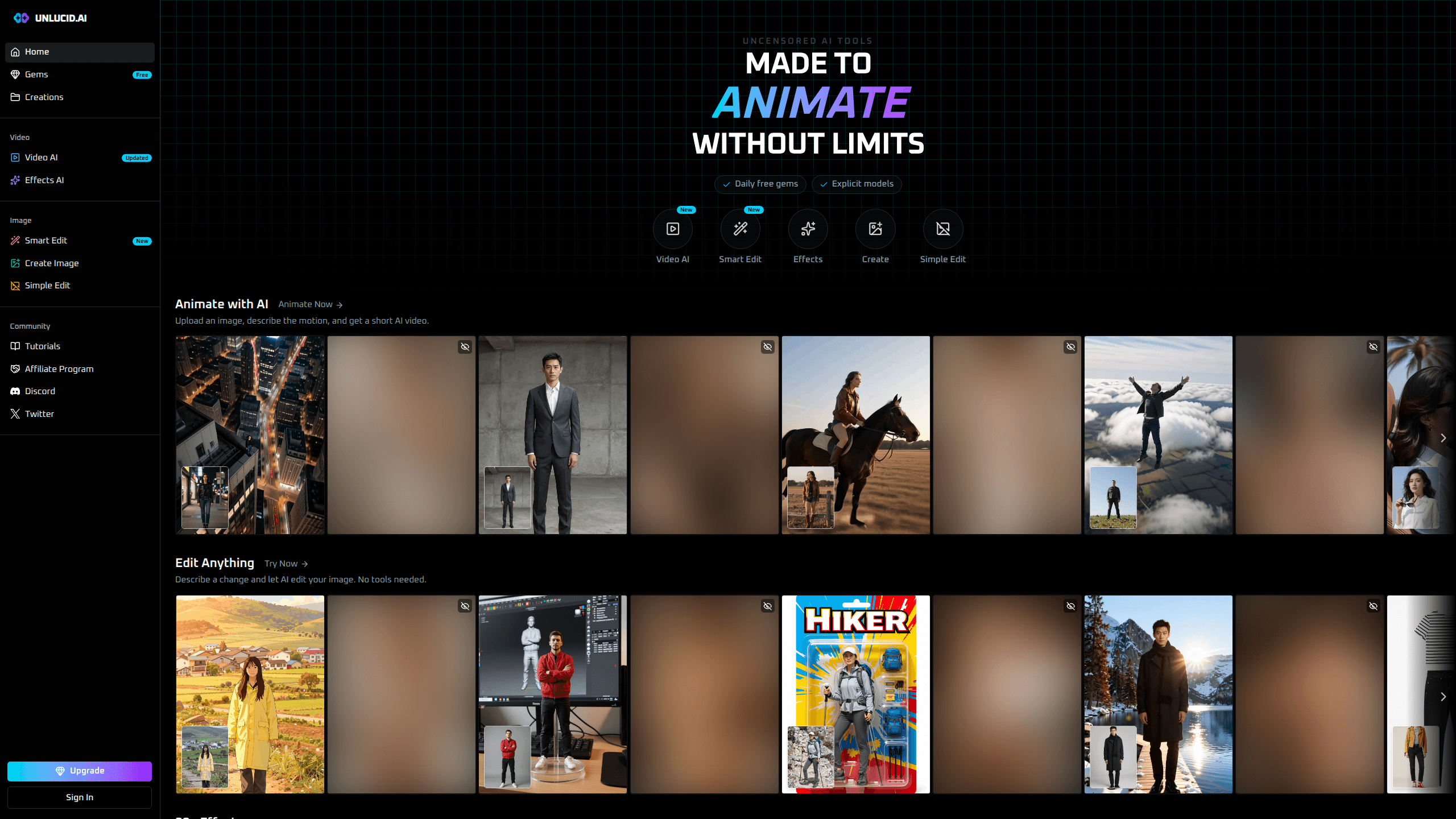
Unlucid AI is an uncensored AI video and image generator that turns text prompts into detailed images and stills into short animated clips. You can create images from words, edit photos by describing the change you want, and push a picture into motion without touching a timeline. It runs in your browser, and the free daily gems mean you can test the video and image tools before you pay.
About Unlucid AI
What Is Unlucid AI
Unlucid AI is a web-based creative studio built around one promise: fewer filters. Most mainstream image and video generators block whole categories of prompts, and that gets frustrating fast if you're a concept artist, a horror writer, or just someone with an idea that doesn't fit a family-friendly mold.
The toolkit splits into a few clear jobs. Create Image makes stills from a text prompt. Smart Edit and Simple Edit change a photo when you describe what to fix. Video AI animates a still by describing the motion, and Effects AI drops ready-made animations onto a picture. Everything spends the same currency, called gems, so you aren't juggling separate subscriptions.
The catch is that "uncensored" cuts both ways. There are fewer guardrails, so the output quality and the legal responsibility land mostly on you. It's also a browser tool with no mobile app, so you're tied to a desktop or a phone browser rather than a native app. And the free tier is thin: you get daily gems to experiment, but real volume needs a top-up.
Getting Started
- Open unlucid.ai and sign in, or create an account with email. No install is needed.
- Claim your free gems from the Gems page and check what each tool costs before you spend.
- Pick a tool: Create Image for text prompts, Smart Edit for photo changes, or Video AI for animation.
- Type your prompt or upload a photo, describe the motion or edit, then generate.
- Review the result, spend more gems to rerun with a tweaked prompt, and download what you like.
Product Information
A quick look at Unlucid AI's pricing, supported platforms, and performance.
Best for
The users, tasks, and scenarios where this tool fits best.
Users
- Digital artists who need reference images for concepts that mainstream generators reject
- Content creators on social platforms who want fast, eye-catching image and video edits
- Writers and worldbuilders who need visuals for adult or dark themes without hitting a filter wall
Tasks
- Generating a detailed image from a text prompt
- Animating a still photo
- Fixing a photo with words
- Applying ready-made effects
Scenarios
- Testing a batch of prompt ideas before committing to a paid run
- Producing quick visuals for a personal project on a tight deadline
- Turning one good photo into several short social clips
- Exploring an edgy concept without tripping automated content filters
Key features
Uncensored image generation
Create Image turns a written prompt into a detailed picture, and the filter set is deliberately loose. For anyone hunting an unrestricted AI tool that won't block the prompt, the filter set is deliberately loose. The trade-off is that you're responsible for what you make and where you use it.
Image to video animation
Video AI takes a still image, reads your description of the motion, and returns a short clip. Instead of a timeline and keyframes, you write a sentence like "slow zoom in as hair moves," and the tool handles the rest. It's the fastest path from a single photo to something that moves, and it makes the platform function as an image to video AI tool rather than just a still-generator.
Smart Edit and Simple Edit
Smart Edit lets you describe a change in plain words and applies it to your photo. Want a different background or fixed lighting? You type it. Simple Edit covers the lighter touch-ups when you don't need full generative edits. Both cut out the masking work that trips up most photo editors, which is why it doubles as a no-fuss AI photo editor for quick fixes.
One-shot effects
Effects AI applies preset animations to any image. Dance, 360 Microwave, Squish, Flying, and Muscles are the current lineup, and each one turns a single picture into a looping clip. It's aimed at people who want a result now rather than a toolkit to learn.
Gems that work across every tool
You buy one currency, gems, and spend it on images, edits, or videos. Gems never expire, and the daily free drop tops you up. That single-currency model beats stacking three subscriptions, and referral signups earn you 4 gems each.
Referral and daily rewards
Log in daily to claim free gems, and every person who signs up through your referral link earns you 4 more. It's a real way to keep experimenting without paying, even if the amounts are modest.
Ten-second video runs
The larger gem bundles give you 10-second video output, which is longer than a single basic clip. If you're making content rather than testing, that extra length matters.
Pros and cons
Pros
- Fewer content filters than mainstream generators, which matters if your ideas keep getting blocked
- Text to image, photo editing, and image to video live in one place, so one account covers several jobs
- Gems never expire and the same currency works across every tool
- Free daily gems and a referral bonus let you try the video tools before paying
- Browser-based, so there's nothing to install
Cons
- No native mobile app, so phone users are stuck on a mobile browser
- Uncensored output means you carry the responsibility for legal and platform rules yourself
- The free tier is small, and heavier users run through daily gems fast and need to buy bundles
- Output quality varies by prompt, and there's no API for developers to automate runs
Frequently asked questions
It's an uncensored AI generator for images and short videos. You use it to create images from text, edit photos by describing the change, and turn stills into animated clips, all in one browser tool.
Related content
Explore related tools, skills, and articles for Unlucid AI.
Unlucid AI Alternatives

X Ray Interpreter
X-ray Interpreter · ImageX Ray Interpreter is a web-based AI radiology tool that turns X-rays, CT scans, MRI, ultrasound, and PET images into plain-language reports. You upload a scan, get a preliminary X-ray interpretation in moments, then ask follow-up questions if something needs explaining. It works as a second opinion and a learning aid, not as a medical diagnosis.

Aieasypic
AIEasyPic · ImageAIEasyPic is an AI image generator that turns plain text prompts into finished artwork in seconds. You can also train custom models on your own photos, swap faces in existing images, and create short video clips from text, all from a browser. It suits casual creators who want quick visuals and hobbyists who want to build a personal model without touching any code.

Chargen
Chargen · ImageChargen is an AI character generator and worldbuilding toolkit built for Dungeons & Dragons and other tabletop RPGs. It turns a one-line idea into a painted character portrait, spins up NPCs, monsters, maps and encounters from the same session, and keeps every creature's details close at hand. The tabletop RPG art side runs on a credit system called Gold, while the text generators stay free for everyone.