

Unspam
Unspam.email · Marketing
Unspam is a browser email spam checker that scores spam risk, shows where a message lands in Gmail and Outlook, previews it in 50+ clients, and tracks results over time.
About Unspam
What Is Unspam
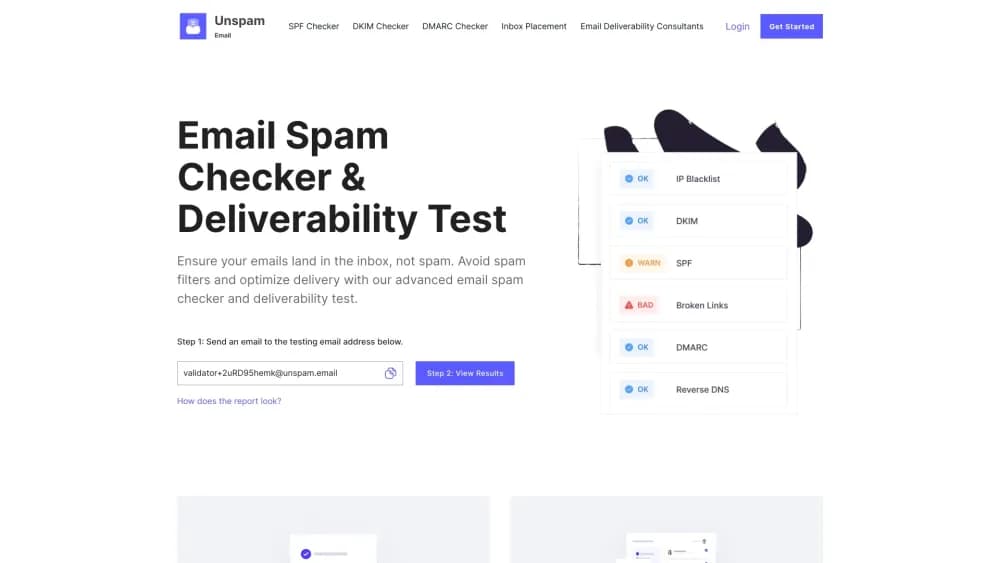
Unspam is an email deliverability platform, and its spam test works as a standalone email spam checker for anyone with a sending domain. You send one test message to an address it gives you, and the platform grades that message before your list ever sees it. The grade comes from authentication records, sender reputation, blocklists, link targets and content signals all read at once.
The practical problem it solves is guessing. A campaign can look fine on your screen and still land in spam at Microsoft 365. Unspam reports the verdict from each provider separately, so a fix aimed at Gmail does not leave you blind at Outlook.
The limits matter too. Spam tests and placement runs measure one message at a time, and the free plan caps both at a few runs a month. The platform shows you what filters object to. Changing your list quality or sender history is your job.
Getting Started
- Open unspam.email and copy the test address shown on the page. It is unique to your session, and no account is needed for the first run.
- Send the email you want checked from the tool you actually use, meaning your ESP or your own SMTP server.
- Click through to results. The report breaks the spam score into individual checks and names the ones that cost you points.
- Read the placement table to see which provider filed the message under Inbox, Promotions, Spam or Missing.
- Create a free account when you want history, the AI assistant and scheduled tests that run without you.
Product Information
A quick look at Unspam's pricing, supported platforms, and performance.
Best for
The users, tasks, and scenarios where this tool fits best.
Users
- Email marketers running regular campaigns
- SaaS founders who send transactional mail
- Agencies managing several clients
- Small businesses hosting their own mail
Tasks
- Scoring a draft email
- Testing inbox placement
- Rolling out a template or subject line change
- Monitoring a domain's DMARC traffic
- Checking an email's look in dark mode
Scenarios
- Cold outreach over several weeks
- Warming up a new sending domain
- Pre-launch review of a newsletter
- An agency shipping client campaigns
Key features
Spam Score From 0 to 100
Unspam grades a message on a single scale, then maps it to four bands: high risk below 50, at risk from 50 to 69, solid from 70 to 89, and excellent from 90 up. Each warning expands into the reason it fired, so a low score turns into a list of edits rather than a vague warning. A failed core authentication check overrides the number and flags the report as high risk.
Inbox Placement Across 10 Seed Mailboxes
The inbox placement test sends your campaign to 10 real mailboxes at 7 providers, split between consumer accounts and business tenants. Every mailbox reports its own verdict: Inbox, Promotions, Updates, Spam or Missing. Testing a business tenant matters for cold email, since Microsoft 365 can return Inbox where Outlook.com returns Spam for the same message.
Email Preview Tool for 50+ Clients
This email preview tool renders screenshots in live clients instead of simulating the HTML markup, so you see how the message actually draws. You get light and dark mode for each device, which catches problems that a desktop webmail view hides. The free plan includes a few device previews a month, and the Custom plan prices them per unit.
AI Eye-Tracking Heatmap
The heatmap predicts where a reader's attention lands on your email, with no participant recruitment. It shows whether a call to action sits in a spot readers skip, and the AI assistant suggests fixes based on the areas it flags. Treat the prediction as a directional hint, not a measurement of real opens.
Automatic Tests on a Schedule
Save the email once, choose the days and time, and Unspam sends it from your own sending identity and mails you the score. Every run is stored, so trends appear without logging in and remembering to test. Automatic inbox placement uses the same scheduling.
Deliverability Checks in One Hub
A set of free checkers covers the SPF, DKIM, DMARC and BIMI records, reverse DNS and list unsubscribe headers, plus an email blacklist check for an address, a domain or a sending IP. Each one explains what the record does and what a broken result costs you. They work without signing up, which makes them useful for a quick audit of a new domain.
API and MCP Access
The REST API runs the same tests as the dashboard and returns JSON, with bearer tokens you create per integration and revoke one at a time. Limits sit at 100 requests a minute, and jobs work through ids you poll rather than webhooks. An MCP server exposes the same work to Claude, ChatGPT and Cursor, which suits teams that want a CI check or a client portal built on top of it.
Pros and cons
Pros
- One test returns placement, spam score, rendering and a heatmap. No need to stitch four tools together.
- Business mailboxes sit in the same seed list as consumer ones, which is the gap most placement tools leave open.
- The free tier includes placement tests and the AI assistant, with no card required.
- Unlimited sender accounts on every plan mean no charge per inbox when an agency manages several brands.
- API access reselling is allowed on the Custom plan, so an email builder can ship its own brand of the test.
Cons
- Placement testing depends on seed mailboxes, so results are an estimate of where your real list lands rather than a guarantee.
- The Custom plan has no fixed monthly price, so budgeting takes a little arithmetic on the pricing page.
- The heatmap predicts attention from a model, which is useful for layout choices but not a substitute for real engagement data.
- Fine grain history sits behind the paid plan, and the free tier keeps data for 14 days only.
Frequently asked questions
Copy the test address from the homepage, send your email to it from your usual sending platform, then open the results page. This runs the same email deliverability test as the full report, with the same score and checks. No account is needed for the first few runs, and results arrive within a minute or two of the message landing.
Related content
Explore related tools, skills, and articles for Unspam.
Unspam Alternatives

Tractionwave
TractionWave · Image · MarketingTractionWave is an AI attention heatmap tool for static ads. Upload a PNG or JPG and it returns predicted attention, ranked hotspots, and fixes before you spend budget.

OpenSEO - AI Visibility
EveryApp · Coding · Marketing · BusinessOpenSEO is an open source SEO platform for keyword research, backlinks, rank tracking, site audits, and AI visibility, with usage-based pricing and MCP access for AI agents.

Plugins Radar
Plugins Radar · Marketing · BusinessPlugins Radar tracks where your ChatGPT plugin ranks in directory and in-chat search, which competitors outrank it and what changed, with hourly checks on 9,885 listings.