

VEIL: Smart Context-Aware Privacy
wushumaster75 · Coding
VEIL: Smart Context-Aware Privacy is a Chrome extension that changes how much protection you get based on what you're doing online. Call it an AI privacy extension that reads the room. Instead of blocking the same trackers everywhere, it reads the site in front of you and picks a matching level, so a banking page gets tighter treatment than a social feed. A free tier covers basic blocking and two identity profiles, and a one-time $39.99 Premium upgrade unlocks the AI context detection, unlimited profiles, and leak protection.
About VEIL: Smart Context-Aware Privacy
What Is VEIL: Smart Context-Aware Privacy
Most privacy extensions treat every site the same way. They load one blocklist, apply it everywhere, and break the parts of the web that need cookies or scripts to function. VEIL starts from a different premise. It looks at the kind of page you've opened, then dials protection up or down to fit.
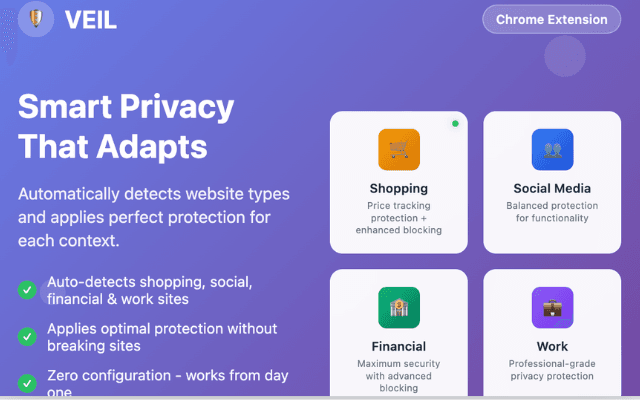
That matters because the risks aren't identical across the web. Price trackers follow shoppers, ad networks follow readers, and login flows on financial sites need more care than a news article. VEIL sorts sites into contexts like shopping, social, financial, work, and general browsing, and applies a different setup for each. The pitch is simple: a privacy browser extension that thinks about where you're browsing before it starts throwing blocks.
The catch is scope. VEIL is a Chrome and Chromium extension, so it only guards what you do in that browser. It won't cover your phone's other apps, and the free tier keeps the smartest features, the AI context detection and WebRTC leak protection, behind the paid upgrade. If you want set-and-forget, the free version is thinner than the name suggests. That's the trade.
Getting Started
- Install VEIL from the Chrome Web Store and pin the icon so you can reach it fast.
- Click the icon to see the privacy score for the page you're on, along with what's being blocked.
- Create or switch identity profiles, keeping Personal and Work separate, or add more on Premium.
- Let context detection assign a protection level automatically, or override it per site in the dashboard.
- Review the blocking stats after a day or two, then whitelist anything a site needs to work.
Product Information
A quick look at VEIL: Smart Context-Aware Privacy's pricing, supported platforms, and performance.
Best for
The users, tasks, and scenarios where this tool fits best.
Users
- Privacy-conscious browsers
- Remote and hybrid workers
- Online shoppers
Tasks
- Blocking trackers on general browsing
- Masking fingerprints
- Separating online identities
Scenarios
- Banking and payments
- Social media sessions
- Sensitive research
Key features
AI-Powered Context Detection
VEIL reads the type of site you've opened and picks a protection level to match, without you flipping switches by hand. Shopping pages get tracker blocking plus fingerprint masking, social sites get a lighter touch so they still load, and financial pages get the strictest setup. This automatic layer is part of Premium, so free users pick contexts manually. Not ideal.
Identity Profiles That Follow Your Context
You can run several browsing identities at once, each with its own profile. Personal covers everyday use, Work adds tighter security for job tools, and Shopping leans on price-tracking protection. Anonymous mode is there for sessions you'd rather keep unattached to the rest. The free plan includes two profiles; Premium removes the cap.
Tracker and Cookie Blocking
The extension blocks known tracking domains as pages load and manages cookies that follow you between sites. Free covers a basic list of 200-plus trackers, and Premium expands that to more than 1000. Think about what the gap means. On a news site the free list catches most of the noise, but on ad-heavy retail pages the difference between 200 and 1000 blocked domains decides whether the page stays quiet or starts dialing out to everyone with something to sell you. A whitelist lets you allow specific trackers when a site breaks without it. Simple enough.
Fingerprint and Leak Protection
Sites can identify your device through canvas rendering, WebRTC, and other signals even when cookies are blocked. So why does that matter? Fingerprints survive cookie clearing. VEIL masks these fingerprints and, on Premium, blocks WebRTC leaks that expose your real IP address. It's the kind of protection that matters more on hostile sites than on familiar ones.
Privacy Intelligence Dashboard
A live score rates the privacy risk of the page you're on, and a stats panel shows exactly which trackers were stopped. The dashboard explains why a given protection kicked in, so the decisions aren't a black box. Recommendations point you at changes worth making. No guesswork needed.
Smart, Lightweight Engine
Because blocking scales with context, VEIL claims less drag on performance than fixed blockers that run the same heavy rules everywhere. It's built to spare memory and battery, which helps on laptops and mobile where a busy blocker can be felt. On a laptop running on fumes at the end of a workday, that efficiency is doing real work, because a blocker that pins your CPU and drains your battery while it protects you is a blocker most people switch off within a week. Big difference.
Custom Rules and Settings Portability
Power users can write their own blocking rules, manage the whitelist, and export or import their configuration to move it between machines. These options sit behind a developer-minded settings area rather than the main dashboard. Fine for tinkerers. Most people will never open it, and that's the point of keeping it out of the way while still making it available to anyone who wants to hand-tune how the extension reads a specific site or a stubborn tracker that keeps slipping through.
Pros and cons
Pros
- Protection adjusts by site type, so banking pages get stricter treatment than social feeds without manual switching.
- Free tier is usable, with basic tracker blocking and two identity profiles before you pay anything.
- One-time $39.99 Premium price, no recurring subscription, which suits people tired of monthly privacy bills.
- Local processing means analysis runs in your browser, and the listing states no data collection.
- Dashboard explains what got blocked and why, which helps you learn what's tracking you.
Cons
- The headline feature, AI context detection, is Premium-only, so free users don't get the smart part.
- Chrome and Chromium only, so it does nothing for Safari, Firefox, or apps outside the browser.
- Some claim counts come from the developer's listing, and independent verification of the 1000+ tracker figure isn't available.
Frequently asked questions
It's a Chrome extension that blocks trackers, masks fingerprints, and manages cookies, then varies how hard it pushes based on the site you're on. The idea is protection that fits the page rather than one setting for everything.
Related content
Explore related tools, skills, and articles for VEIL: Smart Context-Aware Privacy.
VEIL: Smart Context-Aware Privacy Alternatives
Forefront
Forefront · CodingForefront is a web platform for building with open-source AI. It lets you fine-tune leading open-source language models on your own data, evaluate how they perform, and run them through an API or export them to host yourself. Developers who want the convenience of a closed-source platform but insist on owning their models and data are the target audience here.

Startkit
StartKit.AI · CodingStartkit is a boilerplate for building AI SaaS and AI wrapper products. Think of it as an AI startup boilerplate with the boring parts already wired up: authentication, Stripe and Lemon Squeezy payments, usage limits, transactional email, and an AI API starter that talks to OpenAI, Anthropic, Groq, or Llama. You clone the repo, set your price, and start on the part of your product that people actually pay for. It's Next.js under React and Tailwind, so most of the boilerplate code already feels familiar.
Testim
Tricentis · CodingTestim is an AI-powered test automation platform for building and running end-to-end tests across web, mobile, and Salesforce applications. It leans on machine learning to keep tests stable when an interface changes, so teams spend less time fixing broken selectors. Not bad for an automated testing tool you can start using today. You create tests by recording actions in a browser, then optionally add JavaScript when you need more control. It's a solid pick for busy QA teams.