

Vibeo.ai
Vibeo · Video
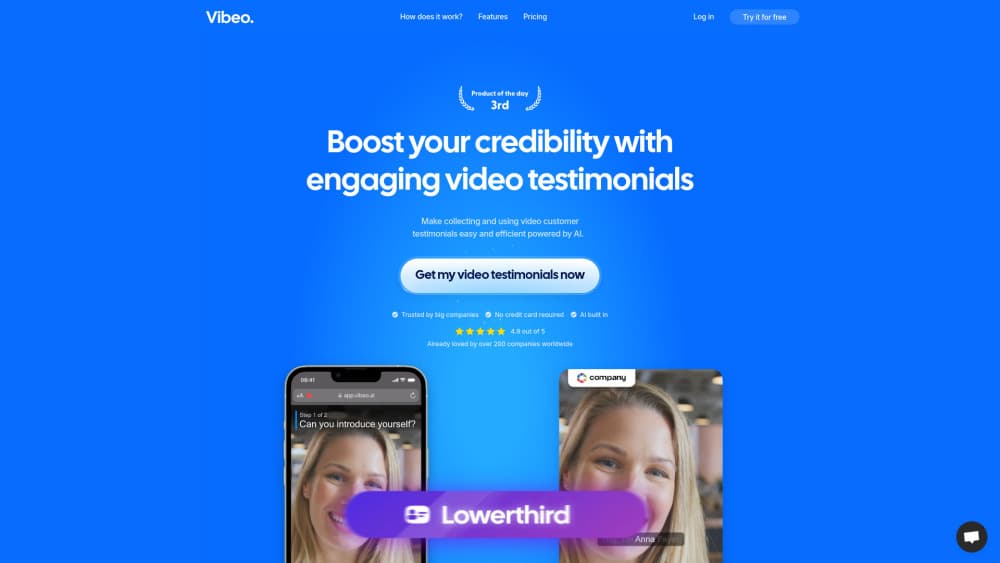
Vibeo.ai collects customer video testimonials through a guided recording form, then edits them with AI subtitles, B-rolls, and templates before publishing each clip on a shareable landing page.
About Vibeo.ai
What Is Vibeo.ai
Vibeo.ai is a video testimonial platform built around one loop: send a link, get a usable customer clip back, publish it. The customer opens a branded page on their phone, reads your questions off a built-in teleprompter, and records. You get the file plus an AI pass that trims it, adds subtitles, and drops in B-rolls.
The problem it solves is the mess in the middle. Most small teams can get a happy client to say yes to a video, then stall on the edit, the captions, and the page where the clip should live. Vibeo bundles those three steps into one account.
Two limits matter before you sign up. Collection is free, but downloading raw files and exporting edited videos sit behind a subscription, and the plan caps export minutes at 60 per month. There's also no documented public API, so pushing clips into your own CMS means grabbing files by hand. Teams that want testimonial videos without hiring an editor fit here; teams with a video editor on staff may find the AI pass redundant.
Getting Started
- Create a free account at vibeo.ai and set up a campaign. Pick a template, then choose the questions you want each customer to answer.
- Brand the request page. Add your logo, colors, and a short intro so the recording screen looks like your company, not a generic form.
- Send the invite. Vibeo emails your customer a link. They record on a phone or laptop, with front or back camera, and consent to GDPR terms on the same screen.
- Let the AI editor process the clip. It trims the dead air, layers dynamic subtitles, and adds B-rolls. You fix what it gets wrong, then export in HD.
- Publish the video testimonial landing page. Set the title, description, and CTA, then share the link by email, on LinkedIn, or on your site.
Product Information
A quick look at Vibeo.ai's pricing, supported platforms, and performance.
Best for
The users, tasks, and scenarios where this tool fits best.
Users
- Solo founders and one-person marketing teams
- B2B sales teams
- Agencies and employer-brand teams
Tasks
- Collect video testimonials at volume
- Edit a raw customer clip without opening an editor
- Publish a video testimonial landing page
- Run a testimonial campaign with incentives
Scenarios
- Launching a product before you have written case studies
- Replacing a text case study with something prospects actually watch
- Hiring and employer branding
Key features
Guided Recording With a Built-In Teleprompter
Customers record straight from a browser link, no app and no account. The testimonial collection form shows your questions one at a time, and the teleprompter keeps answers on topic instead of drifting into a five-minute ramble. Front and back cameras both work, which helps when someone wants to show a product on screen.
AI Video Editing on Autopilot
Upload or record, then let the editor do the first cut. It trims silence, generates dynamic subtitles, adds AI B-rolls for key moments, and layers sound effects. AI video editing here is aimed at speed, not at replacing a human editor, so plan on a quick proofread of captions before anything goes public.
Templates and Brand Overlay
The template system sets the frame, transitions, and lower thirds, and your logo, colors, and fonts sit on top. Pick a template once and the customer testimonial videos from that campaign look like one series, which matters when you run clips side by side in a reel.
Shareable Video Testimonial Landing Pages
Each finished clip gets its own page with a headline, description, and call to action. You can track views, clicks, and conversions per page, so you know which customer story actually moves people toward a demo instead of guessing from anecdote.
Campaign Controls for Consent and Incentives
Per campaign, you can attach a gift reward, add custom fields for company size or role, switch on instant captions, and collect GDPR consent before recording starts. That last part is the difference between a clip you can publish in the EU and one you can't.
Language Coverage and HD Export
Vibeo supports more than 20 languages for collection, so a customer in Brazil or Japan records in their own language and you still get captions. Exports come out as HD .mp4, and you can pull raw files when you want to cut them yourself in another tool.
Pros and cons
Pros
- Collecting costs nothing. You only pay when you want to download or export, which lowers the risk of testing it on one campaign.
- Customers need no account or app. Lower friction means fewer abandoned recordings.
- The AI pass turns a rough phone clip into something you can post the same day.
- Every export ships with a landing page and analytics, so distribution isn't a separate task.
- GDPR consent is collected inside the recording flow instead of by email afterward.
Cons
- Export minutes are capped at 60 per month on the standard plan. Heavy months mean either waiting for the cycle to reset or emailing for a custom corporate plan.
- No public API is documented. Getting clips into your own CMS or ad platform means downloading files and uploading them again.
- One price for everyone. A team exporting two clips a quarter pays the same $67 as a team exporting sixty minutes a month.
- Automatic subtitles need a proofread, especially with accented speech or product names. Budget a few minutes per clip before publishing.
Frequently asked questions
It's video testimonial software for collecting, editing, and publishing customer clips. You send a recording link, the customer answers your questions on camera, and Vibeo turns the result into a captioned video with its own landing page.
Related content
Explore related tools, skills, and articles for Vibeo.ai.
Vibeo.ai Alternatives
Griffin by Tavus
Tavus · Voice & Language · Video · ChatbotGriffin by Tavus is the first Human Interaction Model: a full-duplex, video-to-video system that watches, listens, and answers during a live video call in real time.

Syllaby AI Avatar 2.0
Syllaby · Video · MarketingSyllaby AI Avatar 2.0 turns a script into a presenter-led video with a reusable AI avatar, natural voice, B-roll and automatic subtitles, all in one browser workflow.

Vitra.ai
Vitra.ai · Voice & Language · Video · MarketingVitra.ai is an agentic content platform that creates, translates, reviews, and publishes video, images, documents, and app content in 120 languages from one shared brief.