

VideoMaker.me
VideoMaker.me · Video
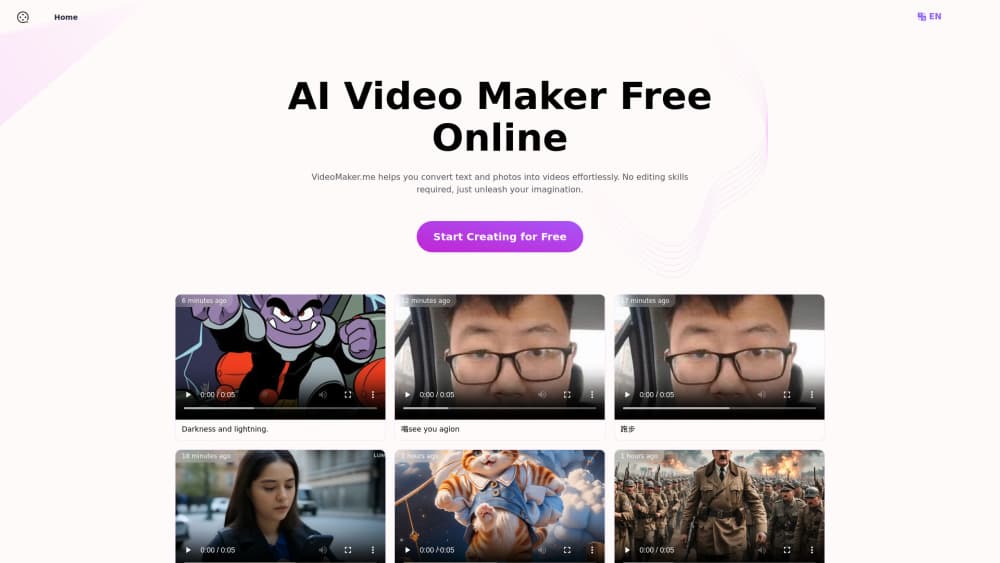
VideoMaker.me is a free online video maker that turns text prompts or still photos into short AI videos, using Luma AI and Google Veo 3 models, with 60+ effects and paid plans from $7.9/mo.
About VideoMaker.me
What Is VideoMaker.me
VideoMaker.me is a browser-based AI video generator run by its own small team, not by Luma AI. You type a prompt or upload a photo, pick an engine, and the site returns a short clip with motion, camera movement, and in some cases generated sound. Nothing gets installed.
The appeal is the low entry point. A free tier exists, you can start a clip without creating an account, and the paid plans cost less than most competing video tools. That makes it a reasonable place to test an idea before committing budget to a production.
The limitation is scope. Clips run a few seconds, output tops out at 1080p, and the free tier adds a watermark plus a slower queue at busy hours. This is a tool for hooks, b-roll, and social posts, not for assembling a ten minute film. Anyone who needs long-form editing still has to export and finish elsewhere.
The model lineup has shifted over time. Early pages leaned on Luma AI's Dream Machine; the current homepage leads with Google Veo 3 and its native audio. In practice you get access to several third-party engines behind one credit balance, which is handy when one model handles a prompt better than another.
Getting Started
- Open videomaker.me in a browser. No install, and the free trial doesn't require an account.
- Choose text to video or image to video, then paste a prompt or drop in a photo.
- Select the model and an effect style if you want one, then confirm the aspect ratio and hit generate.
- Preview the result. If it works, download it, or sign up for a paid plan to remove the watermark and unlock 1080p.
Product Information
A quick look at VideoMaker.me's pricing, supported platforms, and performance.
Best for
The users, tasks, and scenarios where this tool fits best.
Users
- Social media creators
- Small business owners
- Teachers and trainers
- First-time editors
Tasks
- Making b-roll from a script line
- Animating a still product shot
- Adding a talking shot with audio
- Drafting shots before a real shoot
Scenarios
- Testing a campaign idea on a tight budget
- Keeping a posting schedule alive during a busy week
- Explaining a process in class
- Building a logo sting
Key features
Text to Video with Luma AI and Veo 3
Type a scene description and the platform renders it as motion. Luma AI's Dream Machine handles the cinematic, camera-driven look, while Google Veo 3 leans toward realism and dialogue. Having both behind one prompt box means you can rerun the same idea on a second engine when the first result misses.
Image to Video with Camera Motion
Upload a portrait, product photo, or city skyline and the model adds movement: a slow push in, a pan, or drifting light. This is the fastest route from a static asset to something that looks native in a feed, and it works well for real estate, food, and merchandise shots where the subject is already framed.
Generated Audio and Lip Sync
Veo 3 builds sound alongside the picture, including ambient noise, effects, and spoken lines with mouth movement that matches the words. For explainer clips and short ads, that removes the usual step of recording a voice track and matching it by hand.
60+ AI Effects and Templates
Beyond realistic generation, the site ships a library of stylized effects: AI hug, kiss, and dance templates, photo animation, logo animation, and filter packs that push footage toward anime, comic, or vintage looks. These are the clips people share for fun, and they're the main reason the tool gets traffic beyond straight text to video.
Credit Plans from 720p to 1080p
Every plan runs on credits. Basic gives 100 credits a month, roughly 50 videos, at 720p with two jobs at a time. Pro raises that to 1,000 credits, 1080p, and four concurrent jobs; Ultra reaches 3,000 credits and six jobs. Paid tiers remove the watermark, keep generations private, and include commercial rights.
Browser-Only Workflow
There's no desktop app and no plugin. Prompts, uploads, previews, and downloads all happen in the tab, and finished files come out as standard video you can drop into any editor. That keeps the tool usable on a loaner laptop or a Chromebook, which is rarely true of installed video software.
Pros and cons
Pros
- Free tier with no signup to start, so you can judge output quality on a real prompt before spending anything.
- Generated audio and lip sync on Veo 3 clips, which most low-cost AI video makers still lack.
- 60+ effects and templates cover the playful formats that drive social sharing, not just realistic footage.
- Transparent credit pricing: 100 credits for about 50 videos on Basic, scaling to 1,500 videos on Ultra.
- Runs entirely in a browser, with watermark-free downloads and commercial rights once you pay.
Cons
- Free clips carry a watermark and skip private generation, so client work needs a paid plan from day one.
- Credits are spent per attempt, which means a stubborn prompt can cost several generations before you get a usable take.
- The free queue slows down at peak hours, and a missed deadline is a real risk if you're relying on it.
- Output stops at 1080p, so anyone delivering for broadcast or large screens has to upscale elsewhere.
Frequently asked questions
Yes, there's a free tier that lets you generate clips without paying or creating an account. Free output includes a watermark, generations aren't private, and the queue is slower when the site is busy.
Related content
Explore related tools, skills, and articles for VideoMaker.me.
VideoMaker.me Alternatives

ngram 2.0
ngram · Video · Marketingngram 2.0 is an AI video generator for teams. It turns a prompt, a screen recording, or a product URL into a narrated explainer, product demo, or AI avatar video, and every scene stays editable.

OpenScreen 2
OpenScreen (open-source project) · Video · ProductivityOpenScreen 2 is a free, open-source screen recorder and demo video editor for Windows, macOS, and Linux, with automatic zooms, styled frames, local captions, and agent edits.

Skreno
Skreno · Video · ProductivitySkreno is a browser screen recorder that captures a tab, a window or your whole display, then attaches AI transcripts, summaries and console logs to one share link.