

VideoGen - AI Video Generator
VideoGen, Inc. · Video
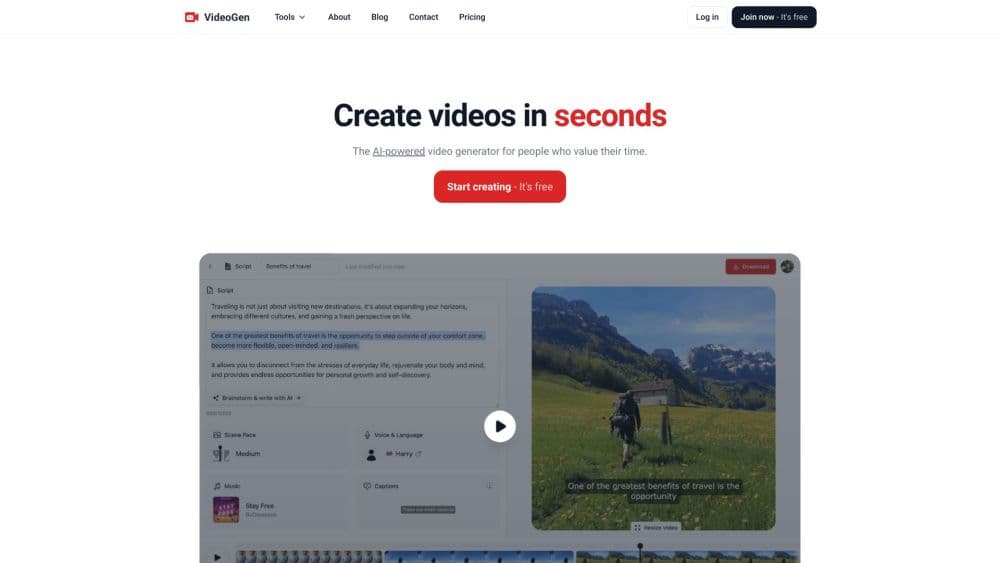
VideoGen is an AI video generator that turns a script, blog post, or product page into a finished video with voiceover, captions, and avatars. It runs on the web and starts free.
About VideoGen - AI Video Generator
What Is VideoGen
VideoGen is a web-based platform for making videos without a film crew. You bring a script, a blog link, or a product page, and the tool assembles a watchable video: it writes or reads the voiceover, picks background clips, adds captions, and sets the pace. Teams use it for product ads, explainers, training clips, and social posts.
The problem it targets is volume. A marketing team that needs fifty ad variants, or a training department that updates lessons every quarter, hits a wall when every video takes a day of editing. VideoGen leans on AI agents to handle the repetitive parts, so one person can push out a batch of finished videos instead of one. The company, founded in 2022 and backed by Y Combinator, says more than five million creators and teams use it.
The catch is that a generated video is only as good as its inputs. A thin script produces a thin video, and the platform's credit system meters the heavier features, so generative clips and AI avatars burn through an allowance faster than still-image videos do. It runs in the browser, so you need a steady connection, and the free tier keeps a watermark and lower quality until you pay.
Getting Started
- Sign up at app.videogen.io with an email address or a Google account. The free plan doesn't ask for a card.
- Pick a starting point: paste a script, drop in a blog or article URL, or connect a product page. Choose an output style for the video.
- Choose or upload a voice, and let the AI draft the voiceover, captions, and background footage.
- Review the timeline, swap any visuals you don't like, and adjust captions or pacing.
- Export the video, download it, or share it to a connected channel.
Product Information
A quick look at VideoGen - AI Video Generator's pricing, supported platforms, and performance.
Best for
The users, tasks, and scenarios where this tool fits best.
Users
- Marketing teams
- Small businesses and e-commerce sellers
- Content creators
- Training and L&D teams
Tasks
- Turning a script into a narrated video
- Generating product ad variants
- Translating a video into another language
- Creating AI avatar videos
- Producing still-image videos at scale
Scenarios
- Launching a product with a batch of ads
- Updating training material quarterly
- Posting daily short-form content
- Localizing marketing for new markets
- Testing a concept before spending on production
Key features
Text to Video and Script to Video
This is the entry point. You supply a script or a topic, and the platform produces a finished video with narration, matching visuals, and captions. The AI handles storyboarding and pacing, so you review a draft instead of assembling one. It's the fastest path from an idea to something you can post.
AI Avatars and Presenters
VideoGen can put a talking avatar on screen to deliver your script, useful for training clips, sales pitches, and explainers where a human presenter isn't practical. Avatars read the same voiceover pipeline as other videos, so the delivery stays consistent across a series. Avatar minutes use more credits than still-image videos, so heavy presenter content costs more.
AI Voiceovers in 40+ Languages
The tool generates a natural-sounding voice for your script, and it supports a wide range of languages for the spoken track. That opens the door to localization without hiring voice actors. You can also bring your own voice or brand voice, which keeps a channel recognizable.
Video Translation and Localization
Beyond a single voiceover, VideoGen can translate an existing video into another language, swapping the spoken track and captions while keeping the visuals. For teams running the same campaign in several markets, this removes a separate dubbing step. Translation still benefits from a human pass on names and technical terms.
AI B-Roll, Stock Footage, and Music
The AI picks background clips and stock footage that match the script, then sets them to fitting music. This is the part that usually eats an editor's afternoon. You can swap any clip you don't like, and the music stays royalty-free for commercial use on all plans.
Social Formats and Captions
Videos come out ready for the aspect ratios social platforms expect, with burnt-in or styled captions. That covers vertical for TikTok, Reels, and Shorts without a separate reframing pass. Captions are auto-generated, so proofreading names and jargon is still on you.
API and MCP Access
Paid plans include API and MCP access, so you can generate videos, images, voices, and avatars from code. There are TypeScript and Python SDKs, plus webhooks for production pipelines. It's a route for developers who want to build video into their own apps rather than click through the editor.
Pros and cons
Pros
- Turns a script or a link into a finished video with voiceover, visuals, and captions in one pass.
- Handles many ad and content variants from a single brief, which fits teams posting at volume.
- Supports AI avatars and translation, so presenter content and localization don't need extra tools.
- A free plan with no credit card makes it easy to test quality before paying.
- Paid plans include API and MCP access, opening up automated video workflows.
- All plans carry full commercial use rights for the output.
Cons
- The free tier adds a watermark and caps quality, so polished videos need a paid plan.
- Credits meter heavily for generative clips and AI avatars, so heavy users hit the monthly ceiling.
- Output quality tracks the script closely, so a thin brief produces a generic video.
- Auto captions miss names and technical terms, so a manual proofreading pass is still needed.
Frequently asked questions
VideoGen is an AI video generator for making videos without editing software or a crew. It turns a script, blog post, or product page into a finished video with a voiceover, background visuals, and captions. Teams use it for product ads, explainers, training videos, and social clips, and it doubles as a UGC ad generator for short-form campaigns.
Related content
Explore related tools, skills, and articles for VideoGen - AI Video Generator.
VideoGen - AI Video Generator Alternatives

ngram 2.0
ngram · Video · Marketingngram 2.0 is an AI video generator for teams. It turns a prompt, a screen recording, or a product URL into a narrated explainer, product demo, or AI avatar video, and every scene stays editable.

OpenScreen 2
OpenScreen (open-source project) · Video · ProductivityOpenScreen 2 is a free, open-source screen recorder and demo video editor for Windows, macOS, and Linux, with automatic zooms, styled frames, local captions, and agent edits.

Skreno
Skreno · Video · ProductivitySkreno is a browser screen recorder that captures a tab, a window or your whole display, then attaches AI transcripts, summaries and console logs to one share link.