

Virse
Virse · Image
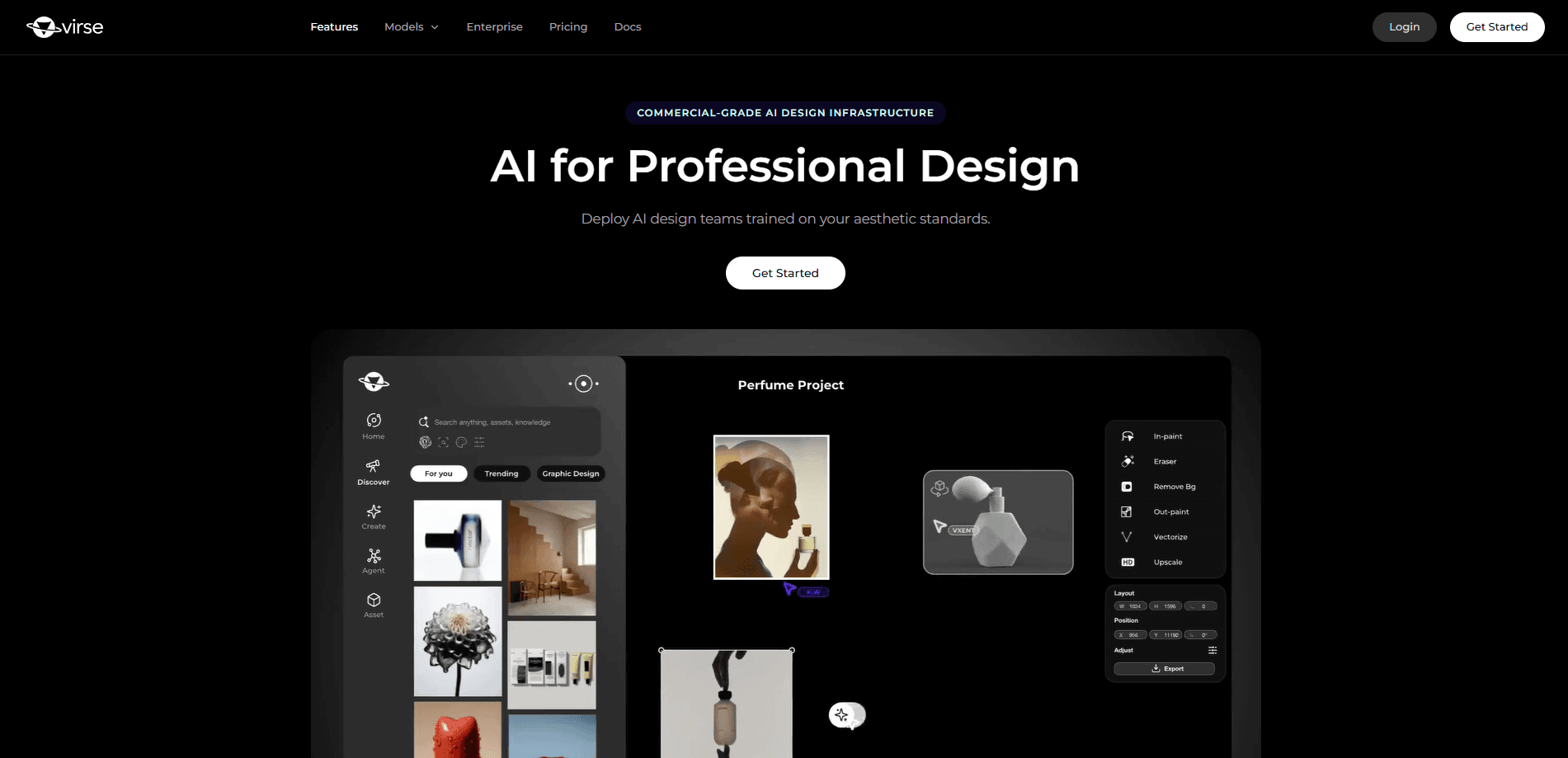
Virse is a commercial-grade AI design platform that brings 50+ image and video models onto a single infinite canvas, so creative teams can move from concept to final asset without hopping between tools. It reads your references, learns your visual language, and keeps style consistent across every iteration. Think of it as a brand design tool with a memory. Built for brands, studios, and in-house design teams rather than casual one-off image generation.
About Virse
What Is Virse
Virse is an AI creative system for professional designers. Instead of treating AI generation as a slot machine that spits out one throwaway image, it puts every model, reference, and past decision on one connected board. Your taste stays in the loop.
The problem it targets is familiar to anyone in a design team. You get a promising render. Then the client asks for a color swap, a new logo placement, or a slightly different crop. In most AI tools that means starting over. Virse keeps the thread, so an edit builds on what came before instead of replacing it.
The catch is that it's aimed at people who already think in visual systems. It's a workspace for teams producing brand, packaging, and campaign work at volume, not a quick prompt-to-picture app for a single social post. If you just want one image, it's more machinery than you need.
Getting Started
- Sign up at virse.ai and open a canvas, which is your working board for references, assets, and generations.
- Add the references that define your direction, like brand imagery, past campaigns, or mood boards.
- Bring in the models you need from the 50+ catalog and set the goal for the current piece of work.
- Let Virse Composer read the canvas and run the batch, then review, adjust, or stop it as it unfolds.
- Save the finished assets and, if you work with a team, encode the result as a shared standard for future projects.
Product Information
A quick look at Virse's pricing, supported platforms, and performance.
Best for
The users, tasks, and scenarios where this tool fits best.
Users
- Brand and packaging designers
- Studio teams
- Creative leads juggling campaigns
Tasks
- Batch rendering on-brand variations
- Iterative edits after client feedback
- Searching your own archive by visual similarity
Scenarios
- A footwear brand building a campaign
- An industrial design team sketching appliance concepts
- An agency onboarding a new partner
Key features
One Canvas for 50+ Models
Virse gathers more than 50 image and video models on a single surface, so you aren't switching accounts and tabs to reach the tool you need. Why does that matter? Because a project keeps its context as it moves between image generation, image editing, and video work on the same board. For a team, this cuts the friction of stitching outputs from separate apps together.
Virse Composer
Composer is the multi-agent workflow that works the canvas with you. It reads the images, text, video, and connections you've placed, then takes action based on your intent rather than a single prompt. It can run batch renders, organize assets, and handle iterative edits while you watch and step in. You set the goal. It does the repetitive lifting, and you stay in control the whole way.
Your Visual Language, Encoded
The platform learns the direction behind your work and carries it forward. Save references, make choices, and it builds a visual language it can hold onto, so you don't restart from zero on every brief. That's the whole point. Over time this becomes a kind of taste layer that keeps new output aligned with what your team already decided.
Team-Wide Style Standard
For studios, Virse encodes your visual system once and then hands every designer, agency, and partner the same rails. That means an outside collaborator produces work that still reads as yours, without a reviewer redoing it. One standard, shared across everyone. It scales a brand without diluting it.
Search With Taste
You can search your own archive by how things look, not just by file name or tag. When you half-remember a campaign from last year by its color and mood, visual search is how you find it again. It's a small feature. It saves a lot of scrolling. If your team produces dozens of assets a month, that adds up fast.
Built Around Control
Virse leans into review, adjust, and stop, rather than fire-and-forget generation. Work unfolds in front of you and you can intervene mid-run. That matters more than it sounds. For professional teams, that control is the difference between an AI tool you can put into a client workflow and one you can't.
Pros and cons
Pros
- Unifies image generation, editing, and video on one canvas, which reduces tool-switching in a project.
- Learns and holds a team's visual language, so output stays on brand across many assets.
- Shared standard makes it easier to bring outside designers and agencies into a project.
- Visual search over your archive helps you reuse past work instead of rebuilding it.
Cons
- Aimed at professional design teams, so individuals wanting a single quick image may find it heavier than needed.
- Pricing details aren't published on the site, so you have to contact the team to plan a budget.
- It's a web platform, which means no desktop or mobile app for offline work.
Frequently asked questions
Virse is an AI design platform for producing commercial-grade visual work, covering brand, packaging, e-commerce, and campaign design. It puts image and video models on one canvas and keeps a consistent style from first concept through to final assets.
Related content
Explore related tools, skills, and articles for Virse.
Virse Alternatives

X Ray Interpreter
X-ray Interpreter · ImageX Ray Interpreter is a web-based AI radiology tool that turns X-rays, CT scans, MRI, ultrasound, and PET images into plain-language reports. You upload a scan, get a preliminary X-ray interpretation in moments, then ask follow-up questions if something needs explaining. It works as a second opinion and a learning aid, not as a medical diagnosis.

Aieasypic
AIEasyPic · ImageAIEasyPic is an AI image generator that turns plain text prompts into finished artwork in seconds. You can also train custom models on your own photos, swap faces in existing images, and create short video clips from text, all from a browser. It suits casual creators who want quick visuals and hobbyists who want to build a personal model without touching any code.

Chargen
Chargen · ImageChargen is an AI character generator and worldbuilding toolkit built for Dungeons & Dragons and other tabletop RPGs. It turns a one-line idea into a painted character portrait, spins up NPCs, monsters, maps and encounters from the same session, and keeps every creature's details close at hand. The tabletop RPG art side runs on a credit system called Gold, while the text generators stay free for everyone.