

Visla
Visla · Video
Visla is an AI video creation and editing platform that turns scripts, webpages, PDFs, or slides into finished videos, then lets you edit them by transcript. Plans start at $18 per month.
About Visla
What Is Visla
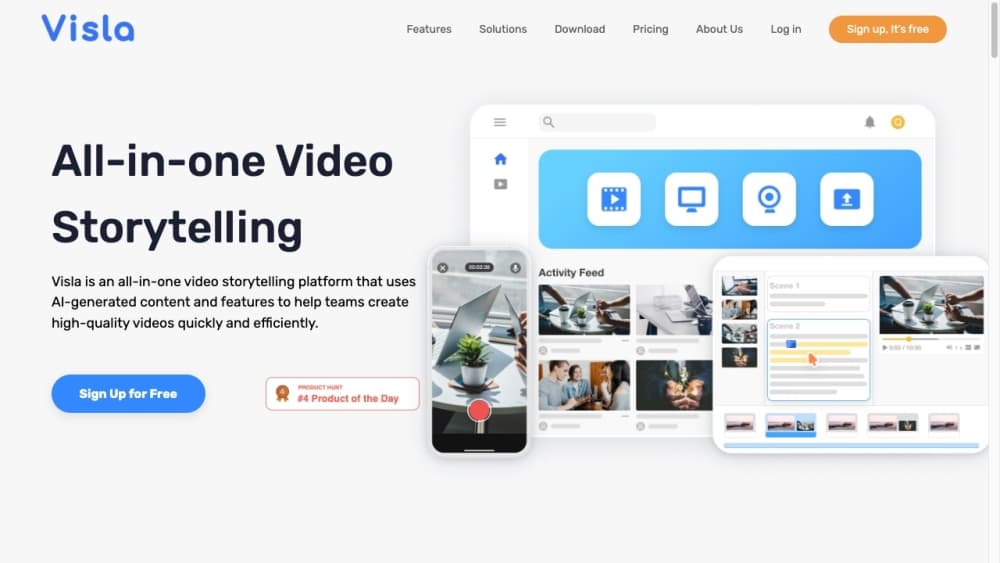
Visla is an AI video platform aimed at teams that need to publish video without a production crew. You bring the raw material, whether that's an idea, a written script, a PDF, a slide deck, or a URL, and Visla handles the assembly: it writes a scene-by-scene draft, picks footage, generates a voice-over, and lays in subtitles and background music. The result opens in an editor built around the transcript rather than a timeline, so trimming a sentence in the text cuts the matching clip.
Editing by transcript is the part that separates it from older video tools. You delete a filler word in the text and it disappears from the video, which means you don't need to scrub through a waveform to find a stumble. For people who record long meetings, demos, or talking-head footage, that's most of the cleanup work done in a minute.
Two things set the boundaries. Most of the platform runs on a credit system where each action spends credits, so heavy users watch their balance rather than a simple per-seat limit. And the more advanced output, AI avatars and cloned voices, sits in the paid tiers. A free plan lets you test the basics, but serious volume means a Pro or Business subscription. Visla was founded in 2020 by Huipin Zhang, a former founding engineer and chief scientist at Zoom.
Getting Started
- Sign up at visla.us and pick a starting point, such as an idea, a script, a webpage URL, a PDF, or a slide deck.
- Let Visla draft the video. It analyzes the source, writes a script, suggests footage, and adds a voice-over, subtitles, and music.
- Refine it in the editor. Cut or reorder scenes from the transcript, swap clips, restyle subtitles, and apply your brand colors, fonts, and logo.
- Add a voice or avatar if you want one. Choose a public voice, clone your own, or drop in an AI avatar for narration scenes.
- Export in 16:9, 9:16, or 1:1 aspect ratios, or hand the project to teammates for comments and review.
Product Information
A quick look at Visla's pricing, supported platforms, and performance.
Best for
The users, tasks, and scenarios where this tool fits best.
Users
- Marketing teams
- Learning and development staff
- Solo creators and founders
- Sales and support teams
Tasks
- Turning a blog post or webpage into a video
- Editing a recorded meeting or demo
- Building a step-by-step tutorial
- Creating multilingual versions
- Generating avatar-led narration
Scenarios
- Producing a batch of social clips in an afternoon
- Onboarding and training libraries
- Localizing a product launch
- Automating video at scale through an API
Key features
Text, Script, and Document to Video
Visla accepts more than a blank prompt. You can start from an idea, a full script, a webpage URL, a PDF, or a slide deck, and it reads the source to build a scene-by-scene draft. From a webpage it pulls the structure and writes scenes around it. From a slide deck it turns each slide into a beat. That range matters because most teams already have the content in one of these forms and would rather not rewrite it.
Transcript-Based Editing
The editor works on the words, not a timeline. Delete a sentence in the transcript and the matching video is cut; drag text to reorder and the clips follow. Visla also auto-removes filler words, repeated phrases, and long pauses, along with silence in speech-centric recordings. For anyone editing interviews, demos, or meeting recordings, this collapses an hour of scrubbing into a few minutes of reading.
AI Avatars and Voice Cloning
You can narrate with a built-in avatar or generate a custom one, and pair it with a public voice or a clone of your own. A custom voice is created through voice cloning or from a text prompt, and once made it can be set as the default for a language. Avatars and cloned voices are what make a video feel on-brand without a presenter, and they're the features most tied to the paid tiers.
AI Video Translation and Multi-Language Output
One project can be translated and re-voiced into other languages, so a single edit covers several markets. The platform handles AI video translation and multi-language voice-over inside the same workflow rather than sending the file out. For teams that publish in more than one language, that removes a separate dubbing step.
Branding and Workspace Controls
A branding layer applies your colors, fonts, logos, subtitle styles, and intro or outro across projects, so output stays consistent as more people use it. Workspace controls add role-based access, permission-based data sharing, and shared credit pools. Business and Enterprise plans unlock full branding, private stock, and admin features such as SSO and usage dashboards.
Screen Recording and Stock Library
Built-in screen recording captures a full screen, a selected area, or a single window, with system audio, auto zoom, and click highlights. On the media side, plans include a stock library that reaches 16 million plus premium assets on paid tiers, and a private stock library for your own footage with automatic labeling. Recording, sourcing, and editing live in one place, which is unusual for a tool this focused on AI as an AI video generator.
Visla API
Visla offers an API for developers who want to automate video creation from text, clips, images, or audio inside their own apps. It needs a Pro, Business, or Enterprise plan, and it's aimed at product and engineering teams building video into a platform rather than individual creators. That makes Visla an option for programmatic video generation, not just a manual editor.
Pros and cons
Pros
- Transcript based video editing removes filler words and pauses automatically, which saves real time on recorded footage.
- Multiple inputs, including webpages, PDFs, and slides, mean you reuse content you already have instead of starting fresh.
- Avatars, voice cloning, and multi-language output make AI avatar video and branded, narrated content possible without a presenter or a studio.
- A free plan and an $18 Pro tier lower the cost of testing before you scale.
- The API supports programmatic generation for teams that want video inside their own product.
Cons
- Credits drive cost. Heavy users need to track the shared balance, and avatar and advanced visual steps burn through it faster than simple text projects.
- Custom voices cost 2,000 credits each and need a Business or Enterprise workspace, so one-off users can't reach them.
- Export tops out at 1080p on Free and Pro, and 4K needs a Business or Enterprise plan.
- Relying on AI avatars and cloned voices means output can look synthetic, which matters for audiences that expect a real presenter.
Frequently asked questions
Visla creates and edits videos with AI. You feed it an idea, a script, a webpage, a PDF, or a slide deck, and it builds a scene-based draft with footage, voice-over, subtitles, and music. Then you refine it in a transcript-based editor and export in several formats.
Related content
Explore related tools, skills, and articles for Visla.
Visla Alternatives

ngram 2.0
ngram · Video · Marketingngram 2.0 is an AI video generator for teams. It turns a prompt, a screen recording, or a product URL into a narrated explainer, product demo, or AI avatar video, and every scene stays editable.

OpenScreen 2
OpenScreen (open-source project) · Video · ProductivityOpenScreen 2 is a free, open-source screen recorder and demo video editor for Windows, macOS, and Linux, with automatic zooms, styled frames, local captions, and agent edits.

Skreno
Skreno · Video · ProductivitySkreno is a browser screen recorder that captures a tab, a window or your whole display, then attaches AI transcripts, summaries and console logs to one share link.