

Wan Animate
Animove AI · Video
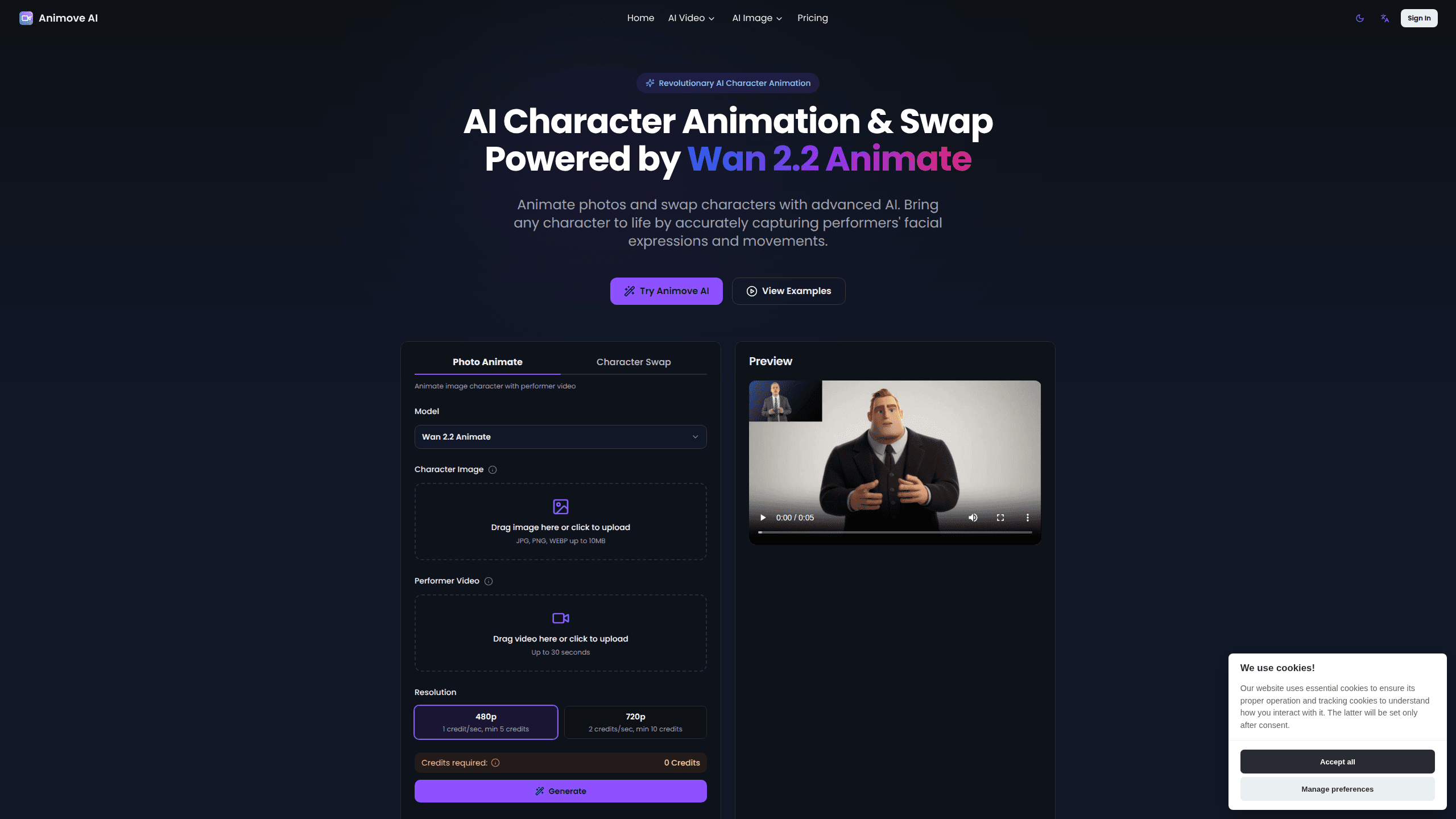
Wan Animate is a web-based AI character animator that turns a still image into a moving, talking video by copying the expressions and body motion of a reference performance. Built on the Wan 2.2 Animate model, it handles two jobs in one tool: animating a character from a photo and swapping one character for another inside existing footage. It runs in the browser, costs credits per second of video, and needs no install. No GPU required either.
About Wan Animate
What Is Wan Animate
Wan Animate is the character animation tool on Animove AI, a browser app for turning static images into lifelike video performances. You give it a character image and a short performer clip, and it transfers the facial expressions, lip movement, and body motion from the clip onto your character. The result is a character video that moves the way the performer moved, without you animating anything by hand. You just supply the inputs.
There are two modes worth knowing. Move Mode animates a character image using a performer video. That's the classic "bring this portrait to life" use case. Mix Mode swaps a character in existing footage while keeping the original lighting and color tones, so the new character blends into the scene instead of looking pasted on. Both rely on the same model. So you pick the mode by the job in front of you: start from a picture, or replace someone already on screen.
The main limits are practical rather than technical. Every generation costs credits tied to resolution and video length, clips run up to 30 seconds, and uploads have to be JPG, PNG, or WEBP under 10MB. If you need long-form output, expect to stitch shorter clips together. Keep it short.
Getting Started
- Open animove.ai and sign in. You'll need an account before you can generate.
- Upload your character image (JPG, PNG, or WEBP, up to 10MB) and a performer video (up to 30 seconds).
- Pick a resolution: 480p runs 1 credit per second with a 5-credit minimum, and 720p runs 2 credits per second with a 10-credit minimum.
- Choose Move Mode to animate your image or Mix Mode to swap a character in existing footage.
- Generate, preview the result, then export it for use in your project.
Product Information
A quick look at Wan Animate's pricing, supported platforms, and performance.
Best for
The users, tasks, and scenarios where this tool fits best.
Users
- Content creators and YouTubers
- Film and animation studios
- Social media marketers
Tasks
- Animating a portrait with motion transfer
- Swapping a character in footage
- Lip-sync dubbing
- Prototyping animation ideas
Scenarios
- Making short promotional videos
- Bringing a mascot or avatar to life
- Educational content
- Quick social posts
Key features
Character Animation From a Single Image
Wan Animate takes one character image and a reference performer video, then drives the character with the performer's expressions and movement. You don't rig anything or set keyframes. The model reads the motion from the clip and applies it, which is why you can get a believable result from a plain photo.
Character Swap AI
Mix Mode replaces a character in existing footage instead of animating a new one. The part that matters here is continuity: the tool preserves the original lighting and color tones, so a swapped character sits in the scene rather than floating on top of it. That keeps the shot usable without a color-grading pass.
Precise Lip and Face Sync
The model syncs lip and teeth movement to the audio track, which is what separates a talking character from a puppet. If your performer clip has speech, Wan Animate carries that mouth movement over to your character so the result reads as a natural, lifelike talking performance.
Motion Transfer Through Skeleton Signals
Wan Animate drives body movement with spatially-aligned skeleton signals. Facial expression comes from implicit facial features. In plain terms, it separates "how the body moves" from "how the face looks." That's how it keeps a high degree of control over both instead of blending them into a blur. Why split them at all? Because motion transfer and face cloning fail in different ways, and you want to tune each one on its own.
Relighting LoRA
A relighting layer adjusts the character's appearance to match the environment's lighting and color tone. This is what makes a character look like it belongs in a scene rather than being dropped in, and it's the same idea that does the heavy lifting in Mix Mode swaps.
Powered by Wan 2.2 Animate
The whole tool runs on the Wan 2.2 Animate model, which uses a Mixture-of-Experts architecture and high-compression video generation. You don't interact with that directly, but it's the reason the tool can produce high-fidelity character video in a browser without you managing a GPU.
Pros and cons
Pros
- Animates from a single image, so you don't need a rigged model or animation skills.
- Mix Mode preserves lighting and color tones, which keeps swaps believable.
- Lip and teeth sync against an audio track produces natural talking characters.
- Runs in the browser with no install and two clear modes.
- Resolution controls cost: 480p is cheaper per second than 720p.
Cons
- You have to stitch clips yourself, since a single performer video caps at 30 seconds, which rules out long-form output.
- There's no free plan, so you have to subscribe before you can test the tool on your own material.
- Credits are metered per second of video, and a 720p clip burns 2 credits per second, so heavy use adds up.
Frequently asked questions
It turns a still character image into a moving, talking video by copying the expressions and body motion from a reference performer clip. It can also swap a character into existing footage while keeping the scene's lighting.
Related content
Explore related tools, skills, and articles for Wan Animate.
Wan Animate Alternatives

Vadu AI
Vadu AI · Image · VideoVadu AI is a web-based AI video generator that turns written prompts or still images into short clips, and it can also generate images on its own. You type what you want, pick a model and style, and the platform renders the result in minutes. A free plan covers light testing, while paid tiers run from $9 to $77.40 per month based on how many credits you burn.

Mykaraoke Video
MyKaraoke Video · VideoMykaraoke Video is an online karaoke video maker and lyric video maker that turns any song into a finished, lyrics-synced video right in your browser. It handles the slow part for you. The AI pulls vocals out of the mix and locks the lyrics to the beat, then lets you customize background, fonts, and colors before exporting in 1080p MP4. If you make lyric videos for social media, party nights, or music promotion, it skips the software installs and manual timing work entirely. Want a karaoke video generator that doesn't eat your whole evening? That's the pitch here.

Finalframe
Finalframe · VideoFinalframe is a set of free, browser-based tools for grabbing exact frames out of a video clip. Its best-known feature, the Final Frame Extractor, lets you extract the last frame of any video so you can use it as the starting image for AI video tools like Luma Dream Machine, Runway, or Kling. Want to keep a clip going? That last frame is your starting point. The tool runs locally in your browser, needs no sign-up, and costs nothing. A separate paid AI video-generation app from the same team is currently offline while it's rebuilt.