

Weather mini
Airwolf Space · Image
Weather mini is a lightweight weather app for Mac built by Airwolf Space. It keeps a live weather illustration in your Dock, shows current, hourly, and daily forecasts in a clean window, and supports multiple saved locations. There's no subscription and no third-party analytics, so it launches fast and costs almost nothing to run in the background.
About Weather mini
What Is Weather mini
Weather mini is a Mac-only weather app from the small studio Airwolf Space. It started life as an Apple Watch app, then came to macOS in March 2020 with the same hand-drawn weather illustrations. The idea is simple: put the weather somewhere you already look, which on a Mac means the Dock.
Most weather apps bury the forecast behind a browser tab or a phone. Weather mini does the opposite. It works as a desktop weather widget you never have to open: the app icon in the Dock shows the current conditions as an illustration, and it updates whether the main window is open or closed. You glance at it and you know. That's the whole pitch.
Why bother with another weather app when your phone already has one? Because on a Mac you're already staring at the screen. Putting the forecast in the Dock removes the reach for your pocket entirely.
The biggest limit is scope. This is a Mac app. There's no iPhone, iPad, Android, or web version from this release, and it relies on Apple's weather data rather than its own forecasting models. If you need radar maps, severe-weather alerts, or hyperlocal storm tracking, this isn't that app.
Getting Started
- Open the App Store on your Mac and buy Weather mini, then launch it from Launchpad or the Applications folder.
- Grant location access when prompted so the app can show your local conditions, or add a city manually if you'd rather not share your location.
- Open the preferences panel and add the locations you care about. You can search for any city or address in the box.
- Right-click the Dock icon or the app window to switch between your saved locations with one click.
- Add the weather widgets to Notification Center on macOS Big Sur or later if you want temperature, wind, humidity, or sunrise counts on the desktop.
Product Information
A quick look at Weather mini's pricing, supported platforms, and performance.
Best for
The users, tasks, and scenarios where this tool fits best.
Users
- Mac users who check the weather constantly and want it visible at a glance, as long as they're fine with a paid app and no mobile companion.
- Design-minded users who prefer illustrated weather over a grid of numbers and tables.
- Privacy-conscious users who don't want a company profiling them, since Weather mini skips third-party analytics services.
Tasks
- Checking the current temperature and conditions without opening a browser or unlocking your phone.
- Planning the day with an hourly and daily forecast that includes UV index, humidity, wind, and precipitation timing.
- Tracking weather across several cities at once, useful for travelers or anyone with family in another region.
Scenarios
- A quick morning glance before you leave the house, where the Dock illustration answers "do I need a jacket" in a second.
- Working from a home office where the desktop widgets keep the forecast on screen all day.
- Switching between saved cities when you're planning a trip or checking in on somewhere far away.
Key features
Live weather in the Dock
The app icon becomes a weather display. When Weather mini runs, the Dock icon shows the same weather illustration as the main window, updating on its own whether the window is open or shut. Sharp. On a Retina display it's crisp enough to read at a glance.
Illustrated current conditions
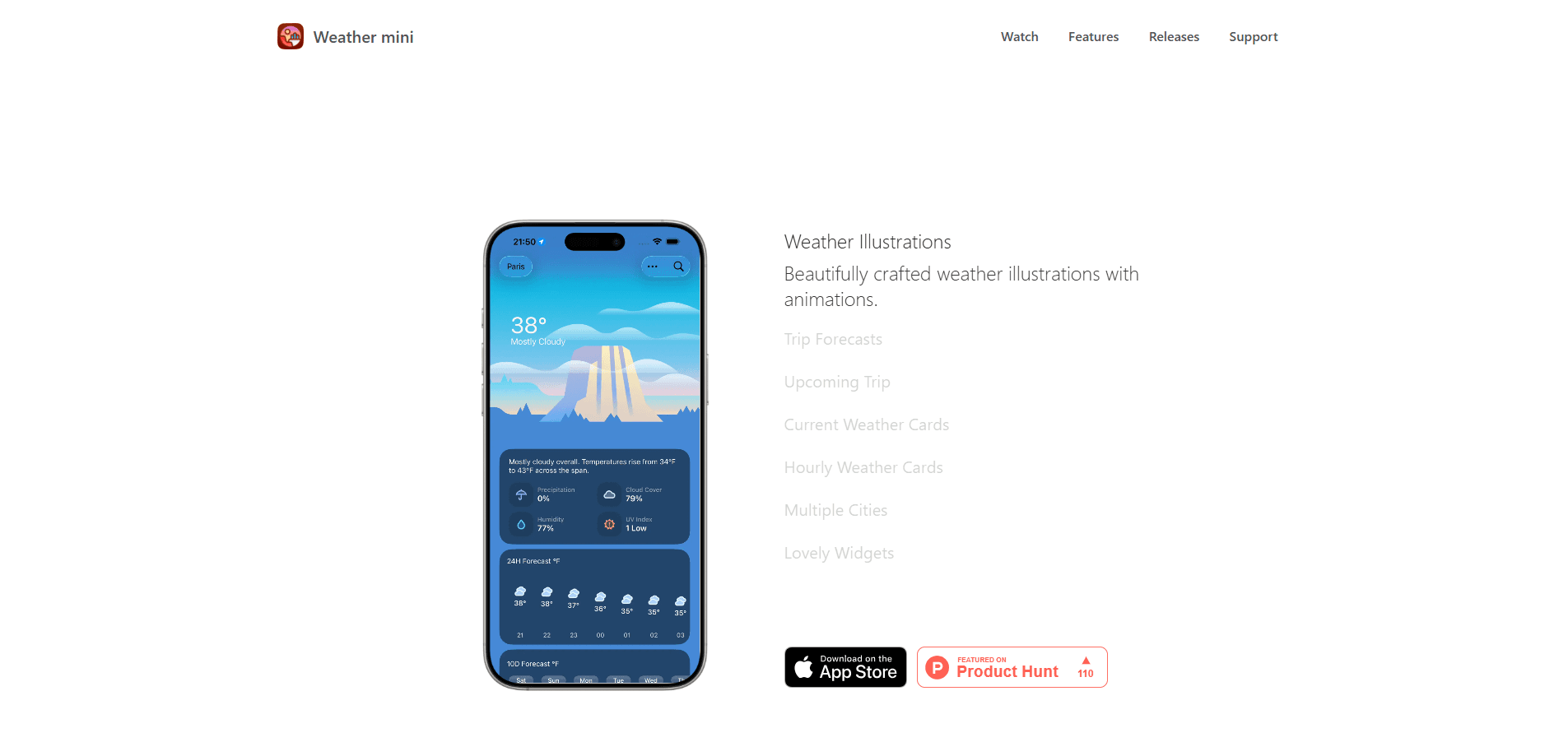
The main window pairs hand-crafted weather illustrations with your current location and temperature in large type. It refreshes automatically, so you get a clear read on conditions without hunting through data.
Current, hourly, and daily forecasts
Forecasts come in three layers. The current section lists condition summaries like humidity and wind. As an hourly forecast app it also shows how the next hours will shift, while the daily view covers the rest of the week. Details include the highest UV index value for the day and when it peaks.
Multiple locations
Added in version 1.4, location support lets you search for any city or address and save it. Recently added places show up in a context menu, and right-clicking the Dock icon or window switches between them in one click.
Notification Center widgets
On macOS Big Sur and later, Weather mini ships dashboards for the notification center. There are small and medium weather illustration widgets, plus dedicated ones for wind and gusts, humidity, precipitation, cloud cover, and sunrise or sunset countdowns.
Lightweight by design
The app runs on very few system resources and you can set the background refresh rate to match your needs. The developer avoids heavy third-party analysis services, which is why it opens and quits quickly.
Pros and cons
Pros
- The Dock icon turns the forecast into something you see without trying, which no browser tab can match.
- A no-subscription weather app in the truest sense. You pay once through the App Store and that's it.
- The weather illustrations are distinct and pleasant, especially compared with flat icon-based apps.
- Multiple saved locations make it easy to track several cities from one window.
- Low system footprint keeps it running in the background without slowing the Mac down.
Cons
- Mac only. If you also want the forecast on an iPhone or Android device, you'll need a second app.
- It depends on Apple's weather data, so accuracy is only as good as the underlying source.
- No radar maps or severe-weather alerts, which limits it for storm tracking or outdoor planning in risky conditions.
Frequently asked questions
No. It's a one-time paid download on the Mac App Store, and the developer states there's no subscription. You buy it once and keep it.
Related content
Explore related tools, skills, and articles for Weather mini.
Weather mini Alternatives

X Ray Interpreter
X-ray Interpreter · ImageX Ray Interpreter is a web-based AI radiology tool that turns X-rays, CT scans, MRI, ultrasound, and PET images into plain-language reports. You upload a scan, get a preliminary X-ray interpretation in moments, then ask follow-up questions if something needs explaining. It works as a second opinion and a learning aid, not as a medical diagnosis.

Aieasypic
AIEasyPic · ImageAIEasyPic is an AI image generator that turns plain text prompts into finished artwork in seconds. You can also train custom models on your own photos, swap faces in existing images, and create short video clips from text, all from a browser. It suits casual creators who want quick visuals and hobbyists who want to build a personal model without touching any code.

Chargen
Chargen · ImageChargen is an AI character generator and worldbuilding toolkit built for Dungeons & Dragons and other tabletop RPGs. It turns a one-line idea into a painted character portrait, spins up NPCs, monsters, maps and encounters from the same session, and keeps every creature's details close at hand. The tabletop RPG art side runs on a credit system called Gold, while the text generators stay free for everyone.