

WIME
Weimob · Image · Productivity
WIME is an AI ecommerce design tool from Weimob. Upload one product photo and the app produces studio images, detail pages, and channel copy for online shops.
About WIME
What Is WIME
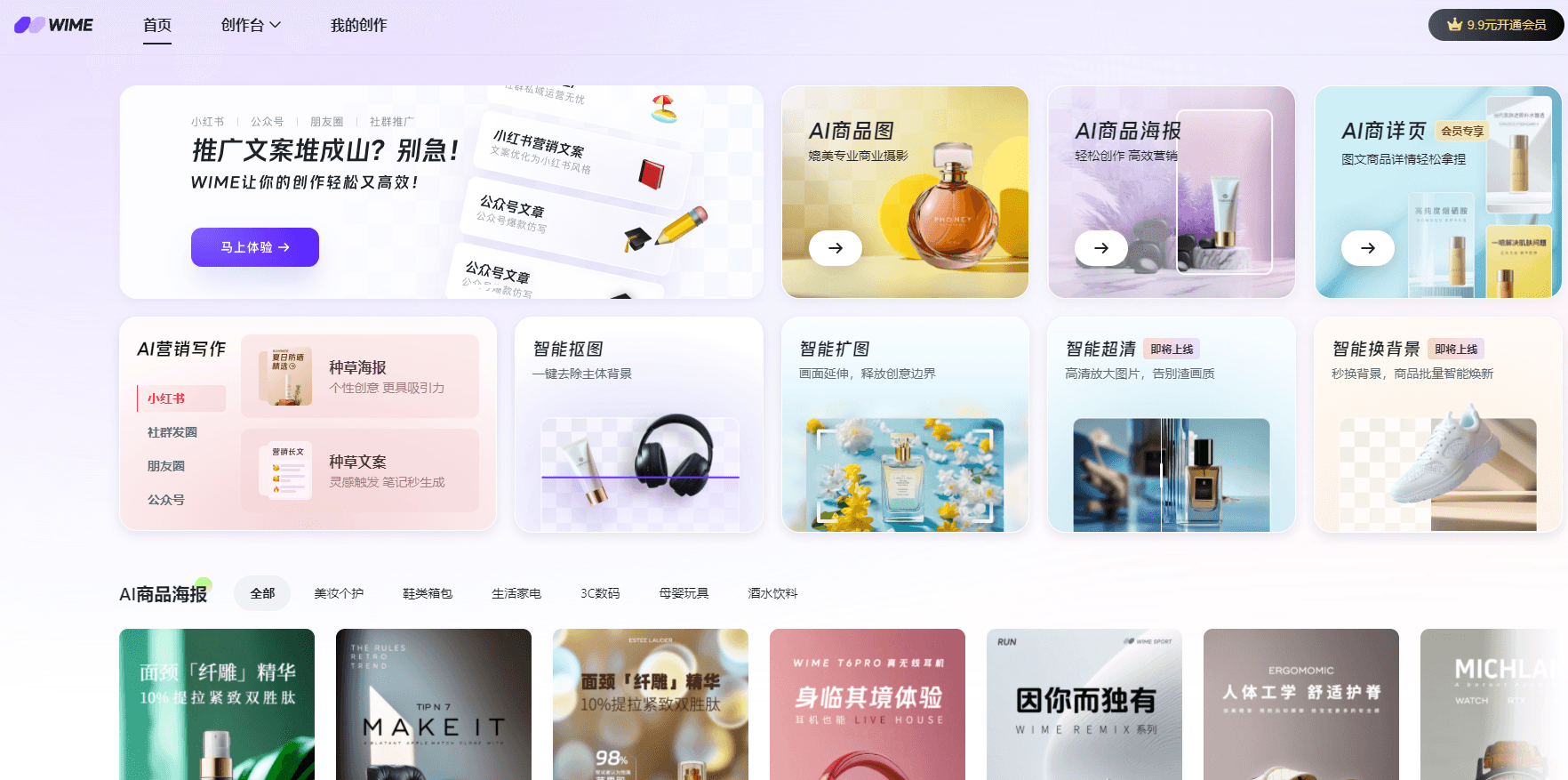
WIME is a browser based content studio for people who run an online shop without a design team. It's built by Weimob, a Hong Kong listed software company that sells storefront and marketing tools to Chinese retailers, and it launched on October 30, 2024. In practice it's an AI product photo generator, a page builder, and a copy assistant sharing one workspace. The job it takes on is the boring half of selling online: product images, listing pages, and the copy that goes around them.
The workflow starts with a single photo. WIME cuts the product out, redraws it against a clean white background or a generated scene, adds headline text, and assembles the pieces into a listing page. You pick a marketplace, and the output follows that marketplace's image rules. You can also feed it a reference image you like and ask for the same look across your own catalog. That reference mode is the feature sellers talk about most, because brand consistency is hard to fake with prompts alone.
Budget matters here too. WIME runs on credits, and a new account gets a batch of free ones. A seasonal card sold during shopping festivals has been priced at 158 yuan for 48,000 credits, which works out to roughly 4,800 images, and an annual card at 198 yuan. Treat those as promotional prices rather than list prices, since the company changes bundles around big sales.
Two limits shape who this suits. The interface, templates, and copy output lean Chinese first, so sellers outside that market should test the language handling before committing. And there's no public API, which means no way to wire WIME into a product database or an existing content pipeline. It's a tool you open and use, not infrastructure.
Getting Started
- Sign up at wime-ai.com with a phone number or WeChat account. Free credits land in the account right away.
- Upload a product photo. Pick an industry template, or upload a reference image if you want WIME to copy a style you already use.
- Choose what to make: a main image, a white background shot, a scene poster, or a full detail page. Set the target marketplace and language before you generate.
- Generate a few variants and keep the one that works. Fix any text the model got wrong, then export in the size the marketplace asks for.
- For a whole catalog, queue products in batch. Top up credits when the free ones run out.
Product Information
A quick look at WIME's pricing, supported platforms, and performance.
Best for
The users, tasks, and scenarios where this tool fits best.
Users
- Solo shop owners
- Small teams without a designer
- Cross border sellers
- Social commerce operators
Tasks
- Product main images
- White background compliance shots
- Product detail pages
- Channel copy
Scenarios
- Shopping festival crunch
- New listing launches
- Entering a new marketplace
Key features
One Photo Product Sets
A single upload produces a studio style shot, a clean white background version, a poster with selling points, a scene image, and a close up detail shot. Each one targets a different slot in a listing, so you're not re-uploading the same picture five times. The model rebuilds the product rather than pasting it onto a new background, which keeps edges and reflections looking natural.
Reference Style Matching
Feed WIME an image whose look you like and it generates your product in that style. Sellers use it to keep a store visually consistent without hiring a designer for every new item. The company also offers custom style training for brands that want a fixed visual signature across a large catalog.
Model Try On
Apparel sellers can put a garment on a generated model instead of booking a shoot with a real person. This cuts the cost of showing how a piece fits and moves, which is the part buyers care about most in clothing. Results still need a look before publishing, especially on patterns and thin straps.
Product Detail Page Builder
The app identifies the product, drafts a name and selling points, matches an industry background, and lays out the page modules with text and images filled in. It's the closest thing here to handing a brief to a designer. You still pick which modules to keep, and the copy reads better after a quick edit.
AI Marketing Copy
Text generation covers product descriptions, social posts, and campaign lines, with tone adjusted per channel. After the company connected DeepSeek in early 2025, longer marketing drafts got noticeably better at matching platform style. Output is a draft, not final copy, so plan on a read through before it ships.
Marketplace Presets and Eight Languages
Image sizes, background rules, and file limits for Taobao, JD, Pinduoduo, and Amazon are built in, so one product photo can serve several storefronts. Posters and listing text can be generated in Chinese, English, Russian, Spanish, German, Japanese, Thai, and Portuguese, which saves a translation round for cross border sellers.
Image Cleanup Tools
Cutout, canvas extension, and upscaling sit alongside the generators. Background removal is the one people use daily, and it handles hair, fur, mesh, and cutout shapes that trip up simpler tools. A product image generator is only useful if the source image survives the trip, and keeping these tools in the same app means no export round trips.
Pros and cons
Pros
- One product photo is enough to fill a listing, which removes the shoot, retouch, and layout steps that usually need three people.
- Marketplace rules for image size and background are presets, so listings clear review without manual resizing.
- Reference matching keeps a store's visual style steady across hundreds of SKUs.
- Free credits let you judge output quality on your own products before paying.
- Batch generation keeps up with festival season, when poster demand multiplies overnight.
Cons
- Credits are consumed per image, so a large catalog can run through a bundle faster than expected. Check the credit cost per output before committing to a batch.
- The interface and template library lean Chinese first. Sellers in other markets will find fewer local marketplace presets and should test the language output early.
- There's no public API, so teams that need images generated inside their own admin or ERP have to export and upload by hand.
- Text baked into posters occasionally comes out garbled, and fine product geometry needs a manual fix. Budget review time on every batch.
Frequently asked questions
It makes the visual and written assets an online listing needs: product photos, white background images, posters, detail pages, and marketing copy. You start with one product picture and end with files ready to upload to a marketplace.
Related content
Explore related tools, skills, and articles for WIME.
WIME Alternatives

Tractionwave
TractionWave · Image · MarketingTractionWave is an AI attention heatmap tool for static ads. Upload a PNG or JPG and it returns predicted attention, ranked hotspots, and fixes before you spend budget.

Imejis.io
Imejis.io · Image · MarketingImejis.io is an AI design studio for agents and marketing teams. Describe an image in plain words, and it writes the copy, builds the layout, reflows it to every size, then exports a finished file.

Layoutr
Van Dijk Ontwikkeling · Image · China AILayoutr is a browser floor plan tool that scales your own plan, places furniture at true size, shows the room in 3D and renders it with AI.