

YT Copycat
YT Copycat · Video
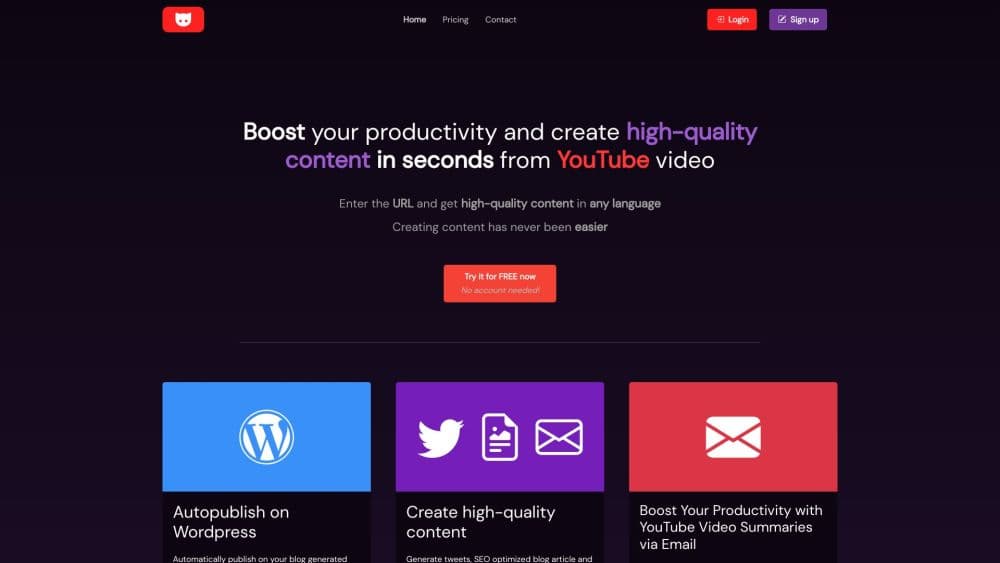
YT Copycat is an AI content generator that turns a YouTube video to text in seconds: a blog article, tweets, a newsletter or a summary, from one link.
About YT Copycat
What Is YT Copycat
YT Copycat is a web app for people who make content and don't want to start from a blank page. You paste a YouTube URL, the tool pulls the transcript, and an AI model rewrites it into the format you picked: a long blog article, a set of tweets, a newsletter, or a condensed summary.
The problem it targets is straightforward, and it's the reason so many creators want to repurpose YouTube videos. A channel owner with three thousand videos has three thousand missed chances to rank in search, because Google can't read audio. Converting one video into a written article costs hours if you do it by hand. Doing it for twenty videos a week is a job in itself.
Three things limit how far that goes. Output quality follows the transcript, so videos with bad auto captions come out muddled. The writing is a competent first draft, not a finished post, and anyone who knows the topic will need to add detail and voice. And the service itself has changed hands: the original site now shows a notice that a new owner has taken over and that new signups are paused, while existing lifetime customers log in on a separate private platform. Treat current availability as something to check before you buy.
Getting Started
- Open ytcopycat.com and create an account, or sign in if you already have one. Paid plans include a seven day trial, and a lifetime option has also been sold that runs on your own OpenAI key.
- Paste the URL of a public YouTube video into the input field. Private, members only, and age restricted videos aren't likely to return usable text.
- Pick an output. Choose the blog article for a long form piece, tweets for social posts, YouTube to newsletter for email, a video summary for a two minute read, or a custom prompt to ask for something specific.
- Choose a language and generate. The tool has advertised support for more than 30 languages, so a Spanish speaker can get Spanish text from an English video.
- Edit before publishing. Read the draft, fix names and figures against the video, then paste it into your blog, email tool, or connect a WordPress site for automatic posting.
Product Information
A quick look at YT Copycat's pricing, supported platforms, and performance.
Best for
The users, tasks, and scenarios where this tool fits best.
Users
- Video creators with a large back catalogue
- Bloggers who also run a channel
- Small marketing teams
Tasks
- Turning a talking head video into a long form article
- Writing a newsletter from a weekly upload
- Summarizing a long interview
- Drafting social posts from a new episode
Scenarios
- Reviving an old backlog before a content audit
- Running a channel and a blog on the same schedule
- Testing whether a topic deserves a fuller article
Key features
Blog Article Generation
This is the YouTube video to blog post mode, and it carries most of the workload. You paste a link and get a complete article with headings and paragraphs, built from what the speaker actually said. You aren't rewriting a transcript line by line, so the first pass reads like prose rather than captions. Most users still spend time on the intro and the conclusion, where generic phrasing shows up fastest.
Tweets and Thread Output
A separate mode turns the video into short social posts and a connected thread, which suits people who publish clips and commentary on X. The output gives you several angles to pick from instead of one long block to cut up yourself. It works best on videos with clear points, and less well on rambling conversations.
Newsletter Drafts
The newsletter format keeps a conversational tone and arranges the material into sections suitable for email. For creators who already run an email list, this cuts the step where you rewatch your own episode to remember the order of the stories. You still set the call to action and the links, since those are specific to your business.
Video Summaries
The summary mode compresses a long video into a short read, advertised as around two minutes of reading for a full episode. This is the fastest way to use the tool: you don't need a polished article, just the argument and the main points. Teams use it to brief colleagues who won't watch a forty minute call.
Custom Prompt Mode
Instead of picking a fixed format, you write your own instruction and let the AI answer from the video. That makes it possible to pull a list of tools mentioned, a step by step process, or answers to a specific question. It's the mode that rewards a clear prompt, and the one that most often returns something you have to redo.
Channel Subscriptions and WordPress Publishing
You can subscribe to channels and receive a summary by email when a new video appears. Higher plans also connect WordPress blogs, so a new upload becomes a published post automatically, which is WordPress auto publishing without any extra plugin. The limits on these two features, how many channels and how many blogs, are the main difference between the plans.
Pros and cons
Pros
- A single paste produces four usable formats, so you aren't buying four separate tools.
- The summary mode is fast enough to use for everyday briefing, not just for publishing.
- Advertised support for more than 30 languages means an English video can be turned into Spanish, French, or Japanese text without a separate translation step.
- WordPress connection removes the manual step between generating a post and publishing it.
- The lifetime option with your own OpenAI key gives heavy users a path without a monthly bill.
Cons
- The output depends on the transcript. Auto captions mangle names, product terms, and numbers, and you'll catch those mistakes only by reading against the video.
- Every format needs editing before it reads like a person wrote it, especially introductions and conclusions.
- The site currently states that a new owner has taken over and new account creation is paused, so availability and billing terms need checking before you pay.
- No public API is offered, which rules it out for anyone who wants to build the conversion into their own app.
Frequently asked questions
YT Copycat converts a YouTube video into written content. You paste a link, choose a format such as a blog article, tweets, a newsletter, or a summary, and the tool generates text from the video transcript. It's aimed at creators who want to reuse video material as written content.
Related content
Explore related tools, skills, and articles for YT Copycat.
YT Copycat Alternatives

ngram 2.0
ngram · Video · Marketingngram 2.0 is an AI video generator for teams. It turns a prompt, a screen recording, or a product URL into a narrated explainer, product demo, or AI avatar video, and every scene stays editable.

OpenScreen 2
OpenScreen (open-source project) · Video · ProductivityOpenScreen 2 is a free, open-source screen recorder and demo video editor for Windows, macOS, and Linux, with automatic zooms, styled frames, local captions, and agent edits.

Skreno
Skreno · Video · ProductivitySkreno is a browser screen recorder that captures a tab, a window or your whole display, then attaches AI transcripts, summaries and console logs to one share link.