
ZeeInvoices
ZeeInvoices · Productivity · Business
ZeeInvoices is a free online invoice builder that helps freelancers and small businesses create professional invoices and get paid faster.
About ZeeInvoices
What Is ZeeInvoices
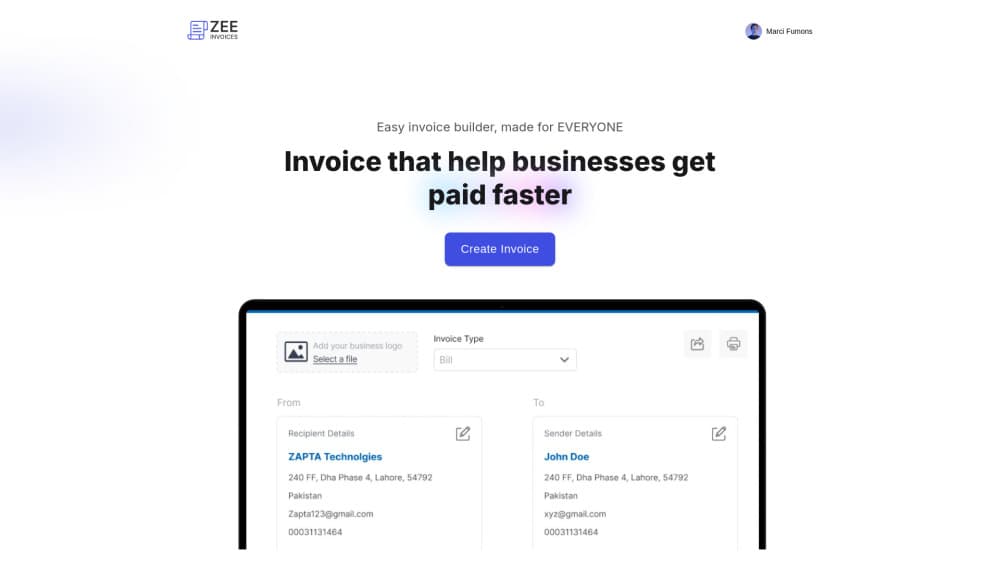
ZeeInvoices is an online invoice builder aimed at freelancers, contractors, and small teams who bill clients but don't want accounting software getting in the way. You open it in a browser, fill in the client and line items, and send out a finished invoice. That's the whole loop.
The appeal is speed. Most people who need an invoice maker don't want a full bookkeeping suite, and they don't want to spend a weekend learning one either. They want something that turns a blank page into a clean, professional invoice in a few minutes, then gets out of the way. ZeeInvoices sticks to that.
The catch is scope. It's a focused invoicing tool, not a full billing platform, so if you need inventory, payroll, or the deep accounting reports that a bookkeeper would ask for at year end, you'll outgrow it fast. And since it runs entirely in the browser, everything depends on being online.
Getting Started
- Go to the ZeeInvoices site and sign up for a free account.
- Add your business details, like your name, logo, and payment info.
- Add a client: their name, address, and any tax or reference numbers you track.
- Build the invoice by listing line items, quantities, and rates, then set the due date.
- Preview the invoice, download the PDF, and send it to your client.
Product Information
A quick look at ZeeInvoices's pricing, supported platforms, and performance.
Best for
The users, tasks, and scenarios where this tool fits best.
Users
- Freelancers
- Small business owners
- Contractors and consultants
Tasks
- Creating a professional invoice
- Reusing a billing format
- Sending a first invoice as a new freelancer
Scenarios
- Wrapping up a project
- Monthly retainer billing
- Side gigs on top of a day job
Key features
Browser-Based Invoice Builder
There's nothing to install. Sign in, and the invoice maker loads in your browser. You can work from any machine you happen to be on. For freelancers who bounce between a laptop and a borrowed one while billing clients from a coffee shop or a client's office, that removes the setup headache that eats the first twenty minutes of any new tool. No download. No update nag. No compatibility drama.
Professional Invoice Templates
Templates give you a clean starting point so you don't design an invoice from scratch. Fill in your details and line items, and the layout handles the rest. Some templates let you drop in a logo to match your brand. That matters more than people think when you're chasing payment from a new client who's deciding whether you look like a real business or someone winging it with a spreadsheet.
Client and Line Item Management
The core workflow is simple: pick or add a client, then list what you're billing for. Each line takes a description, quantity, and rate. The tool totals it up. If you bill the same client often, saving their details means you're not retyping an address every time.
Online Invoicing Without the Bloat
ZeeInvoices is an invoice generator, not a full billing suite. It skips the accounting dashboards, expense tracking, and payroll modules that make bigger platforms slow to learn, which is exactly why a freelancer who bills four clients a month can finish an invoice here in the time it takes just to find the right menu in a heavier tool. Is that a problem? Only if you need those things. The trade-off is real, but for someone who just needs to send an invoice, it's the right trade.
Free to Use
The tool is free, which removes the subscription math that trips up a lot of freelancers just starting out. You're not deciding whether a $20 monthly plan pays for itself when you send three invoices a month. It's just free. If you're testing whether this whole freelancing thing will work, a free invoice builder removes one more cost you'd otherwise have to justify to yourself before you've earned a cent. That means you can bill a client tomorrow without thinking about cost.
Pros and cons
Pros
- Free to use, so there's no monthly fee to weigh against your invoice volume.
- Runs in a browser, meaning no install and no device lock-in.
- Fast for simple billing: client, line items, total, send.
- Templates and optional logos give invoices a professional look without design work.
Cons
- It's a focused invoicing tool, so you'll hit a wall if you need expense tracking, inventory, or full accounting reports.
- Everything lives in the browser, so offline billing isn't an option.
- The developer hasn't published API details, so anyone wanting to wire it into another system is out of luck for now.
Frequently asked questions
ZeeInvoices is an online invoice builder for creating and sending professional invoices. Freelancers and small businesses use it to bill clients and get paid without setting up heavier accounting software.
Related content
Explore related tools, skills, and articles for ZeeInvoices.
ZeeInvoices Alternatives

Swms
Swms AI · Writing · Productivity · BusinessSwms is an AI safety compliance tool that turns a plain description of a job into ready-to-use safety documents. Describe your project, trade, and known hazards, and it writes a safe work method statement, job hazard analysis, safe work procedure, RAMS, or safety data sheet in seconds. It also ships with Oscar, a chat assistant that answers workplace safety questions in any language. Teams in construction, mining, transport, and warehousing use it to cut the paperwork that usually eats into a workday.

Wordly AI Translation
Wordly · Voice & Language · ProductivityWordly AI Translation is a real-time AI translation and captioning platform built for meetings, conferences, and events. It delivers live translation, captions, transcripts, and summaries in more than 60 languages, and attendees join by scanning a QR code or opening a link instead of using dedicated headsets. The platform works with Zoom, Microsoft Teams, Google Meet, and Webex, and it's designed for organizations that want multilingual access without hiring human interpreters for every session. Simple as that.

Rows
Rows (Superhuman) · Productivity · BusinessRows is an AI spreadsheet and data analysis tool that imports live data from more than 50 sources, then lets you work with it using plain language instead of SQL queries or nested formulas. You can pull numbers out of PDFs, connect ad platforms, databases, and bank accounts, and ask the AI to build reports, merge datasets, or set up models that recalculate themselves. It runs in the browser, works like a spreadsheet, and now sits under the Superhuman umbrella.